Description
Excel xlCompiler 3.14 Review: Transform Excel Spreadsheets into Standalone Applications
Quick Summary
Excel xlCompiler 3.14 is a specialized software solution designed to convert Microsoft Excel spreadsheets into standalone Windows executable applications. For organizations, consultants, engineers, financial analysts, and developers who rely heavily on Excel-based models, xlCompiler offers a practical way to distribute spreadsheet functionality without requiring end users to install Microsoft Excel.
What makes Excel xlCompiler 3.14 particularly valuable is its ability to preserve formulas, calculations, logic, and spreadsheet functionality while packaging them into secure, independent applications. This not only simplifies deployment but also helps protect intellectual property and reduces compatibility concerns across different Excel versions.
Whether you’re distributing financial calculators, engineering tools, forecasting models, or custom business applications, Excel xlCompiler 3.14 provides an efficient bridge between traditional spreadsheets and professional software solutions.
Introduction to Excel xlCompiler 3.14
Microsoft Excel remains one of the most widely used business tools in the world. Companies use Excel for budgeting, forecasting, engineering calculations, project management, data analysis, and countless other business processes.
However, sharing Excel-based tools often comes with challenges:
- Users may not have the correct Excel version.
- Workbook formulas can be modified accidentally.
- Sensitive business logic can be exposed.
- Deployment across large teams can become complicated.
- Licensing requirements may increase costs.
This is where Excel xlCompiler 3.14 enters the picture.
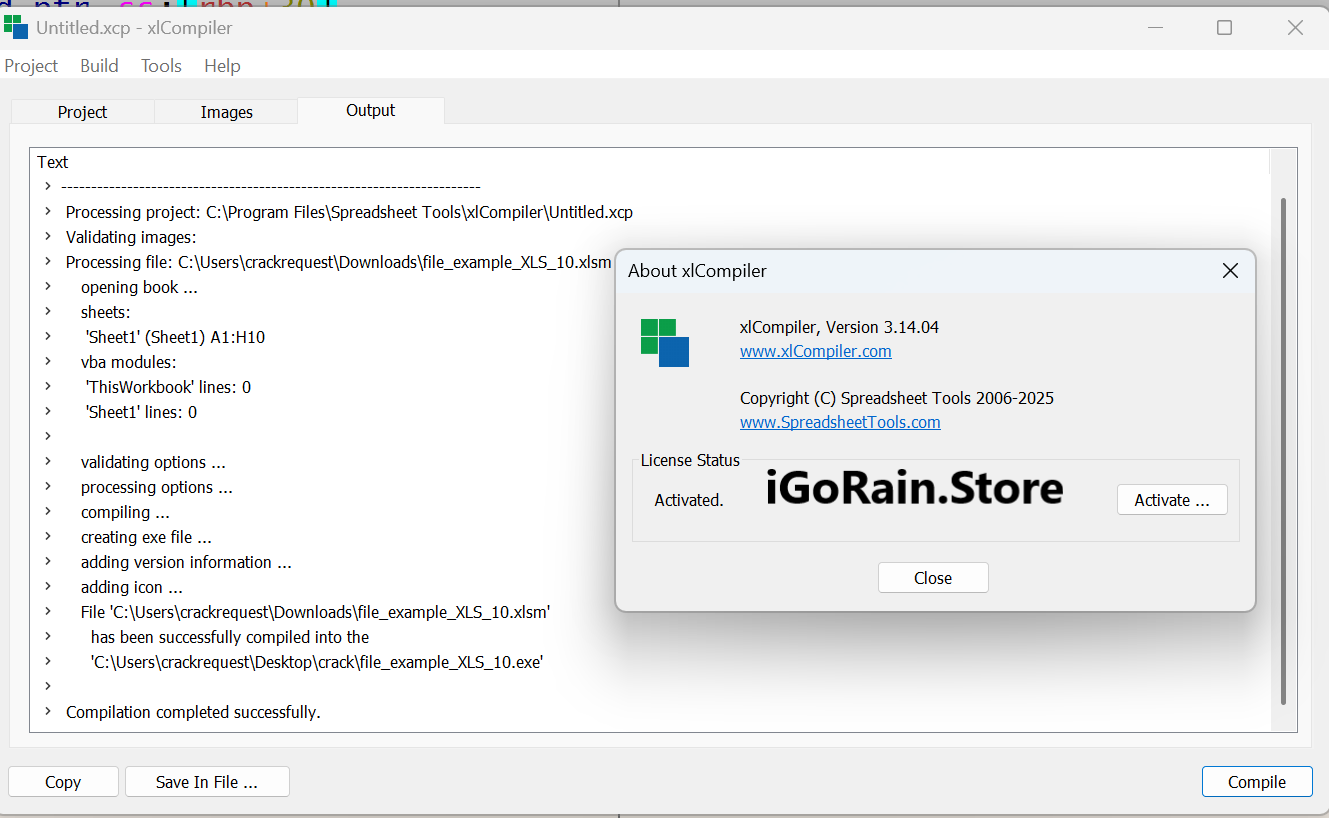
The software enables users to compile Excel spreadsheets into standalone executable programs. Instead of distributing raw workbook files, organizations can deliver secure applications that maintain spreadsheet functionality while improving usability and protection.
For professionals who have invested years building sophisticated Excel models, xlCompiler offers a practical method for turning those models into deployable software products.
Key Features of Excel xlCompiler 3.14
Convert Excel Workbooks into Executable Files
The primary feature of Excel xlCompiler 3.14 is its ability to transform Excel spreadsheets into standalone executable applications.
Benefits include:
- No Excel installation required for end users
- Simplified deployment
- Faster software distribution
- Improved user accessibility
This feature is especially useful for consultants and software vendors who distribute Excel-based solutions to clients.
Protect Spreadsheet Logic and Intellectual Property
Many businesses invest significant resources into developing complex formulas and proprietary calculation methods.
Excel xlCompiler helps protect:
- Financial models
- Engineering formulas
- Business forecasting tools
- Industry-specific calculations
Users can share functionality without exposing underlying spreadsheet structures.
Support for Complex Formulas
One of the strengths of Excel xlCompiler 3.14 is its compatibility with advanced Excel calculations.
Supported capabilities typically include:
- Mathematical formulas
- Financial functions
- Logical operations
- Statistical calculations
- Lookup functions
- Multi-sheet references
This allows sophisticated spreadsheet models to function reliably after compilation.
User-Friendly Interface
Despite its powerful capabilities, xlCompiler is designed for users who may not have extensive software development experience.
Key usability benefits include:
- Simple compilation workflow
- Minimal coding requirements
- Familiar spreadsheet-based environment
- Quick deployment process
Business professionals can often create deployable applications without learning traditional programming languages.
Custom Application Distribution
Compiled applications can be distributed to:
- Employees
- Clients
- Business partners
- Customers
This makes xlCompiler suitable for organizations creating internal tools as well as commercial software products.
Secure Deployment Environment
By eliminating direct workbook access, Excel xlCompiler helps improve security.
Advantages include:
- Reduced risk of formula tampering
- Controlled user interaction
- Protection of business methodologies
- Safer external distribution
Organizations handling sensitive calculations often find this particularly valuable.
Practical Use Cases of Excel xlCompiler 3.14
Financial Planning and Budgeting Tools
A financial consulting firm may build budgeting templates for clients using Excel.
Instead of sending editable spreadsheets, the firm can compile the model into a standalone application.
Benefits include:
- Professional presentation
- Formula protection
- Simplified client usage
- Reduced support requests
Clients receive a user-friendly tool without needing access to the underlying workbook.
Engineering Calculation Applications
Engineering professionals frequently rely on Excel for:
- Structural calculations
- Load analysis
- Cost estimation
- Material planning
Using Excel xlCompiler 3.14, engineers can distribute these calculations as dedicated software applications while protecting proprietary formulas.
Business Forecasting Systems
Many organizations develop forecasting models for:
- Revenue prediction
- Market analysis
- Sales planning
- Operational forecasting
Compiled applications allow management teams to use forecasting tools without modifying underlying assumptions or formulas.
Educational and Training Tools
Teachers, trainers, and educational institutions often create interactive Excel-based learning systems.
With xlCompiler, these systems can be converted into standalone learning applications that are easier to distribute and manage.
Manufacturing and Production Calculators
Manufacturers frequently utilize Excel models for:
- Production planning
- Resource allocation
- Inventory forecasting
- Cost analysis
Compiled applications improve consistency while reducing spreadsheet-related errors.
Real-World User Experience
Many users discover Excel xlCompiler after encountering limitations with traditional workbook sharing.
Consider a business consultant who has spent years refining a financial planning model. Sending Excel files to clients creates several concerns:
- Clients accidentally alter formulas.
- Different Excel versions create compatibility issues.
- Proprietary methods become visible.
After implementing Excel xlCompiler 3.14, the consultant can distribute a professional application rather than a spreadsheet.
The result often includes:
- Better user experience
- Fewer technical support requests
- Increased client confidence
- Stronger protection of intellectual property
Similarly, engineering firms can transform technical spreadsheets into software tools that field teams use without needing Excel expertise.
This transition from spreadsheet to application often increases efficiency while maintaining calculation accuracy.
Performance Analysis
Speed and Reliability
Excel xlCompiler 3.14 generally performs efficiently when handling spreadsheet-based calculations.
Performance advantages may include:
- Faster launch times
- Reduced dependency issues
- Consistent execution environment
- Improved application stability
Users often appreciate the predictable behavior compared to sharing workbooks across multiple Excel versions.
Scalability
For small and medium-sized spreadsheet applications, xlCompiler provides excellent scalability.
Common deployment scenarios include:
- Internal business tools
- Client-facing calculators
- Departmental planning systems
- Industry-specific utility applications
Organizations can distribute compiled tools across multiple users without requiring Excel licenses for every recipient.
Compatibility Benefits
One of the major challenges with Excel deployment is version inconsistency.
Compiled applications help reduce issues related to:
- Excel updates
- Workbook corruption
- Missing add-ins
- Version conflicts
This creates a more consistent experience for end users.
Security Improvements
From a security perspective, xl/Compiler offers clear advantages over distributing raw spreadsheets.
Organizations gain:
- Formula protection
- Controlled access
- Reduced accidental modifications
- Better intellectual property management
For companies whose competitive advantage depends on proprietary calculations, this benefit alone can justify adoption.
Pros and Cons
Pros
Easy Spreadsheet-to-Application Conversion
Transforms Excel workbooks into standalone applications with minimal complexity.
No Excel Required for End Users
Reduces software requirements and simplifies deployment.
Protects Proprietary Formulas
Keeps business logic and calculation methods secure.
Professional Distribution Method
Provides a polished software experience instead of sharing editable spreadsheets.
Supports Complex Excel Models
Handles many advanced formulas and spreadsheet functions.
Reduces Compatibility Problems
Minimizes issues associated with different Excel versions.
Ideal for Consultants and Businesses
Excellent choice for professionals distributing spreadsheet-based tools.
Cons
Windows-Focused Deployment
Organizations requiring cross-platform distribution may need additional solutions.
Learning Curve for Advanced Projects
Complex spreadsheet applications may require testing and optimization.
Feature Limitations Compared to Full Excel
Some advanced Excel-specific functionality may require validation after compilation.
Best Suited for Spreadsheet-Based Applications
Not intended to replace full software development environments for large-scale enterprise systems.
Pricing & Plans
Pricing for Excel xlCompiler 3.14 may vary depending on licensing requirements, deployment needs, and vendor offerings.
Potential licensing options may include:
- Single-user licenses
- Professional licenses
- Commercial deployment licenses
- Business or enterprise packages
Organizations evaluating xlCompiler should review current licensing details Excel xl Compiler 3.14 and support options to determine the best fit for their operational requirements.
Given the potential savings in deployment costs and intellectual property protection, many businesses find the investment worthwhile.
Why Businesses Choose Excel xlCompiler 3.14
Several factors contribute to the software’s continued popularity:
- Leverages existing Excel investments
- Eliminates the need for custom programming
- Protects critical business logic
- Simplifies software distribution
- Improves user experience
- Reduces spreadsheet-related support issues
For companies with extensive Excel-based workflows, xlCompiler serves as a practical modernization tool.
Excel xlCompiler 3.14 Download
Final Verdict
Excel xlCompiler 3.14 remains a highly valuable solution for professionals who want to convert Excel spreadsheets into standalone Windows applications without rebuilding their models from scratch.
Its ability to protect formulas, eliminate Excel dependencies, and simplify software distribution makes it particularly attractive for consultants, engineers, financial analysts, educators, and businesses that rely heavily on spreadsheet-driven processes.
While it is not designed to replace full-scale software development platforms, it excels in its intended purpose: transforming powerful Excel workbooks into secure, professional applications that are easy to deploy and use.
If your organization depends on Excel-based calculators, forecasting tools, financial models, or engineering applications, Excel xl-Compiler 3.14 is a practical and cost-effective solution worth exploring. By converting spreadsheets into standalone software, you can improve security, enhance user experience, and maximize the value of your existing Excel investments.

Reviews
There are no reviews yet.