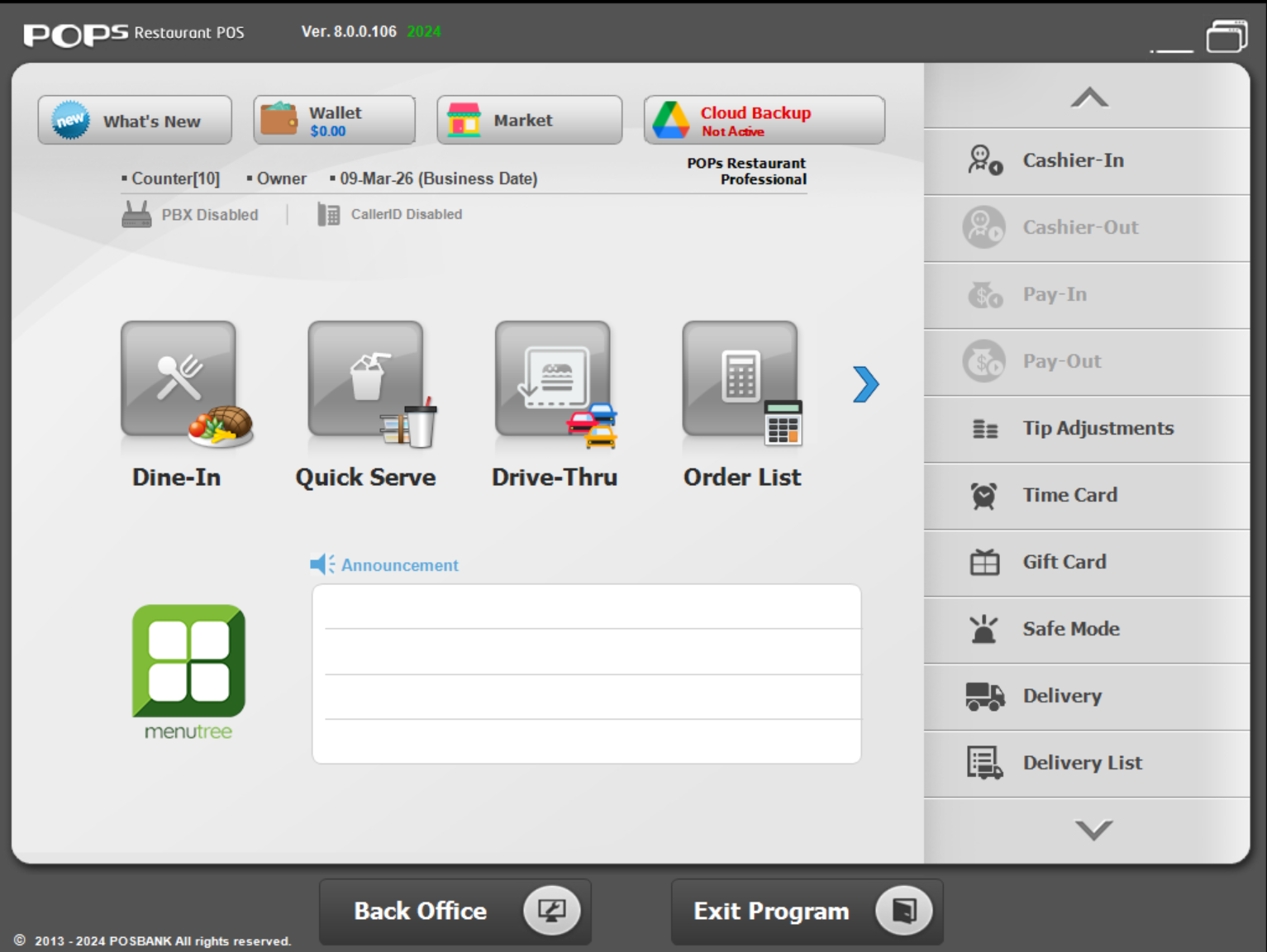
Description
POPS RESTAURANT POS: A Complete Review for Modern Restaurant Management
Introduction
In today’s fast-paced food service industry, efficient order handling, accurate billing, and seamless kitchen coordination are no longer optional—they are essential for survival. POPS RESTAURANT POS emerges as a modern point-of-sale solution designed specifically for restaurants, cafés, fast food outlets, and multi-branch food businesses that require speed, accuracy, and operational control.
This restaurant POS system focuses on simplifying daily operations while improving customer service quality. From order entry to kitchen display synchronization and sales reporting, POPS RESTAURANT POS aims to centralize every critical function of restaurant management into one streamlined platform.
Whether you are running a small dine-in café or a high-volume restaurant chain, this system is designed to reduce manual workload, minimize billing errors, and improve overall efficiency. In this detailed review, we explore its features, real-world applications, performance, and overall value to help you understand whether it fits your business needs.
Key Features of POPS RESTAURANT POS
POPS RESTAURANT POS is built with a strong focus on usability and operational control. It integrates several essential modules that restaurant owners rely on daily.
- Order Management System
The core of any restaurant POS system is order handling. POPS RESTAURANT POS allows staff to take orders quickly through an intuitive interface. Orders can be customized, modified, and sent directly to the kitchen without delays. - Kitchen Display System Integration
Orders are instantly transmitted to kitchen screens or printers, reducing miscommunication between front-of-house and back-of-house teams. This improves order accuracy and reduces preparation delays. - Table and Reservation Management
Restaurants can manage table layouts, track occupied tables, and handle reservations efficiently. This is especially useful for dine-in restaurants aiming to optimize seating capacity during peak hours. - Billing and Invoicing
The software provides fast and accurate billing with support for split bills, discounts, taxes, and multiple payment methods. This ensures smooth checkout experiences for customers. - Inventory Management
POPS RESTAURANT POS includes inventory tracking features that help monitor stock levels in real time. Businesses can reduce waste and avoid shortages by keeping track of ingredient usage. - Sales and Financial Reporting
Detailed reports provide insights into daily sales, peak hours, best-selling items, and staff performance. These analytics help restaurant owners make data-driven decisions. - Multi-Branch Management
For restaurant chains, the system allows centralized control over multiple locations. Managers can monitor performance and standardize operations across branches. - User Roles and Permissions
Different staff members can have controlled access based on roles such as cashier, manager, or kitchen staff, improving security and accountability.
Practical Use Cases
POPS RESTAURANT POS is designed for diverse food service environments. Its flexibility makes it suitable for several real-world scenarios.
Small Cafés and Coffee Shops
For small businesses, speed and simplicity are critical. The system allows quick order entry, fast billing, and easy menu updates, making daily operations smoother even with limited staff.
Fast Food Restaurants
In fast-paced environments where customer turnover is high, POPS RESTAURANT POS helps reduce waiting times by streamlining order processing and kitchen communication.
Fine Dining Restaurants
Fine dining establishments benefit from table management features, reservation handling, and split billing, ensuring a premium customer experience.
Delivery and Takeaway Businesses
With integrated order tracking, the system helps manage online and phone orders efficiently. It ensures that delivery orders are processed without confusion or delay.
Multi-Branch Restaurant Chains
Large businesses can standardize pricing, menu items, and reporting across multiple branches, enabling centralized control and better decision-making.
Performance Analysis
When evaluating a restaurant POS system, performance is measured by speed, reliability, and ease of use. POPS RESTAURANT POS performs strongly in these areas.
Speed and Responsiveness
The system is optimized for fast order entry and real-time updates. Even during peak hours, it maintains stable performance, reducing bottlenecks at the counter.
System Stability
Restaurant environments are high-pressure, and system downtime can cause serious losses. POPS RESTAURANT POS is designed for consistent uptime and reliable operation.
Ease of Use
The interface is structured for quick training and adoption. Staff members can learn basic operations within a short time, reducing onboarding costs.
Data Accuracy
By automating billing and inventory tracking, the system significantly reduces human errors, ensuring more accurate financial records.
Integration Capability
The POS can typically integrate with printers, kitchen displays, and payment systems, allowing smooth workflow across different hardware components.
Pros and Cons
Every software solution has strengths and limitations. Understanding both helps in making a balanced decision.
Pros
- Fast and intuitive order management system
- Real-time kitchen communication
- Accurate billing with multiple payment options
- Inventory tracking for better stock control
- Useful reporting and analytics tools
- Suitable for single and multi-branch restaurants
- Role-based access for improved security
- Scalable for growing businesses
Cons
- May require initial setup and staff training
- Advanced features may depend on configuration
- Hardware compatibility may vary depending on setup
- Internet or local network stability may affect performance in some deployments
Pricing and Plans
Pricing for POPS RESTAURANT POS typically depends on the size of the business, number of terminals, and required features. In many cases, POS systems like this are offered in tiered licensing models or subscription-based plans.
Common structures may include:
- Basic Plan: Suitable for small cafés or single-terminal setups
- Standard Plan: Includes inventory and reporting features for mid-sized restaurants
- Enterprise Plan: Designed for large chains with multi-branch management and advanced analytics
Some providers may also offer customized pricing based on hardware integration, support level, and deployment type (cloud-based or on-premise). It is recommended that restaurant owners evaluate their operational needs before selecting a plan.
POPS RESTAURANT POS 8.0.0.106 Dowload
Final Verdict
POPS RESTAURANT POS positions itself as a reliable and efficient solution for modern restaurant management. It brings together essential tools such as order processing, inventory tracking, billing automation, and real-time reporting into a unified system that enhances operational efficiency.
For small businesses, it simplifies daily tasks and reduces workload. For larger establishments, it provides scalability and centralized control across multiple locations. Its ability to improve speed, accuracy, and coordination makes it a strong contender in the restaurant POS software category.
While initial setup and training may require some effort, the long-term benefits in efficiency and cost control outweigh these early challenges. Businesses looking to modernize their operations and improve customer service will find POPS RESTAURANT POS a practical and valuable investment.
If your goal is to streamline restaurant workflows, reduce errors, and gain better control over your sales and inventory, this system offers a structured and dependable solution worth exploring.



Reviews
There are no reviews yet.