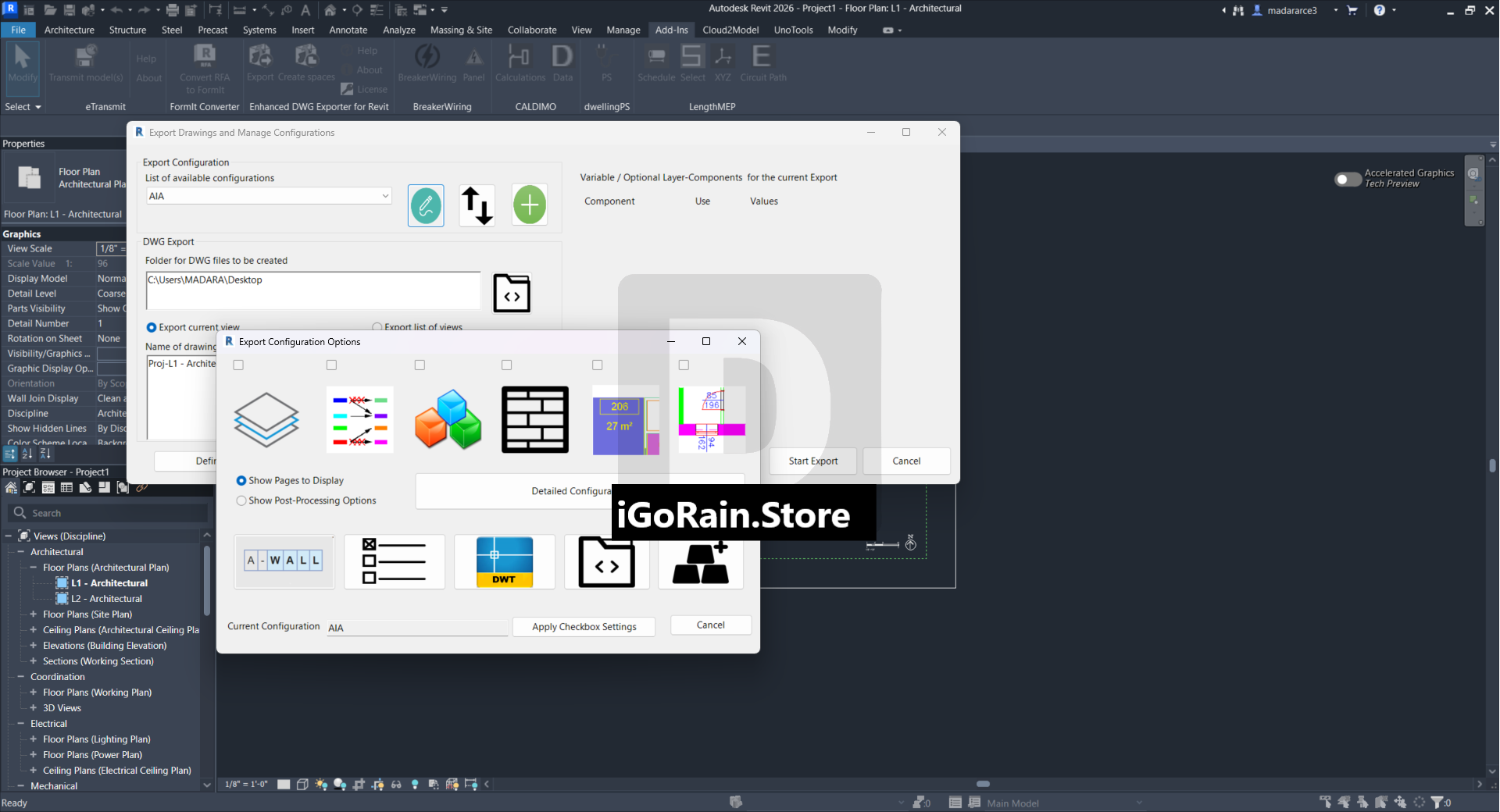
Description
EDER-Tool (Enhanced DWG Exporter for Revit) Review: Streamlining DWG Export Workflows for Autodesk Revit Users
Quick Summary
EDER-Tool (Enhanced DWG Exporter for Revit) is a specialized productivity add-in designed to improve and automate DWG export workflows within Autodesk Revit. For architecture, engineering, and construction (AEC) professionals who regularly exchange project data with consultants, contractors, and CAD-based teams, exporting clean and organized DWG files can be a time-consuming task. EDER-Tool addresses this challenge by simplifying export management, reducing manual effort, and helping users maintain consistent DWG output standards.
Whether you’re managing a large-scale commercial project, coordinating multidisciplinary BIM models, or delivering construction documentation to clients who rely on AutoCAD-based workflows, EDER-Tool offers practical tools that can significantly improve efficiency. This review explores its features, real-world applications, performance, advantages, and limitations to help you determine whether it deserves a place in your Revit toolkit.
Introduction to EDER-Tool (Enhanced DWG Exporter for Revit)
In the modern BIM environment, Autodesk Revit serves as the foundation for project design and documentation. However, many project stakeholders still rely on DWG files for coordination, fabrication, and construction purposes. As a result, exporting Revit data into DWG format remains an essential step in many workflows.
Unfortunately, standard DWG export processes can become repetitive and difficult to manage, especially on projects involving hundreds of views, sheets, and consultants. Naming conventions, layer standards, export settings, and file organization often require extensive manual intervention.
EDER-Tool (Enhanced DWG Exporter for Revit) was developed to solve these common challenges. By extending Revit’s native export capabilities, it provides users with greater control, automation, and consistency when generating DWG deliverables.
For BIM managers, CAD coordinators, architects, structural engineers, and MEP professionals, this tool can become a valuable productivity enhancer that reduces errors while accelerating project delivery.
Key Features of EDER-Tool (Enhanced DWG Exporter for Revit)
Advanced DWG Export Automation
One of the strongest features of EDER-Tool is its ability to automate repetitive export processes.
Instead of manually exporting multiple views and sheets one by one, users can create streamlined workflows that handle large batches of exports efficiently.
Benefits include:
- Reduced manual work
- Faster project deliverables
- Consistent export results
- Lower risk of human error
This feature is particularly valuable on large projects with hundreds of drawings.
Batch Export Management
Managing dozens or even hundreds of drawings can be overwhelming using standard methods.
EDER-Tool simplifies this process through batch export functionality, allowing users to:
- Export multiple sheets simultaneously
- Process large drawing sets
- Apply predefined export settings
- Save significant time during project milestones
Many firms report that batch exporting can transform a task that previously required hours into a process completed in minutes.
Custom Naming Rules
Drawing organization is critical in professional environments.
EDER-Tool enables advanced file naming strategies that help maintain project standards and client requirements.
Users can create naming conventions based on:
- Sheet numbers
- Sheet names
- Project parameters
- Discipline codes
- Custom metadata
This ensures exported DWG files remain organized and easy to locate.
Improved Layer Control
DWG recipients often require strict adherence to CAD layer standards.
EDER-Tool helps users maintain consistent layer mapping and export structures, improving interoperability between Revit and AutoCAD environments.
Advantages include:
- Better consultant coordination
- Reduced cleanup work
- Standardized CAD deliverables
- Improved compliance with project requirements
Enhanced Export Configuration
The software allows users to save and reuse export settings across multiple projects.
Rather than rebuilding export configurations every time, teams can establish standardized templates that ensure consistency across an entire organization.
This capability is especially useful for firms managing multiple projects simultaneously.
User-Friendly Interface
Despite offering advanced functionality, EDER-Tool maintains a straightforward workflow that integrates naturally with Revit.
Users familiar with Revit can generally adapt quickly without extensive training.
The clean interface helps reduce the learning curve while providing access to powerful export options.
Practical Use Cases
Architectural Firms Delivering Construction Documents
Architectural teams frequently issue DWG files to consultants, contractors, and clients.
A typical architecture firm may export:
- Floor plans
- Elevations
- Sections
- Detail drawings
- Site plans
EDER-Tool automates much of this process, allowing project teams to focus more on design and less on administrative tasks.
Structural Engineering Coordination
Structural engineers often exchange DWG files with architects and fabricators.
Using EDER-Tool helps ensure:
- Accurate drawing exports
- Consistent layer standards
- Organized file structures
- Faster project coordination
This reduces communication issues and accelerates interdisciplinary collaboration.
MEP Design Workflows
Mechanical, electrical, and plumbing teams frequently rely on DWG deliverables during coordination and construction phases.
EDER-Tool helps MEP professionals:
- Export multiple systems efficiently
- Maintain naming standards
- Improve consultant communication
- Deliver cleaner CAD files
For projects involving extensive coordination, these improvements can save substantial time.
BIM Management and Standardization
BIM managers are responsible for maintaining consistency across project teams.
EDER-Tool supports this objective by providing standardized export procedures.
Benefits include:
- Reduced training requirements
- Consistent deliverables
- Improved quality control
- Better compliance with company standards
Many BIM managers view export automation as a critical component of successful project delivery.
Large Commercial Projects
On large commercial developments, teams often generate hundreds of sheets throughout project phases.
Manual export methods can become a bottleneck.
EDER-Tool helps organizations:
- Meet tight deadlines
- Reduce repetitive work
- Improve output consistency
- Enhance team productivity
This scalability makes it suitable for enterprise-level BIM environments.
Performance Analysis
Speed and Efficiency
One of the most noticeable improvements users experience is export speed.
By automating repetitive tasks and supporting batch operations, EDER-Tool significantly reduces the time spent preparing DWG deliverables.
Users handling large drawing sets often see dramatic workflow improvements compared to traditional export methods.
Reliability
Consistency is essential when generating project deliverables.
EDER-Tool helps reduce common export mistakes such as:
- Incorrect naming conventions
- Missing drawings
- Inconsistent settings
- Layer mapping issues
This reliability contributes to smoother project coordination and fewer revision cycles.
Workflow Integration
The tool integrates directly into Autodesk Revit workflows, minimizing disruption to existing processes.
Rather than forcing users to adopt an entirely new system, EDER-Tool enhances familiar workflows while introducing productivity improvements.
This seamless integration is one of its most appealing qualities.
Scalability
Whether working on a small residential project or a large commercial development, EDER-Tool scales effectively.
Its automation features become increasingly valuable as project complexity grows, making it particularly attractive for larger organizations and multidisciplinary teams.
Pros and Cons
Pros
Significant Time Savings
Automates repetitive DWG export tasks and reduces manual effort.
Improved Consistency
Ensures standardized file naming, layer structures, and export settings.
Batch Processing Capabilities
Allows users to export large drawing sets efficiently.
Better Project Coordination
Produces cleaner DWG files for consultants, contractors, and external stakeholders.
BIM-Friendly Workflow
Integrates naturally into Revit environments without requiring major workflow changes.
Enhanced Productivity
Helps teams focus on design and documentation rather than administrative export tasks.
Cons
Revit Dependency
The software is designed specifically for Autodesk Revit users and may not provide value outside that ecosystem.
Learning Curve for Advanced Configurations
While basic use is straightforward, organizations implementing complex naming rules and standards may require initial setup time.
Feature Requirements May Vary
Smaller firms with limited DWG export needs may not fully utilize all automation capabilities.
Pricing & Plans
Pricing for EDER-Tool (Enhanced DWG Exporter for Revit) may vary depending on:
- License type
- Software version
- Organizational requirements
- Subscription or perpetual licensing options
Prospective buyers should review current licensing details from authorized software providers to determine the most suitable plan for their workflow needs.
For professional firms that regularly export DWG files, the productivity gains often justify the investment through reduced labor costs and improved project efficiency.
EDER-Tool (Enhanced DWG Exporter for Revit) 12.10 Download
Why Revit Professionals Choose EDER-Tool
The demand for BIM-to-CAD interoperability continues to grow across the AEC industry.
Many firms still rely on DWG deliverables because:
- Contractors use AutoCAD workflows
- Consultants require CAD files
- Fabrication teams depend on DWG formats
- Clients request traditional CAD documentation
EDER-Tool addresses these realities by helping Revit users deliver high-quality DWG exports faster and more consistently.
For organizations seeking BIM workflow optimization, DWG export automation for Revit, and improved CAD deliverable management, EDER-Tool represents a practical solution that directly addresses everyday project challenges.
Final Verdict
EDER-Tool (Enhanced DWG Exporter for Revit) is a highly practical productivity solution for architects, engineers, BIM managers, and design professionals who regularly export DWG files from Autodesk Revit. Its focus on automation, consistency, batch processing, and export standardization helps eliminate many of the frustrations associated with traditional DWG workflows.
The software shines in environments where project teams manage large drawing sets, maintain strict naming standards, and coordinate with multiple stakeholders who depend on CAD deliverables. By reducing manual effort and improving output quality, EDER-Tool enables professionals to spend less time on repetitive export tasks and more time on design, coordination, and project delivery.
For firms seeking a reliable Revit DWG export enhancement tool, advanced DWG export automation software, or a streamlined BIM-to-CAD workflow solution, EDER-Tool is a valuable addition to the Autodesk Revit ecosystem.
If your team regularly handles complex DWG deliverables and wants to improve efficiency, consistency, and overall project coordination, DER-Tool is well worth exploring as part of your Revit workflow strategy.



Reviews
There are no reviews yet.