Description
EngraveLab Laser Review 2026: Professional Laser Engraving Software for Precision, Production, and Creative Freedom
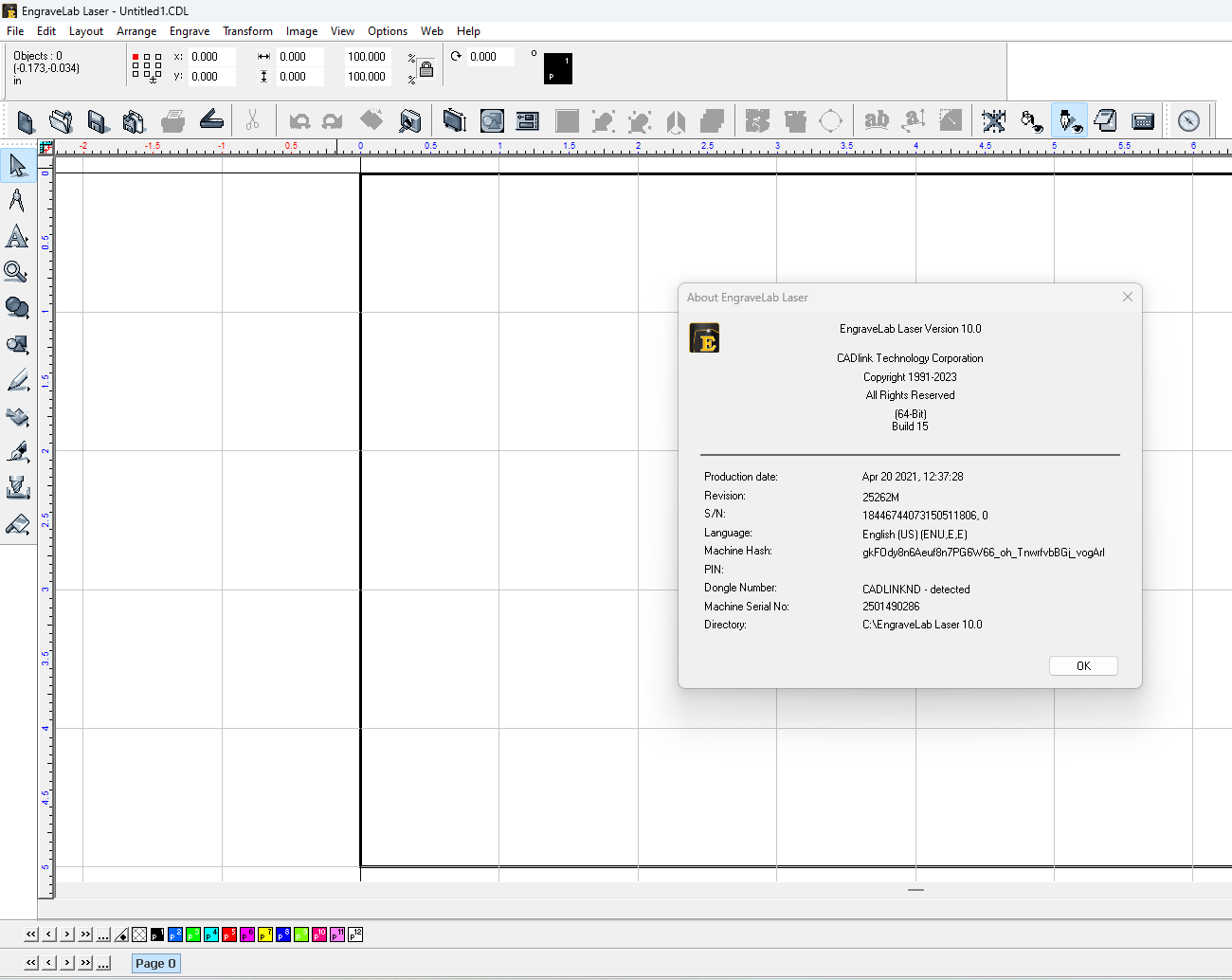
EngraveLab Laser has earned a strong reputation among engraving professionals, sign makers, trophy shops, and industrial manufacturers seeking a reliable solution for laser cutting and engraving workflows. Designed to simplify everything from artwork preparation to machine output, the software combines advanced design capabilities with broad laser machine compatibility.
Whether you’re personalizing gifts, producing industrial identification plates, or managing a high-volume engraving business, EngraveLab Laser provides tools that help reduce production errors, improve efficiency, and deliver consistent results. Its feature-rich environment appeals to both experienced operators and businesses looking to scale their laser engraving operations.
This review explores EngraveLab Laser’s capabilities, real-world applications, strengths, limitations, and overall value for businesses investing in professional engraving software.
Introduction to EngraveLab Laser
Laser engraving has evolved significantly over the past decade. Customers increasingly expect customized products, faster turnaround times, and flawless finishes. Businesses need software that can bridge the gap between creative design and machine execution without introducing unnecessary complexity.
EngraveLab Laser was developed specifically for engraving professionals who require precise control over laser equipment. Unlike general graphic design programs, it focuses on production-oriented tools that streamline engraving workflows.
The software supports numerous laser systems and enables users to:
- Create vector artwork
- Import customer designs
- Add variable text
- Generate barcodes
- Prepare cutting paths
- Optimize engraving layouts
- Send jobs directly to compatible laser machines
For businesses handling daily production orders, these capabilities can significantly improve turnaround times.
Key Features of EngraveLab Laser
Extensive Design Tools
EngraveLab Laser includes a comprehensive collection of design features suitable for professional engraving environments.
Users can create:
- Logos
- Personalized nameplates
- Awards
- Industrial tags
- Signage
- Decorative artwork
- Promotional products
Available design functions include:
- Node editing
- Shape creation
- Text manipulation
- Contour generation
- Welding tools
- Distortion effects
- Alignment utilities
These tools eliminate the need to switch constantly between multiple software applications.
Broad Laser Machine Compatibility
One of the software’s strongest selling points is its compatibility with many laser systems.
Supported hardware often includes equipment from major manufacturers used in commercial engraving environments.
Benefits include:
- Reduced setup complexity
- Easier machine integration
- Faster job preparation
- Improved production consistency
Businesses operating multiple laser devices can often manage workflows more efficiently within a unified software environment.
Barcode Generation
Industrial manufacturers frequently need engraved identification systems.
EngraveLab Laser offers barcode generation capabilities supporting various industry standards.
Applications include:
- Asset management
- Product tracking
- Inventory labels
- Compliance marking
- Equipment identification
The barcode tools allow users to customize size, spacing, and positioning according to project requirements.
Variable Data Personalization
Personalized products remain one of the fastest-growing segments in the engraving industry.
EngraveLab Laser simplifies batch production by allowing users to import data from external files.
Examples include:
- Employee badges
- Award plaques
- Memorial products
- Promotional gifts
- Serial-numbered components
Instead of manually creating hundreds of unique designs, operators can automate the process.
For engraving shops processing large orders, this feature can save substantial production time.
Advanced Text Handling
Text engraving is a core function for many businesses.
The software provides tools for:
- Text on curves
- Multi-line formatting
- Font conversion
- Character spacing adjustments
- Text distortion
- Artistic effects
These features are especially useful for trophy shops and personalization businesses.
Vectorization Tools
Customers often submit low-quality images for engraving.
EngraveLab Laser includes bitmap-to-vector conversion tools that help transform artwork into cleaner engraving paths.
Advantages include:
- Sharper engraving output
- Better edge definition
- Faster machine processing
- Improved final appearance
Designers can further refine vectors for enhanced precision.
Practical Use Cases
Trophy and Awards Businesses
A trophy shop may receive dozens of orders daily.
Examples include:
- Employee recognition awards
- Sports medals
- Corporate plaques
- Academic achievements
Using variable text functions, operators can import recipient information and generate personalized engravings quickly.
Instead of manually editing each design, entire batches can be processed efficiently.
This improves customer satisfaction while reducing labor costs.
Sign Making Companies
Sign manufacturers often work with multiple materials.
Examples include:
- Acrylic
- Wood
- Metal
- Glass
- Laminates
EngraveLab Laser assists in preparing clean cutting paths and engraving layers.
Designers can optimize layouts before sending files to production equipment.
This minimizes material waste and increases profitability.
Industrial Manufacturing
Manufacturers frequently require permanent markings.
Typical applications include:
- Control panels
- Machine tags
- Safety labels
- Serial number plates
- Compliance markings
EngraveLab Laser provides precision and repeatability essential for industrial environments.
Its barcode capabilities also support traceability initiatives.
Personalized Gift Businesses
Small customization shops continue to grow thanks to demand for unique products.
Popular engraved products include:
- Tumblers
- Jewelry
- Leather goods
- Pens
- Phone accessories
- Wooden keepsakes
EngraveLab Laser allows businesses to process customer personalization requests efficiently.
The ability to preview designs before engraving reduces costly mistakes.
Educational Institutions
Schools and universities increasingly use laser systems.
Applications may include:
- Engineering projects
- Student awards
- Laboratory identification
- Fabrication coursework
Students can learn both design fundamentals and production workflows within a professional software environment.
User Experience and Workflow
One aspect frequently appreciated by experienced engraving operators is workflow efficiency.
A typical project might involve:
Step 1: Import Artwork
Users can bring in customer-supplied graphics from various file formats.
Step 2: Edit Design
Adjustments may include:
- Scaling
- Alignment
- Text insertion
- Layer management
Step 3: Configure Laser Settings
Operators define parameters such as:
- Speed
- Power
- Frequency
- Cutting sequence
Step 4: Preview Output
Visual previews help detect positioning issues before engraving begins.
Step 5: Production
The completed design is sent directly to the connected laser system.
For production shops, this streamlined workflow contributes to faster turnaround times and improved accuracy.
Performance Analysis
Processing Efficiency
EngraveLab Laser performs well when handling moderately complex engraving projects.
Its optimization tools help maintain responsiveness even with detailed vector artwork.
Businesses producing repetitive jobs often notice increased productivity after implementing automated personalization features.
Accuracy
Precision is critical in laser engraving.
The software offers detailed control over engraving parameters, helping operators achieve cleaner cuts and sharper markings.
Proper setup and calibration further enhance output quality.
Stability
Long production runs require dependable software.
Users working in commercial environments generally value stable job handling and reduced interruption risks.
For businesses operating multiple shifts, software reliability can directly impact revenue generation.
Learning Curve
Beginners may initially find some advanced tools overwhelming.
However, experienced designers and engraving professionals often adapt relatively quickly.
Investing time in training can unlock the software’s full capabilities.
Pros and Cons
Pros
Comprehensive Engraving Features
Offers tools specifically designed for professional laser production.
Strong Machine Support
Compatible with many commercial laser engraving systems.
Excellent Personalization Tools
Ideal for batch engraving and variable data projects.
Efficient Workflow
Reduces repetitive manual tasks.
Industrial Applications
Supports barcoding and identification marking requirements.
Cons
Initial Learning Period
New users may need time to understand advanced functions.
Professional Pricing
Costs may be higher compared to entry-level engraving software.
Hardware Dependency
Some capabilities may vary depending on laser machine compatibility.
Pricing and Plans
EngraveLab Laser pricing can vary depending on several factors, including:
- Software edition
- Licensing options
- Supported hardware
- Additional modules
- Technical support packages
Businesses interested in deployment should contact authorized distributors or software providers for current pricing information.
For commercial engraving operations, the investment often becomes justifiable through increased production capacity and reduced manual labor.
Is EngraveLab Laser Worth It?
The answer largely depends on the scale of your engraving activities.
For hobbyists occasionally engraving personal items, the software may offer more functionality than necessary.
However, for businesses involved in:
- Awards production
- Sign manufacturing
- Industrial marking
- Promotional products
- Personalized gifts
- High-volume engraving services
EngraveLab Laser can become a valuable production asset.
Its combination of professional design tools, automation capabilities, and machine integration helps businesses maintain consistent quality while improving operational efficiency.
Final Verdict
EngraveLab Laser stands out as a robust and production-focused laser engraving software solution designed for professionals who demand precision, flexibility, and scalability. Its advanced personalization features, barcode support, comprehensive design toolkit, and compatibility with numerous laser systems make it particularly attractive for commercial engraving shops and industrial users.
While new users may encounter a learning curve, the software rewards that investment with streamlined workflows, reduced production errors, and greater control over engraving projects. Businesses seeking dependable laser engraving software capable of supporting growth and customization demands will likely find EngraveLab Laser to be a worthwhile addition to their workflow.
If you’re looking to enhance engraving productivity, improve design accuracy, and expand your customization capabilities, exploring EngraveLab Laser could be a practical next step for building a more efficient and profitable engraving business.

Reviews
There are no reviews yet.