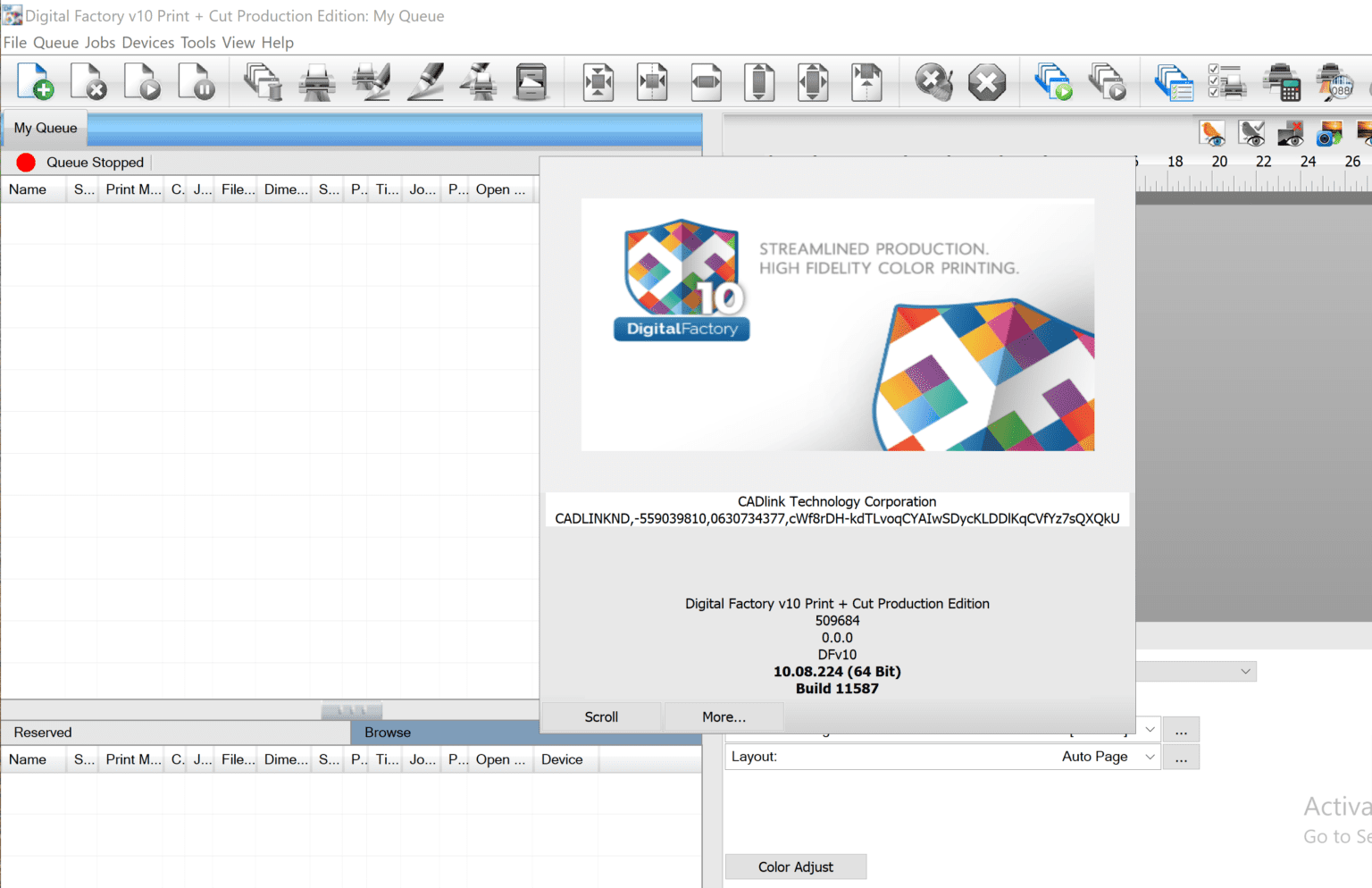
Description
Digital Factory Print + Cut Edition Review: Professional Print & Cut Workflow Software for Sign Makers and Print Shops
Summary
Digital Factory Print + Cut Edition is a professional RIP (Raster Image Processor) and workflow management solution designed for businesses that rely on high-quality printing and contour cutting. Whether you’re producing vehicle wraps, banners, stickers, labels, decals, window graphics, or promotional signage, this software combines powerful color management, print optimization, and cutter integration into one streamlined platform.
Unlike basic print utilities, Digital Factory Print + Cut Edition helps print professionals improve production efficiency, maintain consistent color accuracy, reduce material waste, and automate repetitive tasks. It supports a wide variety of printers and cutting plotters, making it an excellent choice for sign shops, commercial printing businesses, apparel decorators, and graphics professionals looking for reliable print production software.
If your goal is to increase productivity while maintaining exceptional print quality, Digital Factory Print + Cut Edition is a solution worth considering.
Introduction
The digital printing industry has become increasingly competitive. Customers expect vibrant colors, precise contour cuts, fast turnaround times, and consistent quality across every order. Meeting these expectations requires more than a capable printer—it requires intelligent workflow software.
Digital Factory Print + Cut Edition was developed specifically to solve these production challenges. By integrating print management and cutting workflows into a single interface, it simplifies complex production processes while giving operators greater control over every print job.
Instead of manually preparing artwork, adjusting colors repeatedly, or transferring files between multiple applications, users can manage the entire production cycle from one professional platform.
Whether you operate a small sign business or a large commercial print facility, Digital Factory Print + Cut Edition offers tools that help maximize equipment performance while reducing production time.
Key Features of Digital Factory Print + Cut Edition
Professional RIP Engine
The software includes a high-performance RIP engine that processes artwork efficiently while preserving image quality and ensuring accurate print output.
Benefits include:
- Faster image processing
- Improved print quality
- Better gradient rendering
- Sharp text reproduction
- Smooth color transitions
Integrated Print and Cut Workflow
One of the software’s biggest strengths is its ability to handle both printing and contour cutting within one workflow.
Users can:
- Print graphics
- Generate cut paths
- Send jobs directly to compatible cutters
- Reduce manual setup
- Improve production speed
This integrated workflow minimizes operator errors and keeps production running smoothly.
Advanced Color Management
Color consistency is essential in professional printing.
Digital Factory Print + Cut Edition provides advanced color management tools that help achieve:
- Accurate brand colors
- Consistent print reproduction
- ICC profile support
- Better color calibration
- Predictable output across different media
This is especially valuable for businesses producing repeat customer orders.
Wide Device Compatibility
The software supports numerous printers and cutting devices from leading manufacturers.
This flexibility allows businesses to:
- Upgrade hardware without changing workflow
- Manage multiple devices
- Expand production capabilities
- Centralize print operations
Job Queue Management
Managing multiple customer orders becomes much easier through the built-in production queue.
Operators can:
- Prioritize jobs
- Pause production
- Resume printing
- Reprint completed jobs
- Monitor production status
This feature significantly improves shop efficiency during busy production schedules.
Automatic Nesting
Media costs are one of the biggest expenses in commercial printing.
Digital Factory Print + Cut Edition includes automatic nesting tools that intelligently arrange graphics to maximize material usage.
Benefits include:
- Less wasted vinyl
- Reduced media costs
- Higher production efficiency
- Better use of printable space
Variable Production Controls
Professional users appreciate the ability to fine-tune production settings.
The software provides control over:
- Resolution
- Ink limits
- Pass count
- Drying settings
- Print quality modes
These controls allow users to optimize output for different media types.
Practical Use Cases
Digital Factory Print + Cut Edition serves a wide range of industries.
Sign Making Businesses
Sign companies regularly produce:
- Outdoor signs
- Indoor displays
- Safety signage
- Promotional graphics
- Event banners
The software simplifies production while maintaining excellent print quality.
Sticker and Decal Production
Contour cutting features make the software ideal for:
- Product labels
- Custom stickers
- Vinyl decals
- Logo stickers
- Branding materials
Precise cut alignment helps reduce wasted material.
Vehicle Graphics
Vehicle wraps require accurate color matching and perfect contour cutting.
Digital Factory Print + Cut Edition assists professionals by ensuring:
- Smooth image scaling
- High-resolution output
- Accurate cut registration
- Consistent color reproduction
Apparel Decoration
Many apparel decorators create:
- Heat transfer graphics
- Printable vinyl
- Team logos
- Sports apparel
- Promotional garments
The software helps prepare production-ready artwork with minimal effort.
Commercial Print Shops
Commercial printers benefit from workflow automation for producing:
- Posters
- Wall graphics
- Retail displays
- Window decals
- Floor graphics
- Marketing materials
Real-World User Experience
Many production professionals appreciate how Digital Factory Print +Cut Edition reduces workflow complexity.
Instead of switching between multiple design applications, print utilities, and cutter software, operators can manage most production tasks from one environment.
For businesses processing dozens or even hundreds of print jobs each week, this centralized workflow saves valuable time while reducing production errors.
New operators typically find the interface organized enough to learn quickly, while experienced professionals appreciate the advanced customization options available for more demanding projects.
Performance Analysis
From a production standpoint, Digital Factory Print + Cut Edition delivers reliable performance for daily commercial printing.
Speed
The RIP engine processes complex graphics efficiently, reducing waiting time before printing begins.
Stability
The software is designed for continuous production environments where reliability is essential.
Print Accuracy
Advanced color management contributes to sharp graphics, vibrant colors, and consistent output.
Cutting Precision
Contour cutting alignment is accurate when using supported devices, helping reduce production mistakes.
Workflow Efficiency
Integrated print and cut management minimizes unnecessary manual steps and helps improve overall productivity.
Benefits for Businesses
Companies using Digital Factory Print + Cut Edition often experience several operational improvements:
- Faster job completion
- Reduced labor time
- Improved color consistency
- Better customer satisfaction
- Lower material waste
- Higher production capacity
- Streamlined workflow
- Professional-quality output
These advantages can contribute to increased efficiency and profitability over time.
Pros and Cons
Pros
- Professional print and cut workflow
- Advanced RIP processing engine
- Excellent color management tools
- Supports multiple printers and cutters
- Automatic media nesting
- Efficient job queue management
- Reliable production performance
- Suitable for commercial environments
- User-friendly interface
- Helps reduce production waste
Cons
- Learning advanced features may take time for beginners
- Full capabilities depend on compatible hardware
- Premium workflow software may represent a larger investment for small startups
Pricing & Plans
Digital Factory Print + Cut Edition pricing may vary depending on:
- Software edition
- Device compatibility
- Licensing model
- Optional modules
- Regional distributors
Businesses interested in purchasing should verify the latest licensing options and supported hardware before making a buying decision.
Why Choose Digital Factory Print + Cut Edition?
There are many RIP software solutions available, but Digital Factory Print + Cut Edition stands out because it combines professional printing, contour cutting, workflow automation, and color management within one comprehensive platform.
It is especially valuable for businesses seeking to:
- Increase production speed
- Improve print quality
- Maintain consistent branding colors
- Reduce operating costs
- Simplify print workflows
- Expand production capabilities
Whether you’re creating a handful of custom decals or managing high-volume commercial print jobs, the software offers the tools needed to maintain efficient and professional production.
Digital Factory Print + Cut Edition 2026 Developer
Digital Factory Print + Cut Edition 10
Final Verdict
Digital Factory Print + Cut Edition is a capable solution for businesses involved in professional digital printing and contour cutting. Its combination of advanced RIP technology, integrated workflow management, accurate color control, and broad hardware compatibility makes it a dependable choice for modern print environments.
While new users may need some time to master its advanced features, the long-term benefits in productivity, print consistency, and workflow efficiency make it a worthwhile investment for many print professionals.
For sign makers, commercial printers, vehicle wrap specialists, and graphics production companies, Digital Factory Print + Cut Edition provides a practical and scalable platform that can support both everyday production and business growth.
Conclusion
If you’re looking for professional print and cut software that helps streamline production, improve color accuracy, and increase overall efficiency, Digital Factory Print + Cut Edition deserves serious consideration. Its comprehensive feature set, reliable performance, and workflow automation tools make it an excellent addition to any print business aiming to deliver consistent, high-quality results. Explore its capabilities to determine how it can enhance your production process and support your business goals.


Reviews
There are no reviews yet.