Description
Email Parser 2026 – The Smart Way to Automate Email Data Extraction
Summary
Managing hundreds or even thousands of emails every day can quickly become overwhelming, especially when important business information is buried inside invoices, order confirmations, support requests, shipping notifications, or lead inquiries. Email Parser is designed to solve this problem by automatically extracting valuable data from incoming emails and sending it wherever your business needs it.
Whether you’re running an eCommerce business, managing customer support, handling accounting workflows, or automating CRM updates, Email Parser can significantly reduce manual data entry while improving speed and accuracy. Its automation capabilities help businesses save time, minimize human error, and streamline repetitive administrative tasks.
In this comprehensive Email Parser review, we’ll explore its features, practical use cases, performance, advantages, limitations, pricing considerations, and whether it’s the right email automation solution for your workflow.
Introduction
Email remains one of the most important communication tools in business. Unfortunately, many organizations still rely on employees to manually copy information from emails into spreadsheets, CRM systems, databases, or project management platforms.
This repetitive work consumes valuable time and increases the risk of mistakes.
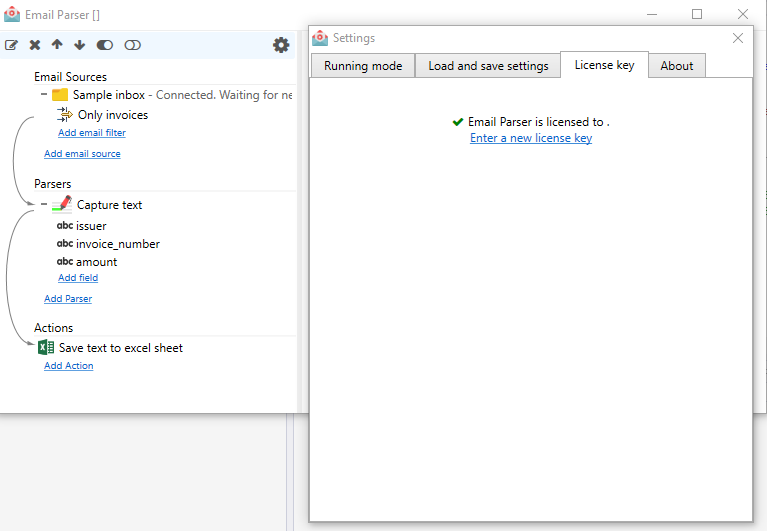
Email Parser is an intelligent email automation solution that automatically identifies important information within incoming emails, extracts specific data fields, and exports the information into business applications without requiring constant human intervention.
Instead of manually processing hundreds of emails every day, users can create parsing rules once and let the software perform the repetitive work automatically.
Businesses across multiple industries use Email Parser for:
- Lead management
- Order processing
- Invoice extraction
- Customer support automation
- Shipping notifications
- HR recruitment
- Financial reporting
- CRM synchronization
- Inventory management
Its flexibility makes it suitable for both small businesses and large enterprises seeking workflow automation.
Key Features of Email Parser
Intelligent Email Data Extraction
The primary function of Email Parser is automatically extracting structured information from unstructured emails.
It can identify:
- Customer names
- Email addresses
- Phone numbers
- Order IDs
- Invoice numbers
- Purchase amounts
- Tracking numbers
- Dates
- Product details
- Payment information
Once extracted, the data becomes available for further automation.
Custom Parsing Rules
Every business receives different types of emails.
Email Parser allows users to create custom parsing templates based on:
- Text patterns
- Labels
- Keywords
- Line positions
- Dynamic fields
This flexibility makes it adaptable to nearly any email format.
Automatic Email Processing
Instead of manually opening each email, Email Parser continuously monitors incoming messages.
When a new email arrives, it can:
- Detect matching templates
- Extract required information
- Export structured data
- Trigger automated workflows
This reduces repetitive manual work dramatically.
Integration with Business Applications
One of Email Parser’s biggest strengths is its compatibility with business systems.
Extracted information can often be sent to:
- CRM software
- Accounting platforms
- Spreadsheet applications
- Project management tools
- Marketing automation systems
- Database software
- ERP solutions
- Internal APIs
This helps organizations create end-to-end automation.
Multiple Email Sources
Businesses often receive emails from several inboxes.
Email Parser supports processing emails from multiple accounts, making it easier to centralize business operations.
Attachment Support
Many business emails include:
- PDF invoices
- Purchase orders
- Shipping documents
- Reports
- Receipts
Some Email Parser solutions can extract useful information from supported attachments, reducing manual document processing.
Export Options
Users can export parsed data in various formats depending on workflow requirements.
Common export methods include:
- CSV
- Excel
- JSON
- XML
- Database entries
- API connections
This flexibility allows businesses to integrate extracted data into existing systems.
Practical Use Cases
eCommerce Order Processing
Online stores receive numerous order confirmation emails every day.
Email Parser can automatically extract:
- Customer details
- Shipping addresses
- Purchased products
- Order values
- Tracking information
The extracted data can then populate inventory systems or shipping software.
Lead Management
Marketing teams often receive leads via email.
Instead of manually entering each lead into CRM software, Email Parser automatically captures:
- Contact name
- Company
- Phone number
- Email address
- Service request
Sales representatives receive qualified leads much faster.
Invoice Automation
Accounting departments spend significant time processing supplier invoices.
Email Parser helps automate:
- Invoice numbers
- Vendor names
- Due dates
- Payment amounts
- Tax values
This accelerates financial workflows while reducing manual errors.
Customer Support
Support teams receive hundreds of service requests every day.
Email Parser automatically extracts:
- Ticket IDs
- Customer information
- Issue categories
- Product names
- Priority levels
Support agents can begin working immediately without manual data entry.
HR Recruitment
Recruiters receive resumes and job applications through email.
Email Parser helps organize:
- Applicant names
- Contact information
- Job titles
- Application dates
- Resume details
Hiring becomes more organized and efficient.
Logistics and Shipping
Shipping companies frequently receive delivery updates.
Email Parser can capture:
- Tracking numbers
- Shipment status
- Delivery dates
- Carrier information
- Customer references
This improves shipment visibility across operations.
Performance Analysis
Email Parser performs exceptionally well when businesses receive structured or semi-structured emails.
After configuring parsing templates correctly, automation typically becomes highly reliable.
Speed
The software processes emails within seconds after arrival, allowing businesses to react quickly to incoming information.
Accuracy
When templates are properly configured, extraction accuracy is generally excellent for consistent email formats.
Scalability
Email Parser scales effectively from processing dozens of emails per day to handling thousands, making it suitable for growing businesses.
Ease of Use
Many Email Parser platforms provide user-friendly interfaces with template builders that simplify rule creation, even for non-technical users.
Some advanced parsing scenarios may require additional testing during initial setup, but ongoing maintenance is usually minimal once workflows are established.
Real-World Benefits
Organizations implementing Email Parser often experience measurable improvements.
Common benefits include:
- Reduced manual data entry
- Faster business processes
- Improved employee productivity
- Better customer response times
- Lower operational costs
- Fewer data entry mistakes
- Increased workflow consistency
- Better reporting accuracy
- Improved scalability
These improvements allow teams to focus on higher-value work instead of repetitive administrative tasks.
User Experience
Many users appreciate Email Parser because it transforms repetitive email processing into automated workflows.
Small business owners often report saving several hours each week by eliminating manual copying and pasting.
Customer support teams benefit from faster ticket creation, while finance departments enjoy quicker invoice processing. Sales teams also value automatic lead capture, ensuring potential customers are added to CRM systems without delay.
Although the initial setup requires planning and testing, most users find the long-term productivity gains well worth the investment.
Pros and Cons
Pros
- Easy automation of repetitive email tasks
- Saves significant administrative time
- Reduces manual data entry errors
- Supports multiple business workflows
- Flexible parsing rules
- Integrates with numerous business systems
- Suitable for businesses of various sizes
- Improves overall operational efficiency
Cons
- Initial configuration can take time
- Complex email layouts may require advanced parsing rules
- Some advanced integrations may require technical knowledge
- Pricing and features vary depending on the provider or edition
Pricing & Plans
Pricing for Email Parser solutions varies depending on the vendor, deployment model, and included features.
Common pricing options include:
- Free trial (offered by some providers)
- Monthly subscription plans
- Annual business licenses
- Enterprise plans with advanced automation capabilities
Before purchasing, businesses should compare:
- Number of emails processed
- Parsing limits
- Integration options
- API availability
- Support services
- Storage capacity
- Team collaboration features
Choosing the right plan depends on your organization’s email volume and automation requirements.
Who Should Use Email Parser?
Email Parser is an excellent solution for:
- Small businesses
- Large enterprises
- eCommerce companies
- Accounting firms
- Customer support teams
- Marketing agencies
- Sales organizations
- HR departments
- Logistics companies
- Real estate agencies
- Healthcare administration
- Financial services
If your business regularly copies information from emails into other systems, Email Parser can provide substantial productivity improvements.
Final Verdict
Email Parser is a powerful automation solution that helps businesses eliminate repetitive email processing tasks and transform unstructured messages into organized, actionable data. Its flexible parsing rules, workflow automation capabilities, and integration options make it a valuable tool for organizations aiming to improve efficiency and reduce manual effort.
Whether you’re processing online orders, capturing sales leads, managing invoices, or organizing customer support requests, Email Parser delivers reliable performance and meaningful productivity gains. While the initial setup may require some planning, the long-term time savings and improved accuracy make it a worthwhile investment for many businesses.
If you’re looking to automate email workflows, reduce administrative overhead, and streamline business operations, Email Parser is a solution worth exploring. Evaluate the available features, choose a plan that aligns with your needs, and experience how automated email data extraction can simplify your daily operations.
Short Description
Email Parser is an intelligent email automation solution that extracts important data from incoming emails and converts it into structured information for business workflows. Ideal for CRM updates, invoice processing, lead management, and customer support automation, it helps organizations save time, reduce manual data entry, and improve operational efficiency.



Reviews
There are no reviews yet.