Description
Codemill DataManager For Revit – Complete BIM Data Management Solution for Smarter Revit Workflows
Summary
Managing Building Information Modeling (BIM) data becomes increasingly challenging as Revit projects grow in size and complexity. Inconsistent parameters, duplicate information, missing metadata, and manual data entry can slow down project delivery while increasing the chances of costly errors.
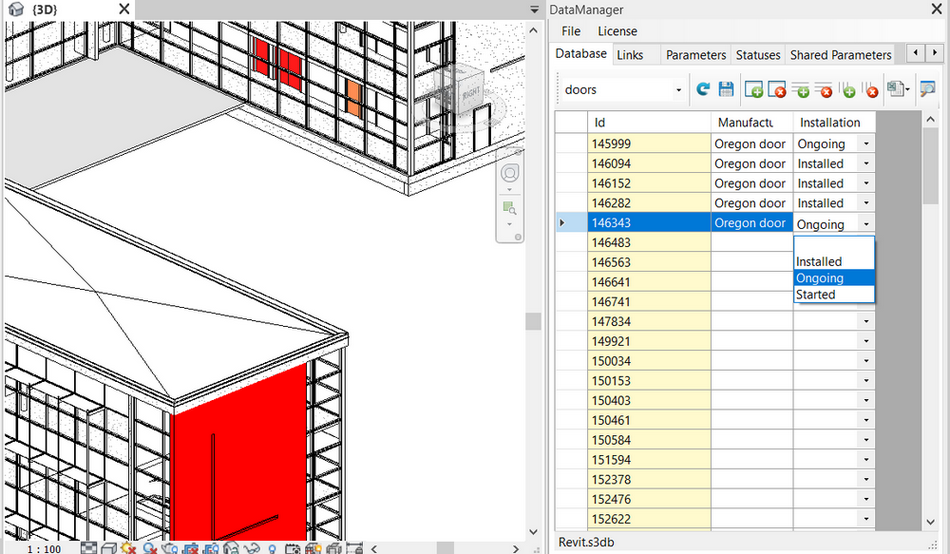
Codemill DataManager For Revit is designed to solve these common BIM management challenges by providing an efficient environment for organizing, validating, editing, and maintaining Revit project data. Whether you’re working on architectural, structural, or MEP projects, the software helps teams improve data quality, streamline workflows, and maintain consistency throughout the project lifecycle.
For BIM managers, architects, engineers, contractors, and design firms, Codemill DataManager For Revit offers practical tools that simplify data administration while reducing repetitive manual tasks. Instead of spending hours correcting project information, teams can focus on delivering better designs with confidence.
Introduction
Modern BIM projects depend on accurate and standardized information. As Revit models become more detailed, maintaining clean and reliable project data can become one of the biggest challenges for design teams.
Large projects often involve hundreds of families, thousands of elements, and countless parameters. Even a small inconsistency can affect schedules, quantity takeoffs, clash detection, documentation, and downstream workflows.
This is where Codemill DataManager For Revit becomes an essential productivity solution.
Instead of manually reviewing every parameter, BIM professionals can efficiently organize project information, identify inconsistencies, and update data in bulk. The software supports better project governance while making daily Revit management significantly more efficient.
Whether you’re coordinating a commercial building, healthcare facility, educational campus, industrial plant, or residential development, maintaining high-quality BIM data directly contributes to smoother collaboration and more reliable project outcomes.
Key Features of Codemill DataManager For Revit
Centralized BIM Data Management
One of the strongest capabilities of Codemill DataManager For Revit is its ability to centralize project information management.
Instead of navigating through numerous Revit properties manually, users can quickly organize and review project data from one efficient interface.
Benefits include:
- Better project visibility
- Faster parameter management
- Improved consistency
- Simplified information control
Bulk Parameter Editing
Editing hundreds—or even thousands—of Revit elements individually can consume valuable project time.
Codemill DataManager simplifies this process by allowing users to edit multiple parameters simultaneously, significantly reducing repetitive work.
This feature is particularly useful during:
- Project setup
- BIM standard implementation
- Model cleanup
- Quality control reviews
- Design revisions
Advanced Data Validation
Reliable BIM data is essential for accurate documentation and downstream coordination.
The software helps identify:
- Missing values
- Incorrect parameters
- Duplicate information
- Inconsistent naming conventions
- Invalid project data
By validating project information early, teams can reduce coordination issues before they impact construction documentation.
Improved BIM Standard Compliance
Every organization follows specific BIM standards.
Codemill DataManager helps maintain consistency by ensuring that project information follows predefined company guidelines.
This leads to:
- Cleaner models
- Standardized documentation
- Better collaboration
- Improved project quality
Intelligent Filtering and Search
Finding specific information inside a large Revit project can be time-consuming.
The software offers intelligent filtering tools that allow users to locate project elements quickly based on categories, parameters, values, or custom criteria.
This greatly improves productivity during model reviews and data management tasks.
Project Data Auditing
Regular audits help identify problems before they become costly.
Codemill DataManager provides valuable insights into project information by helping BIM managers review model quality and identify areas requiring correction.
Routine audits improve long-term project reliability.
Workflow Automation
Many BIM management tasks involve repetitive operations.
Codemill DataManager reduces manual effort by streamlining recurring data management processes, helping teams work faster while maintaining accuracy.
Automation contributes to:
- Reduced human error
- Faster project delivery
- Higher productivity
- Better consistency
Practical Use Cases
Codemill DataManager For Revit serves professionals across multiple industries.
Architectural Design Firms
Architects frequently manage large BIM models containing extensive building information.
The software helps maintain organized project data while ensuring consistency across design documentation.
Structural Engineering
Structural teams can manage element parameters more efficiently, ensuring that structural information remains accurate throughout design development.
MEP Engineering
Mechanical, electrical, and plumbing engineers often coordinate thousands of model components.
Codemill DataManager simplifies parameter management and improves data consistency during multidisciplinary coordination.
BIM Management
For BIM managers responsible for enforcing company standards, the software provides practical tools for reviewing, correcting, and maintaining project-wide information.
Construction Documentation
Accurate project information leads to more reliable schedules, quantity takeoffs, documentation, and coordination.
Improved BIM data quality ultimately reduces costly revisions during construction.
Facility Management Preparation
Many organizations use BIM models beyond construction.
Well-organized project information supports facility management teams by providing accurate building data for long-term operations and maintenance.
Performance Analysis
Performance is one of the major strengths of Codemill DataManager For Revit.
Instead of manually opening numerous element properties, users can perform large-scale data management operations much more efficiently.
In real-world BIM environments, this translates into measurable productivity gains.
Strengths observed in professional workflows include:
- Faster parameter editing
- Improved project organization
- Reduced manual errors
- Better model quality
- Simplified project auditing
- Increased BIM consistency
For firms managing multiple concurrent projects, these efficiencies can save countless hours over the course of a project.
The software becomes especially valuable during project handover, quality assurance reviews, and BIM coordination meetings where accurate information is critical.
Benefits of Using Codemill DataManager For Revit
Organizations implementing better BIM data management often experience improvements in several areas.
Key benefits include:
- Improved Revit project organization
- Higher BIM data quality
- Faster parameter management
- Reduced repetitive work
- Better project collaboration
- Cleaner documentation
- Easier quality assurance
- Consistent BIM standards
- Enhanced project coordination
- More reliable construction documentation
These advantages help design teams deliver projects with greater confidence and fewer information-related issues.
Pros and Cons
Pros
- Efficient BIM data management
- Streamlined parameter editing
- Excellent for large Revit projects
- Improves BIM quality control
- Supports standardized workflows
- Saves significant project time
- Reduces manual data errors
- Enhances collaboration across teams
- Suitable for architects, engineers, and BIM managers
Cons
- Learning advanced data management workflows may require some practice.
- Organizations should establish clear BIM standards to maximize the software’s capabilities.
- Feature availability may vary depending on the software edition and Revit version.
Who Should Use Codemill DataManager For Revit?
This solution is ideal for:
- BIM Managers
- Architects
- Structural Engineers
- MEP Engineers
- Construction Companies
- Design Consultants
- Engineering Firms
- BIM Coordinators
- Project Managers
- Digital Construction Teams
Whether working on small commercial projects or complex multi-disciplinary developments, the software helps maintain accurate and organized project information.
Pricing & Plans
Pricing for Codemill DataManager For Revit may vary depending on licensing options, software versions, organizational requirements, and deployment preferences.
Businesses interested in implementing the software should contact an authorized software provider or reseller to obtain the latest licensing information, subscription options, and enterprise pricing suitable for their specific workflow.
Why Codemill DataManager For Revit Stands Out
Many BIM tools focus primarily on model creation, but successful BIM projects depend just as much on the quality of the underlying information.
Codemill DataManager For Revit stands out because it focuses on making project data accurate, consistent, and easy to manage. Rather than relying on time-consuming manual checks, it gives teams efficient ways to review, update, and maintain project information at scale.
As BIM adoption continues to grow across the architecture, engineering, and construction industry, robust data management has become a critical factor in delivering reliable models and successful project outcomes.
Codemill DataManager For Revit Developer
Codemill DataManager For Revit 2026
Final Verdict
Codemill DataManager For Revit is a valuable solution for organizations that want to improve BIM data quality, reduce manual editing, and maintain consistent Revit project information.
Its powerful data management capabilities help architects, engineers, BIM coordinators, and construction professionals streamline complex workflows while supporting higher standards of accuracy and collaboration. From parameter management and project auditing to workflow optimization and quality assurance, the software addresses many of the everyday challenges faced by modern Revit users.
For teams seeking greater efficiency and better control over BIM information, Codemill DataManager For Revit is a practical investment that supports smarter project management and more dependable project delivery.
If you’re looking to optimize your Revit workflows, improve BIM data consistency, and increase productivity across your projects, Codemill DataManager For Revit is well worth exploring.



Reviews
There are no reviews yet.