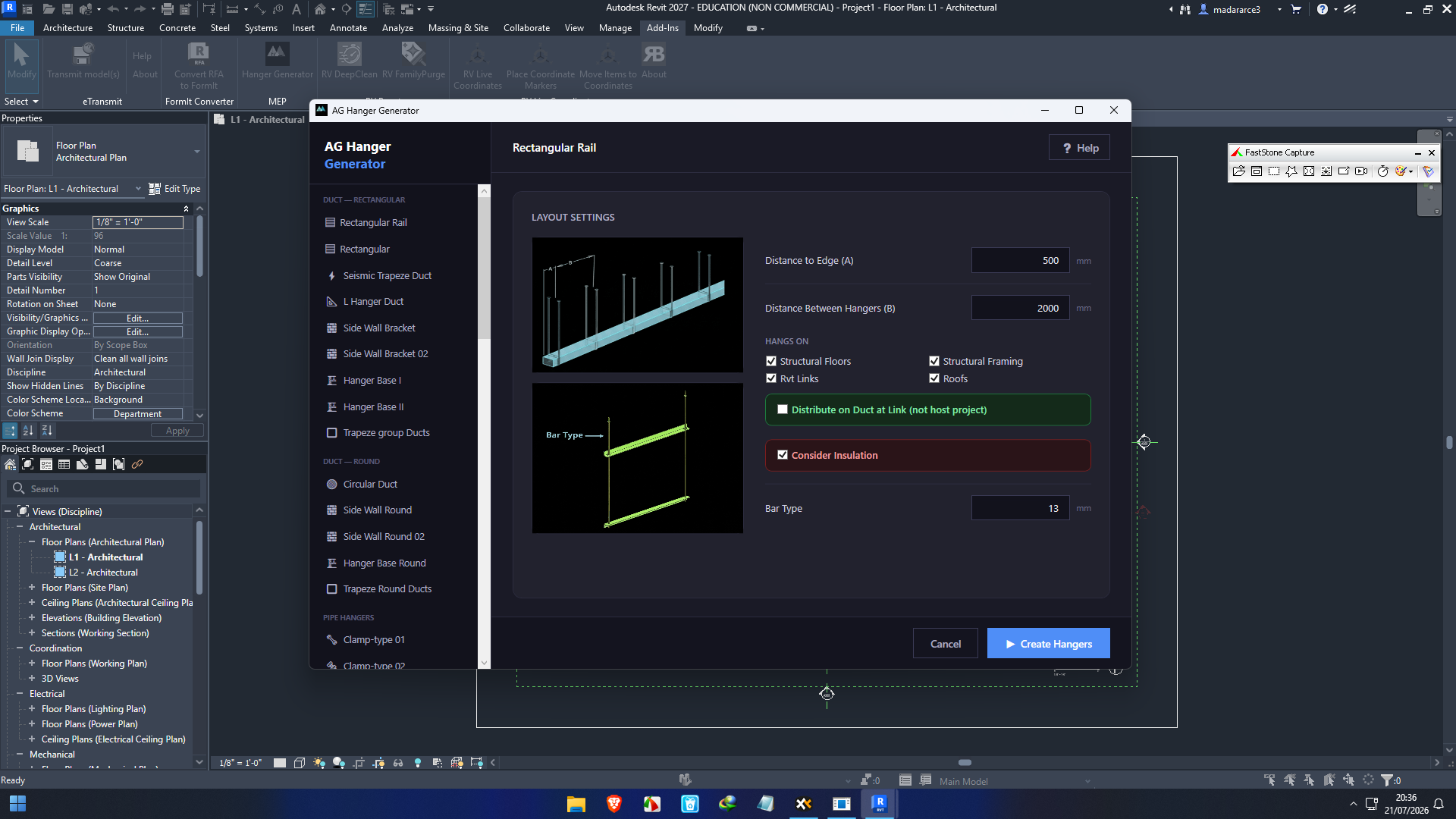
Description
AG Hanger Generator For Autodesk Review: Streamlining Hanger Design and Placement for BIM Professionals
Designing and placing hangers for MEP systems can quickly become one of the most repetitive and time-consuming tasks in Autodesk-based workflows. AG Hanger Generator For Autodesk is built to solve this challenge by automating hanger creation, improving design consistency, and reducing manual modeling effort. Whether you’re working on commercial buildings, industrial facilities, hospitals, or large infrastructure projects, this powerful Autodesk plugin helps engineers, BIM coordinators, and contractors generate accurate hanger layouts with greater speed and precision.
Instead of manually placing hundreds or even thousands of hangers throughout a project, users can automate the process while maintaining compliance with project standards. The result is improved productivity, fewer modeling errors, and better project coordination.
If your team relies on Autodesk software for Building Information Modeling (BIM), AG Hanger Generator is a valuable productivity tool that can significantly improve workflow efficiency.
Introduction
Modern construction projects demand accuracy, speed, and collaboration. Mechanical, electrical, and plumbing (MEP) systems continue growing more complex, making repetitive modeling tasks increasingly difficult to manage manually.
AG Hanger Generator For Autodesk addresses these challenges by automating the creation and placement of support hangers within Autodesk environments. Instead of spending hours positioning supports individually, users can generate intelligent hangers based on project requirements, system geometry, and predefined rules.
This automation not only accelerates modeling but also improves coordination among engineers, fabricators, and contractors throughout the project lifecycle.
Whether you’re managing a medium-sized office building or a massive industrial plant, AG Hanger Generator helps reduce repetitive work while maintaining high-quality BIM standards.
Key Features of AG Hanger Generator For Autodesk
Intelligent Automatic Hanger Generation
One of the software’s strongest capabilities is its intelligent automation engine.
Users can generate hangers for multiple MEP systems with only a few inputs, dramatically reducing manual placement time.
Benefits include:
- Automatic hanger positioning
- Rule-based generation
- Consistent spacing
- Standardized support layouts
- Reduced modeling errors
Seamless Autodesk Integration
AG Hanger Generator works directly within Autodesk workflows, allowing users to continue using familiar tools without switching software.
The integration enables:
- Smooth BIM workflows
- Native project compatibility
- Faster project updates
- Efficient model coordination
This minimizes disruption while maximizing productivity.
Customizable Design Standards
Every organization follows different engineering standards.
AG Hanger Generator allows users to configure:
- Hanger spacing
- Support types
- Structural attachment methods
- Pipe support rules
- Company standards
This flexibility ensures projects remain compliant with both internal and client requirements.
Fast Batch Processing
Large commercial projects often require thousands of hangers.
Instead of placing each support manually, AG Hanger Generator processes entire systems in batches, saving countless hours during project development.
Batch processing becomes especially valuable on:
- Hospitals
- Airports
- Manufacturing facilities
- Shopping centers
- Data centers
Smart Clash Reduction
Proper hanger placement helps reduce coordination issues before construction begins.
The software assists teams by generating support layouts that work within existing project geometry, helping minimize conflicts with structural and architectural components.
This improves overall BIM coordination and reduces costly field modifications.
Improved Model Consistency
Manual modeling often introduces inconsistencies.
AG Hanger Generator creates standardized support arrangements throughout the project, producing cleaner and more professional BIM models.
Consistency becomes especially important when multiple BIM technicians collaborate on the same project.
Practical Use Cases
Commercial Office Buildings
Large office developments include extensive HVAC, piping, and plumbing systems.
Instead of manually placing thousands of supports, BIM teams can automate hanger creation and complete modeling significantly faster.
Hospital Construction
Hospitals contain highly complex MEP infrastructure with strict coordination requirements.
AG Hanger Generator simplifies support placement while helping maintain organized and accurate BIM models across multiple disciplines.
Industrial Facilities
Industrial plants often feature extensive piping networks requiring numerous supports.
Automation reduces repetitive modeling while ensuring consistency throughout large mechanical systems.
Educational Campuses
Universities and schools frequently involve multiple interconnected buildings.
Using automated hanger generation allows project teams to maintain standardized support layouts across every structure.
Data Centers
Modern data centers rely on dense mechanical and electrical systems.
Accurate hanger placement improves installation planning while reducing coordination conflicts during construction.
Real-World User Experience
Many BIM professionals discover that hanger placement consumes far more project time than initially expected.
Imagine an MEP coordinator responsible for modeling a 25-story office tower.
Without automation, placing several thousand hangers manually may require days of repetitive work.
After implementing AG Hanger Generator, the same workflow becomes largely automated.
Instead of focusing on repetitive placement, engineers can spend more time reviewing design quality, improving coordination, and resolving project issues.
The overall BIM model becomes cleaner, more consistent, and easier for construction teams to interpret.
This shift from manual drafting to intelligent automation is one of the software’s greatest strengths.
Performance Analysis
Speed
AG Hanger Generator dramatically reduces modeling time by automating repetitive support placement.
Projects that previously required days of manual work can often be completed in a fraction of the time.
Accuracy
Automation improves consistency across the entire model.
Since hangers follow predefined rules, the risk of inconsistent spacing or misplaced supports is greatly reduced.
Scalability
Whether modeling a small office or a massive industrial complex, the software scales efficiently.
Large BIM models benefit particularly from automated processing.
Reliability
Because the plugin operates within Autodesk workflows, users experience dependable performance while maintaining compatibility with existing project environments.
Productivity
Perhaps the biggest advantage is increased productivity.
Engineers spend less time performing repetitive tasks and more time improving overall project quality.
Pros and Cons
Pros
- Excellent Autodesk integration
- Significant time savings
- Intelligent automation
- Consistent hanger placement
- Customizable project standards
- Faster BIM coordination
- Reduces repetitive modeling
- Suitable for large construction projects
- Improves design quality
- User-friendly workflow
Cons
- Primarily intended for Autodesk-based workflows
- New users may require initial setup and configuration
- Full benefits are most noticeable on medium and large projects
Pricing & Plans
Pricing for AG Hanger Generator For Autodesk may vary depending on licensing options, software versions, organizational requirements, and deployment methods.
Common licensing models may include:
- Single-user licenses
- Multi-user licenses
- Business or enterprise licensing
- Annual subscription options
- Commercial deployment packages
Organizations should evaluate the licensing model that best fits their project size, team structure, and long-term BIM workflow needs.
Why AG Hanger Generator Stands Out
Many BIM productivity plugins focus on isolated tasks.
AG Hanger Generator addresses one of the most repetitive activities in MEP modeling while integrating naturally into Autodesk workflows.
Its combination of automation, flexibility, and standardization makes it especially valuable for firms managing large-scale BIM projects.
Instead of simply accelerating modeling, it also improves documentation quality, project consistency, and collaboration between design and construction teams.
For organizations seeking to enhance BIM productivity without disrupting existing processes, AG Hanger Generator delivers measurable benefits.
SEO Highlights
Professionals searching for the following terms will find AG Hanger Generator highly relevant:
- AG Hanger Generator For Autodesk
- Autodesk hanger generation plugin
- BIM hanger automation software
- MEP hanger design tool
- Autodesk BIM productivity plugin
- Automatic pipe hanger generator
- Revit hanger automation
- Intelligent MEP support modeling
- BIM coordination software
- Autodesk MEP workflow automation
These related keywords naturally strengthen the article’s search visibility while matching common user search intent.
Final Verdict
AG Hanger Generator For Autodesk is a highly practical BIM productivity solution designed to eliminate one of the most repetitive tasks in MEP modeling. By automating hanger generation, improving consistency, and integrating seamlessly into Autodesk environments, it enables engineers and BIM professionals to complete projects faster while maintaining high-quality standards.
Its intelligent automation, customizable design rules, and efficient batch processing make it an excellent choice for commercial buildings, hospitals, industrial facilities, educational campuses, and other large-scale construction projects. While smaller projects may not fully showcase its capabilities, medium and enterprise-level BIM teams can realize substantial gains in productivity and coordination.
If your organization wants to reduce manual modeling, improve BIM accuracy, and accelerate project delivery, AG Hanger Generator For Autodesk is a solution worth exploring. Incorporating this tool into your Autodesk workflow can help your team work more efficiently, deliver consistent results, and focus on higher-value engineering tasks rather than repetitive modeling.



Reviews
There are no reviews yet.