Description
Clash Tracker Review: A Smarter Way to Manage BIM Clash Detection and Project Coordination
Modern construction projects involve architects, structural engineers, MEP designers, contractors, and project managers working together on complex BIM models. While Building Information Modeling has improved collaboration, it has also introduced the challenge of identifying, tracking, and resolving design conflicts before construction begins. This is where Clash Tracker becomes an invaluable solution.
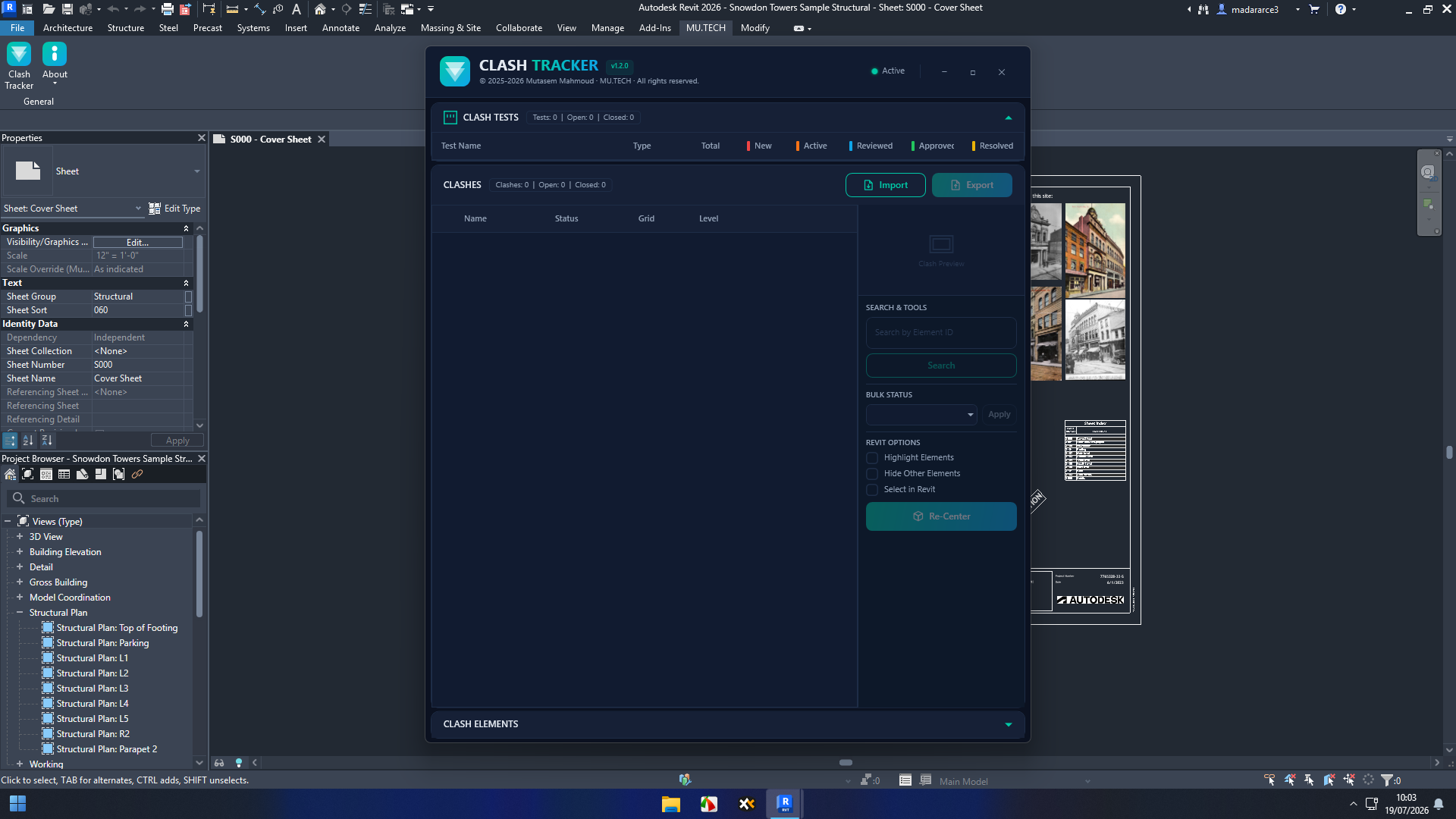
Clash Tracker is designed to streamline clash management by helping project teams organize, assign, monitor, and resolve model clashes efficiently. Instead of relying on scattered spreadsheets or lengthy email chains, the software centralizes clash information, making collaboration faster and reducing costly mistakes during construction.
Whether you’re coordinating a commercial building, infrastructure project, industrial facility, or residential development, Clash Tracker provides an organized workflow that helps teams detect issues early, improve communication, and deliver projects with greater confidence.
Introduction
Building Information Modeling (BIM) has transformed how construction professionals design, coordinate, and deliver projects. However, even with advanced BIM tools, clashes between structural, architectural, and MEP elements remain one of the biggest challenges during project development.
A single unresolved clash can delay construction, increase project costs, or require expensive redesigns after work has already started.
Clash Tracker addresses these problems by providing a centralized platform for clash management, issue tracking, coordination workflows, and team collaboration. Rather than simply detecting clashes, the software helps teams manage the entire clash resolution process from discovery to final approval.
For organizations focused on improving BIM coordination, reducing RFIs, and minimizing construction risks, Clash Tracker can become an essential part of the digital construction workflow.
Key Features of Clash Tracker
Centralized Clash Management
One of the strongest features of Clash Tracker is its ability to organize all detected clashes in one location.
Instead of manually sorting hundreds or thousands of issues, project teams can:
- Categorize clashes
- Prioritize critical issues
- Assign responsibility
- Track progress
- Monitor resolution status
This structured workflow significantly improves project organization.
Intelligent Issue Tracking
Managing clash detection isn’t only about finding problems—it’s about ensuring they get resolved.
Clash Tracker allows users to:
- Assign clashes to team members
- Add comments
- Update issue status
- Record design decisions
- Maintain complete issue history
Everyone involved stays informed throughout the coordination process.
BIM Coordination Workflow
Large BIM projects involve multiple disciplines working simultaneously.
Clash Tracker helps coordinate:
- Architectural models
- Structural models
- Mechanical systems
- Electrical systems
- Plumbing layouts
- Fire protection systems
This improves communication between departments while reducing duplicated work.
Progress Monitoring
Project managers benefit from detailed dashboards that display:
- Open clashes
- Resolved clashes
- High-priority issues
- Team performance
- Pending reviews
These insights help managers keep coordination meetings productive and focused.
Reporting Tools
Professional reports make it easier to communicate project status to stakeholders.
Reports typically include:
- Clash summaries
- Assigned responsibilities
- Resolution timelines
- Project statistics
- Outstanding issues
Well-organized reporting improves transparency across the project lifecycle.
Team Collaboration
Construction projects require collaboration between numerous specialists.
Clash Tracker supports smoother teamwork by allowing users to:
- Share updates
- Exchange comments
- Review coordination decisions
- Monitor responsibilities
- Track completed tasks
The result is a more collaborative BIM environment.
Practical Use Cases
Commercial Building Projects
Large office buildings contain thousands of building components.
Clash Tracker helps coordinate:
- HVAC ducts
- Steel framing
- Electrical conduits
- Plumbing systems
- Ceiling layouts
Detecting conflicts before construction prevents expensive field modifications.
Hospital Construction
Hospitals have highly complex MEP systems.
Engineers can use Clash Tracker to coordinate:
- Medical gas piping
- Electrical infrastructure
- Ventilation systems
- Structural supports
- Equipment installation
Early clash resolution helps maintain construction schedules.
Infrastructure Projects
Roads, tunnels, airports, and transportation facilities involve multiple engineering disciplines.
Clash Tracker assists teams by organizing clashes between:
- Civil engineering models
- Utility networks
- Drainage systems
- Structural elements
- Electrical installations
This minimizes costly redesign during construction.
Industrial Facilities
Factories, manufacturing plants, and processing facilities contain dense mechanical systems.
Project teams can efficiently manage clashes involving:
- Pipe networks
- Equipment foundations
- Cable trays
- Structural supports
- Maintenance access zones
Improved coordination leads to smoother installation.
Residential Developments
Even residential projects benefit from structured clash coordination.
Builders can reduce conflicts involving:
- Plumbing routes
- HVAC systems
- Structural framing
- Electrical installations
- Interior layouts
This improves construction quality while reducing project delays.
Performance Analysis
Performance is one of the areas where Clash Tracker delivers practical value.
Unlike manual spreadsheets or disconnected issue logs, the software centralizes project coordination into one organized environment.
For medium and large BIM projects, users often experience noticeable improvements in:
- Issue tracking efficiency
- Team communication
- Clash resolution speed
- Coordination meeting productivity
- Documentation accuracy
The software also scales well for projects involving multiple consultants and contractors.
As projects grow in complexity, structured clash management becomes increasingly important, making Clash Tracker a valuable investment for BIM-focused organizations.
Benefits of Using Clash Tracker
Organizations adopting Clash Tracker frequently experience several practical advantages.
Better Team Communication
Everyone works from the same clash database, reducing confusion and duplicate discussions.
Reduced Construction Risk
Resolving clashes during design is significantly less expensive than fixing them during construction.
Improved Project Documentation
Every issue remains documented throughout its lifecycle, creating better accountability.
Faster Coordination Meetings
Instead of reviewing spreadsheets manually, teams can focus on priority issues and decision-making.
Increased Productivity
Automation and structured workflows reduce administrative work while improving coordination efficiency.
Higher Project Quality
Better coordination leads to fewer construction errors and higher-quality project delivery.
Pros and Cons
Pros
- Easy-to-manage clash tracking workflow
- Centralized issue management
- Improves BIM coordination
- Supports multidisciplinary collaboration
- Detailed reporting capabilities
- Reduces project delays
- Enhances communication among stakeholders
- Organized project documentation
- Scalable for large construction projects
Cons
- May require onboarding for new BIM users
- Benefits are greatest on medium and large projects
- Advanced workflows may depend on project-specific configurations
Pricing & Plans
Pricing for Clash Tracker can vary depending on:
- Licensing model
- Number of users
- Organization size
- Enterprise deployment requirements
- Subscription or perpetual licensing options
Many software vendors also provide customized licensing for engineering firms, construction companies, and BIM consultants. Organizations should review the latest licensing options to determine the best fit for their project needs.
Who Should Use Clash Tracker?
Clash Tracker is particularly useful for:
- BIM Managers
- BIM Coordinators
- Architects
- Structural Engineers
- MEP Engineers
- Construction Managers
- General Contractors
- Project Coordinators
- Engineering Consultants
- Design Review Teams
Any organization managing multidisciplinary BIM projects can benefit from a structured clash management workflow.
Why Clash Tracker Stands Out
Many clash detection solutions identify conflicts, but managing those conflicts efficiently is often the real challenge. Clash Tracker bridges this gap by transforming raw clash data into actionable tasks that teams can prioritize, assign, and resolve.
Its emphasis on collaboration, accountability, and progress tracking makes it more than just a clash reporting tool. It becomes a project coordination platform that supports better communication across every stage of the BIM process.
For organizations aiming to reduce design revisions, avoid construction delays, and improve project transparency, Clash Tracker offers a practical and scalable solution.
Final Verdict
Clash Tracker is a powerful BIM coordination and clash management solution that helps construction professionals organize, monitor, and resolve design conflicts with greater efficiency. By centralizing clash information, improving team collaboration, and streamlining issue tracking, it enables project teams to minimize costly errors before construction begins.
Its structured workflows, detailed reporting, and collaborative features make it well suited for commercial buildings, infrastructure projects, industrial facilities, healthcare developments, and large residential projects. While new users may need some time to become familiar with its workflow, the long-term productivity gains and reduction in coordination issues make it a worthwhile investment.
If your goal is to improve BIM coordination, accelerate clash resolution, and deliver higher-quality construction projects, Clash Tracker is a solution worth exploring for your software toolkit.



Reviews
There are no reviews yet.