Description
OtsDJ Software 2027: Features, Benefits, DJ Mixing Capabilities, and Performance
Summary
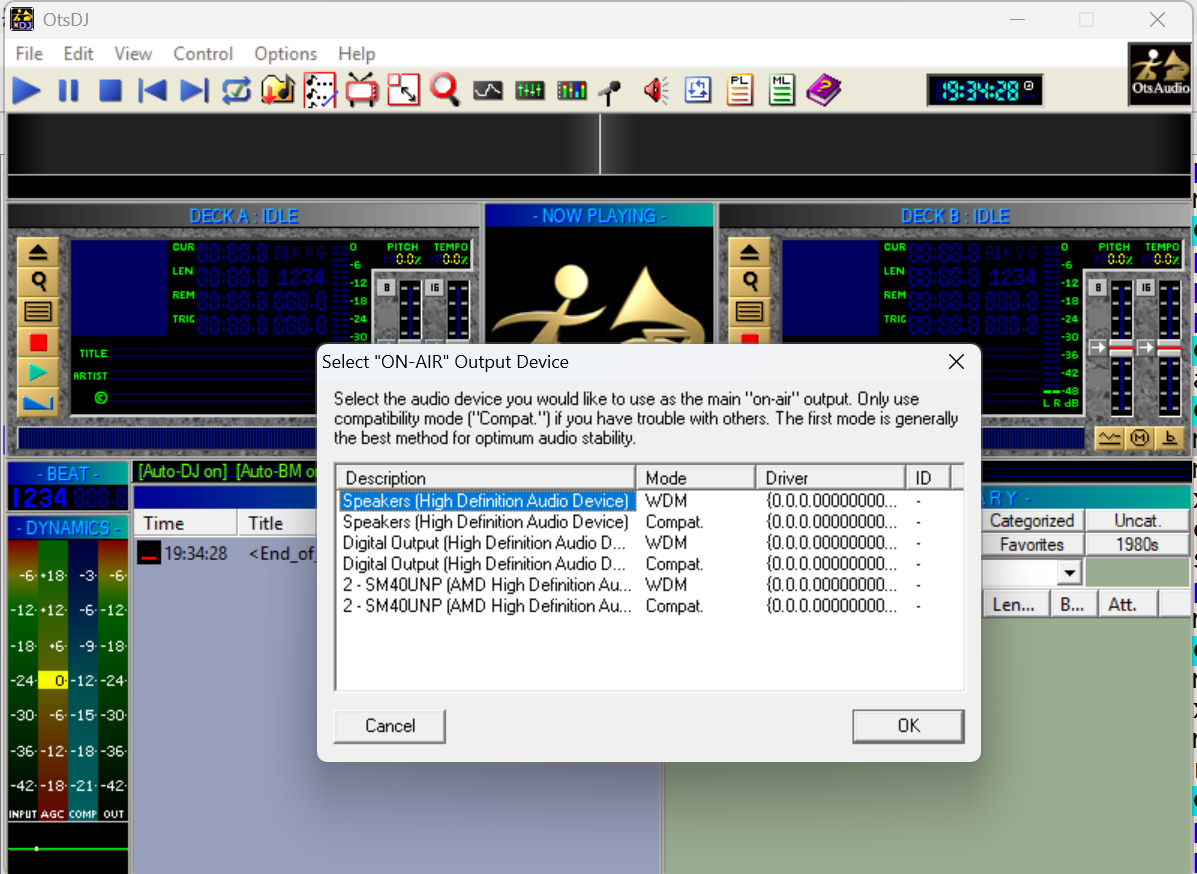
OtsDJ is a professional DJ and digital audio mixing solution developed by Ots Labs, designed to help DJs, music enthusiasts, broadcasters, and entertainment professionals manage and play music with greater control. Known for its automated mixing technology, intelligent music library management, smooth transitions, and professional audio processing, OtsDJ has established a reputation as a practical solution for continuous music playback and live entertainment.
One of its biggest strengths is its ability to simplify music mixing without removing the creative control that DJs need. Features such as automated beat mixing, intelligent fade mixing, tempo adjustment, cueing, scratching, and volume management make it suitable for different audio production and entertainment environments.
An important detail for prospective users is that OtsDJ was eventually renamed OtsAV. The original OtsDJ software evolved into a broader audio and video playback platform, with separate product editions designed for DJ performances, radio broadcasting, and television applications.
For users exploring OtsDJ software, understanding its development, functionality, and relationship with OtsAV is essential. Whether you are interested in traditional DJ mixing, automated music playback, or professional media presentation, this software family offers several capabilities worth examining.
Introduction
The world of digital DJ software has changed significantly over the years. DJs once depended heavily on physical records, CD players, and traditional mixing equipment. Modern software has made it possible to organize extensive music collections, automate transitions, control playback, and manage live entertainment from a computer.
OtsDJ was developed to address these needs by combining music playback, mixing, and media management in one application. Originally introduced as OtsJuke DJ, the software became known as OtsDJ before evolving into OtsAV.
Unlike applications focused exclusively on manual DJ performance, OtsDJ placed considerable emphasis on intelligent automation. Its automated mixing technology helped users create smooth transitions between tracks, while its audio processing capabilities aimed to maintain consistent playback quality.
This approach made the software particularly interesting for mobile DJs, radio professionals, entertainment venues, and users who wanted reliable background music without constantly adjusting every transition manually.
The platform also developed beyond audio-only playback. Video mixing and karaoke capabilities expanded its usefulness for entertainment environments requiring more than conventional music playback.
Today, OtsDJ is primarily relevant as a legacy product name, while OtsAV represents the continued development of the software family.
Key Features of OtsDJ Software
OtsDJ combines several important tools for music playback, digital mixing, and media organization. Its feature set was designed to support both automated operation and hands-on DJ control.
1. Automated Beat Mixing
One of the most recognizable features associated with OtsDJ is automated beat mixing.
This functionality helps synchronize the rhythm and timing of different music tracks, allowing transitions to sound more natural. Instead of manually adjusting every transition, users can rely on the software’s BeatMorph technology to assist with mixing.
Practical benefits include:
-
More consistent transitions between songs.
-
Reduced manual adjustments during continuous playback.
-
Better synchronization between tracks with different tempos.
-
Convenient music mixing for DJs managing busy performances.
For DJs working with large playlists, automated beat mixing can make a noticeable difference in workflow efficiency.
2. Intelligent Fade Mixing
Smooth transitions are important in professional music playback. Abrupt changes between tracks can interrupt the atmosphere, particularly during parties, events, and radio programming.
OtsDJ includes intelligent fade-mixing capabilities that help manage transitions between songs.
Users can create continuous playback experiences while reducing unnecessary silence between tracks. This is especially useful for background music services, restaurants, entertainment venues, and mobile DJs.
3. Professional Audio Processing
Audio quality plays an important role in any DJ performance.
OtsDJ incorporates a Dynamics Processor designed to help maintain consistent sound levels and deliver a more polished audio output.
Its audio management capabilities support:
-
Volume balancing.
-
Dynamic audio processing.
-
Consistent playback levels.
-
Improved listening experiences.
-
More controlled music presentation.
These functions are valuable when working with music collections containing recordings produced at different volume levels.
4. Advanced Music Library Management
Managing hundreds or thousands of audio files can become difficult without proper organization.
OtsDJ provides a media library system that helps users organize their music collections and access tracks efficiently.
A structured library can make it easier to locate songs, prepare playlists, and maintain organized music selections for different occasions.
For professional DJs, this functionality can reduce preparation time and make live performances more manageable.
5. Tempo and Pitch Control
OtsDJ offers playback controls that allow users to adjust tempo, pitch, and playback direction.
Its time-scaling technology, known as ClearScale, was developed to maintain audio quality while changing playback speed.
The historical feature set includes a wide adjustment range, extending from stationary playback to double-speed operation.
These controls provide flexibility for DJs experimenting with different mixing styles and musical arrangements.
6. Cueing and Virtual Scratching
OtsDJ also includes traditional DJ-oriented controls such as cueing and virtual scratching.
Cueing allows users to prepare and monitor audio before bringing it into the main playback.
Virtual scratching provides additional creative control, helping DJs introduce performance techniques commonly associated with physical turntables.
Together, these tools make the software more flexible than a basic music player.
7. Video Mixing and Karaoke Capabilities
The later OtsAV DJ product family expanded beyond traditional audio mixing.
Depending on the edition, users can access video playback, video mixing, and karaoke CD+G functionality.
These capabilities are particularly useful for:
-
Video DJs.
-
Karaoke entertainment businesses.
-
Wedding and event professionals.
-
Nightclubs and entertainment venues.
-
Audio-video presentation environments.
This expansion helped transform the original OtsDJ concept into a more comprehensive digital media playback platform.
Practical Use Cases of OtsDJ
OtsDJ was developed for more than casual music playback. Its combination of automated mixing, media organization, and audio processing makes it relevant to several professional and personal applications.
1. Mobile DJ Performances
Mobile DJs frequently work at weddings, birthday celebrations, corporate events, and private parties. They need dependable playback tools that allow them to manage music without interrupting the event.
OtsDJ’s automated mixing and fade transitions can help maintain continuous music throughout an event. Its manual controls also provide opportunities to adjust playback when the audience or atmosphere changes.
For example, a DJ preparing a wedding playlist can organize different musical selections for the reception, dinner, and dance floor. Smooth transitions help maintain the atmosphere while reducing the need for constant manual intervention.
2. Radio Broadcasting
Radio stations need reliable audio playback systems capable of delivering continuous programming.
OtsDJ’s development into OtsAV Radio introduced capabilities intended for broadcasting environments, including playlist management, scheduling, and professional audio processing.
These functions can help radio operators organize music programming, manage playback sequences, and maintain consistent audio output.
For smaller broadcasters and internet radio operators, automated playback can also reduce repetitive production tasks.
3. Nightclubs and Entertainment Venues
Nightclubs and entertainment venues often require continuous music throughout operating hours.
Automated mixing helps maintain a consistent musical experience, while tempo controls and manual playback options provide additional flexibility.
Venue operators can benefit from organized playlists and reliable transitions, particularly when managing background music or extended entertainment sessions.
4. Karaoke Businesses
Karaoke venues need software capable of supporting music playback and compatible karaoke content.
The later OtsAV DJ editions provide karaoke CD+G functionality, making the platform relevant to businesses that combine music entertainment with audience participation.
This can be useful for karaoke lounges, private parties, restaurants, and entertainment facilities.
5. Video DJ and Multimedia Entertainment
Some entertainment professionals combine music with video content to create more engaging performances.
The video capabilities introduced through the OtsAV product family support multimedia presentations, allowing DJs to work with audio and video rather than depending entirely on traditional music playback.
This approach is particularly useful for visual entertainment, music video presentations, and events where synchronized audio and video contribute to the overall experience.
Performance Analysis
Performance is one of the most important considerations when choosing DJ software. A program may offer impressive features, but its practical value depends on how reliably it handles playback, transitions, and audio processing.
OtsDJ was developed with an emphasis on dependable music playback and professional audio management.
Audio Quality and Processing
The integrated Dynamics Processor is an important part of its audio-focused design. It helps manage variations in sound levels and provides a more consistent listening experience.
Its ClearScale time-scaling technology also offers flexibility when adjusting playback speed.
For DJs working with different music genres, these capabilities can be useful when combining recordings with varying tempos and production characteristics.
Mixing Efficiency
Automated beat mixing and intelligent fade mixing are among the software’s strongest capabilities.
These functions reduce the amount of manual work involved in preparing transitions. They can be particularly beneficial during long performances where maintaining continuous playback is important.
However, automated mixing should not be considered a complete replacement for DJ creativity. Professionals who prefer highly customized transitions, live effects, and detailed performance manipulation may still want additional hardware or specialized DJ applications.
System Compatibility
OtsDJ belongs to an older generation of Windows-based DJ software. Its successor, OtsAV, also maintains Windows-focused releases.
This is an important consideration for buyers. Users should check the supported Windows versions, audio hardware requirements, sound card compatibility, and license conditions before purchasing or installing a particular edition.
The newer OtsAV development roadmap also discusses a broader cross-platform architecture, but prospective users should distinguish announced future development from currently available releases.
Workflow and Usability
OtsDJ emphasizes practical playback controls and media organization rather than relying entirely on a visually elaborate interface.
Its functionality may appeal to users who prioritize audio management, automated playback, and operational reliability.
New users may need some time to understand the library system, mixing controls, and advanced playback options. Once familiar with the interface, however, the software can provide a structured workflow for preparing and managing music sessions.
Pros and Cons of OtsDJ Software
Choosing the right DJ application requires understanding both its advantages and limitations.
Pros
-
Automated beat mixing helps create smoother transitions.
-
Intelligent fade mixing supports continuous music playback.
-
Professional audio processing helps maintain consistent sound levels.
-
Music library management makes organizing large collections easier.
-
Tempo and pitch controls provide playback flexibility.
-
Cueing and virtual scratching support traditional DJ techniques.
-
The broader OtsAV product family offers video and karaoke capabilities.
-
Different product editions accommodate different entertainment requirements.
Cons
-
OtsDJ is a legacy product name rather than the current main product branding.
-
The Windows-focused platform may not suit macOS users.
-
Some advanced features are restricted to higher editions.
-
New users may require time to understand the software’s controls.
-
Modern DJs looking for extensive contemporary performance integrations may find its feature approach less suitable.
-
Compatibility should be checked carefully when using older releases with modern computers.
Pricing & Plans
OtsDJ and its successor, OtsAV, have been offered through different licensing options designed for different types of users.
The OtsAV DJ product family includes several editions:
| Edition | Main purpose |
|---|---|
| OtsAV DJ Silver | Audio-only DJ playback and mixing |
| OtsAV DJ Pro | Audio, video, and karaoke functionality |
| OtsAV DJ Enterprise | Advanced DJ and multimedia requirements |
A 30-day trial has also been offered for OtsAV DJ, allowing prospective customers to evaluate its functionality before purchasing.
It is important to understand that OtsDJ’s original Silver and Boombox licenses are legacy products. They are not interchangeable with newer OtsAV licenses. The developer’s licensing information also identifies version 1.94.161, released on May 27, 2026, for eligible licensed users.
Because licensing arrangements and upgrade options can change, buyers should verify the current edition, license compatibility, and final purchase price before making a decision.
Who Should Use OtsDJ?
OtsDJ and the broader OtsAV software family may be worth considering for several types of users.
Mobile and professional DJs: Users who need automated transitions, organized playlists, and dependable music playback.
Radio broadcasters: Professionals looking for structured music programming and audio automation capabilities.
Entertainment businesses: Venues that require continuous background music and organized playback.
Video DJs: Users interested in combining audio and video presentations.
Karaoke operators: Entertainment providers who need compatible karaoke playback functionality.
Music enthusiasts: Individuals interested in experimenting with digital mixing and music library management.
However, users looking for modern cross-platform DJ applications should carefully evaluate the specific version available to them rather than assuming that every OtsDJ feature is supported on current operating systems.
Final Verdict
OtsDJ remains an interesting name in the history of digital DJ software. Its combination of automated beat mixing, intelligent fade transitions, music library management, audio processing, and manual playback controls helped establish its position as a practical solution for DJs and professional music playback environments.
Its greatest strength is the balance between automation and user control. DJs can simplify repetitive mixing tasks while retaining the ability to manage playback, adjust tempo, prepare cue points, and create more personalized music experiences.



Reviews
There are no reviews yet.