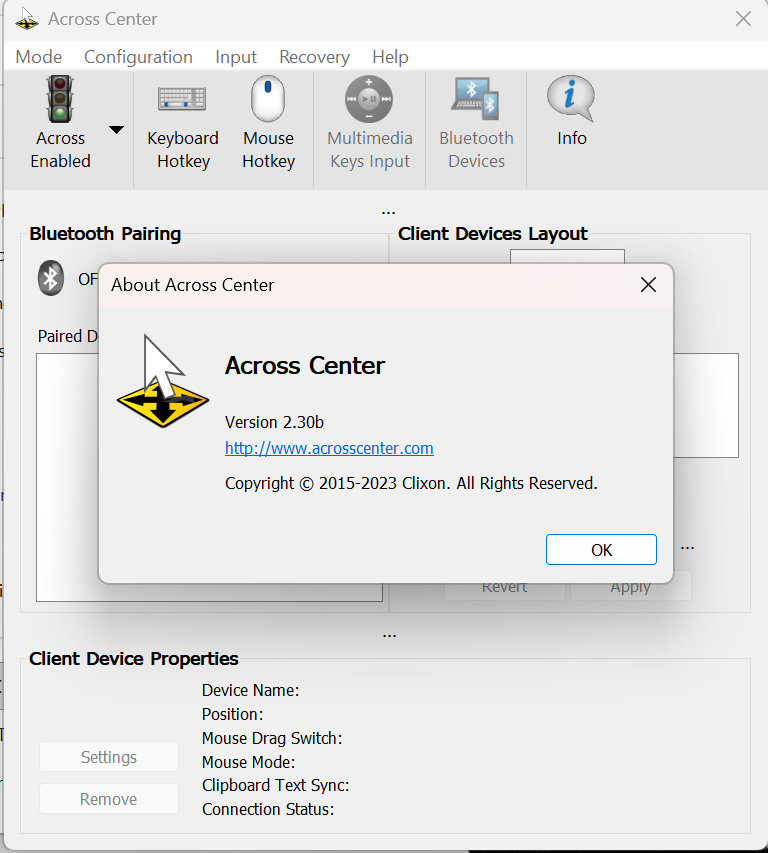
Description
Across Center 2.30b Software 2026 – Features, Benefits, Performance, and Complete Overview
Across Center is a versatile software KVM (Keyboard, Video, and Mouse) solution designed to make working across multiple computers, smartphones, and tablets easier and more convenient. Instead of constantly switching between different keyboards and mice, users can operate compatible devices using the keyboard and mouse connected to a primary computer. By combining Bluetooth connectivity, wired and wireless network communication, clipboard synchronization, file sharing, and screen mirroring, Across Center creates a more connected multi-device working environment.
One of its biggest advantages is its ability to simplify everyday workflows without requiring users to purchase additional physical KVM hardware. Whether someone works with multiple computers, manages files between devices, or wants to control a smartphone using a desktop keyboard, Across Center offers practical tools for improving productivity. Its support for Windows, macOS, Linux, and Android also makes it a flexible option for users with different operating systems.
Introduction to Across Center
Managing multiple devices can become frustrating when every computer or mobile device requires a separate keyboard, mouse, and file-transfer process. Professionals frequently switch between desktop computers, laptops, tablets, and smartphones throughout the day. These repeated interruptions can reduce productivity and make even simple tasks unnecessarily complicated.
Across Center addresses this challenge by providing software-based keyboard and mouse sharing between compatible devices. It allows a primary computer to function as a central control station, enabling users to interact with other connected devices through a familiar keyboard and mouse.
Unlike traditional hardware KVM switches, which generally require physical connections and dedicated equipment, Across Center uses Bluetooth and network communication to establish connections between supported devices.
The software is particularly useful for people who maintain multiple workstations or regularly move information between computers. Its additional features, including clipboard synchronization, file sharing, multimedia control, and screen mirroring, make it more than a basic input-sharing application.
For users looking for a practical multi-device control solution, Across Center offers an interesting combination of convenience, flexibility, and productivity-focused functionality.
Key Features of Across Center
Across Center includes several features designed to improve communication and interaction between connected devices. Its functionality extends beyond keyboard and mouse sharing, making it useful for different personal and professional workflows.
1. Keyboard and Mouse Sharing
The primary feature of Across Center is its ability to share a computer’s keyboard and mouse with other supported devices.
Users can operate compatible computers and mobile devices without constantly switching between separate input accessories. The primary computer acts as the server, while connected devices function as clients.
This arrangement is particularly helpful for people who work with multiple screens or maintain different computers for specific tasks.
For example, a user can write documents on a desktop computer and then switch to a connected laptop or smartphone using the same keyboard and mouse.
2. Bluetooth Connectivity
Across Center supports Bluetooth HID (Human Interface Device) emulation, allowing a compatible Windows or Mac computer to function as a standard Bluetooth keyboard and mouse.
This feature makes it possible to connect supported smart devices without relying entirely on traditional physical peripherals.
Bluetooth connectivity is especially useful when users want to control mobile devices from a computer. The pairing process is designed to be straightforward, allowing users to establish connections through the device’s Bluetooth settings.
3. Wired and Wireless Network Sharing
Another important capability is network-based keyboard and mouse sharing.
Across Center supports wired and wireless network connections between computers. Users can choose their preferred communication method depending on their hardware, network environment, and performance requirements.
Network-based input sharing can be particularly beneficial when using high-resolution mice or Mac trackpad gestures.
This flexibility gives users more control over how their devices communicate.
4. Clipboard Synchronization
Copying information between devices is a common requirement in modern workflows.
Across Center includes clipboard synchronization, allowing supported devices to exchange copied information without requiring users to send it through email or external cloud services.
Depending on the connection and supported client configuration, clipboard synchronization can handle:
- Plain text.
- HTML content.
- Rich Text Format (RTF).
- Images.
- Compatible clipboard data.
The software also supports text copying between connected devices through its client functionality.
This feature can save time when transferring notes, website information, short instructions, and other frequently used content.
5. File Sharing and Transfer
Across Center includes its own file-sharing functionality, allowing users to exchange files and folders between connected computers.
Shared folders can appear as mapped network drives or mounted volumes within the native file-management applications of supported operating systems.
Users can browse shared folders, copy files, paste information, and use drag-and-drop operations where supported.
One advantage of this approach is that file transfers can take place directly between connected computers instead of requiring an intermediate cloud storage service.
This can be convenient for transferring project documents, images, presentations, and other work-related files within a local network.
6. Remote Desktop Functionality
Across Center also provides functionality for opening Remote Desktop Protocol (RDP) sessions with compatible client computers.
This allows users to access and control supported remote computers through an integrated workflow.
Remote desktop functionality can be valuable for administrators, technical professionals, and people who maintain multiple computers.
It also helps reduce the need to move physically between workstations when performing certain remote operations.
7. Screen Mirroring and Remote Control
Screen mirroring adds another useful dimension to the software.
Across Center supports screen mirroring for compatible iOS, iPadOS, macOS, and Android devices over wireless networks.
Users can view supported device screens on the primary Across Center computer. In supported configurations, they can also interact with the mirrored device using the computer’s keyboard and mouse.
This capability can be useful for demonstrations, monitoring mobile applications, and managing certain mobile-device workflows.
8. Multi-Device Management
Across Center supports pairing with up to six client devices, with simultaneous control of up to four client devices.
Users can arrange connected devices around the primary computer, making it easier to switch between different workstations.
The ability to pair a client device with multiple Across Center servers is also useful. For example, a smartphone can be paired with separate computers at home and in the office.
Practical Use Cases of Across Center
Across Center is designed for situations where users need to work with multiple devices. Its features can support different professional environments and everyday computing activities.
Multi-Computer Office Workstations
Professionals who use desktop computers and laptops simultaneously can benefit from centralized keyboard and mouse control.
Instead of maintaining separate input devices for every workstation, they can use one primary setup to interact with connected computers.
This arrangement can create a cleaner workspace and reduce unnecessary switching.
Software Development and IT Administration
Developers and IT professionals frequently work with multiple operating systems and testing environments.
Across Center can simplify interactions between supported Windows, macOS, and Linux computers.
For example, a developer could use one workstation for programming, another for testing, and a separate mobile device for checking application behavior.
File Management and Document Transfer
People who regularly exchange documents between computers can use the integrated file-sharing functionality.
Rather than repeatedly uploading and downloading files through cloud storage, users can access shared folders and transfer compatible data through their network connection.
This can be particularly helpful for offices handling large collections of working documents and media files.
Mobile Device Productivity
Smartphone users can benefit from keyboard and mouse sharing when working with supported devices.
Writing longer text, navigating applications, or interacting with a mirrored mobile screen can become more convenient when using desktop peripherals.
Presentations and Demonstrations
Screen mirroring can help professionals demonstrate mobile applications and display compatible device screens on a computer.
This may be useful for product demonstrations, software testing, training sessions, and technical presentations.
Performance Analysis
Performance is an important consideration for software that shares input devices and transfers information between computers.
Across Center is designed to provide a responsive experience while using relatively limited system resources. Its lightweight operation is intended to make connected devices feel more like extensions of the primary computer.
For everyday keyboard and mouse operations, the software’s Bluetooth and network-based communication options provide flexibility.
Network connectivity can be particularly useful when users require more responsive mouse movement or support for Mac trackpad gestures between computers.
File-sharing performance depends on several factors, including network speed, connection stability, computer hardware, and file size. A wired network connection may offer more consistent performance than an unreliable wireless environment.
Security is another important aspect. Across Center describes several network protection mechanisms, including encrypted TLS communication, dynamically generated certificates, device whitelisting, and configurable TCP port settings.
These features help protect communications between authorized devices.
However, actual performance and security depend on the installation, configuration, network environment, and software version being used. Users should always verify their configuration and maintain updated security software.
Overall, Across Center offers a practical combination of low-resource operation, flexible connectivity, and integrated device-management capabilities.
System Requirements and Compatibility
Across Center supports several desktop operating systems, making it suitable for users with different computing environments.
Across Center Server compatibility:
- Windows 7, 8, 8.1, 10, and 11 (32-bit and 64-bit).
- macOS 10.7 or later.
- x86 and x64 Linux distributions released since 2016.
- ARMv7 and AArch64 Linux distributions released since 2020.
Across Center Client compatibility:
- Android 6.0 or later.
The server application runs on the computer whose keyboard and mouse are shared with other devices. The client application provides supporting functionality on compatible connected devices.
Some features require a specific client application or supported operating-system configuration. Therefore, users should check compatibility before planning a multi-device setup.
Pros and Cons of Across Center
Understanding the advantages and limitations of Across Center can help users decide whether it meets their requirements.
Pros
- Supports keyboard and mouse sharing across compatible devices.
- Offers Bluetooth HID emulation.
- Supports wired and wireless network connectivity.
- Includes clipboard synchronization.
- Provides integrated file-sharing capabilities.
- Supports remote desktop functionality through RDP.
- Offers screen mirroring for compatible mobile and desktop devices.
- Allows pairing with multiple client devices.
- Supports simultaneous control of up to four client devices.
- Provides encrypted network communication.
- Supports Windows, macOS, Linux, and Android environments.
- Designed to operate with relatively low system-resource consumption.
Cons
- Some features require additional client-side configuration.
- Bluetooth compatibility can depend on the hardware and operating system.
- Network-based functionality requires a stable connection.
- Certain features are not available on every supported platform.
- Initial pairing and network configuration may require some technical understanding.
- The available feature set can differ between software editions.
- Users should verify current compatibility before purchasing a license.
Pricing and Plans
Across Center offers different software editions and licensing options. Its functionality and supported features can vary depending on the selected model.
The available models include Pro, T2, T1, and Basic. These editions are intended to provide different levels of functionality for different user requirements.
However, exact current pricing, licensing conditions, and feature restrictions should be verified before purchasing because these details can change.
When evaluating Across Center, users should consider the following factors:
- Number of devices they need to connect.
- Required Bluetooth and network functionality.
- File-sharing and clipboard requirements.
- Remote desktop and screen-mirroring needs.
- Operating-system compatibility.
- Available licensing options.
For users who only need basic keyboard and mouse sharing, a simpler edition may be sufficient. Those who require more advanced connectivity and device-management features should compare the available editions carefully.
Across Center 2.30b Full Version 2026
Final Verdict
Across Center is a useful multi-device productivity solution for people who regularly work with multiple computers, smartphones, and tablets. By combining keyboard and mouse sharing, Bluetooth connectivity, network communication, clipboard synchronization, file sharing, remote desktop functionality, and screen mirroring, it provides a broader set of capabilities than a conventional keyboard-sharing application.
Its biggest strength is the convenience of managing several compatible devices through one primary workstation. Instead of repeatedly switching peripherals or relying on separate file-transfer methods, users can bring several everyday computing activities into a more connected environment.


Reviews
There are no reviews yet.