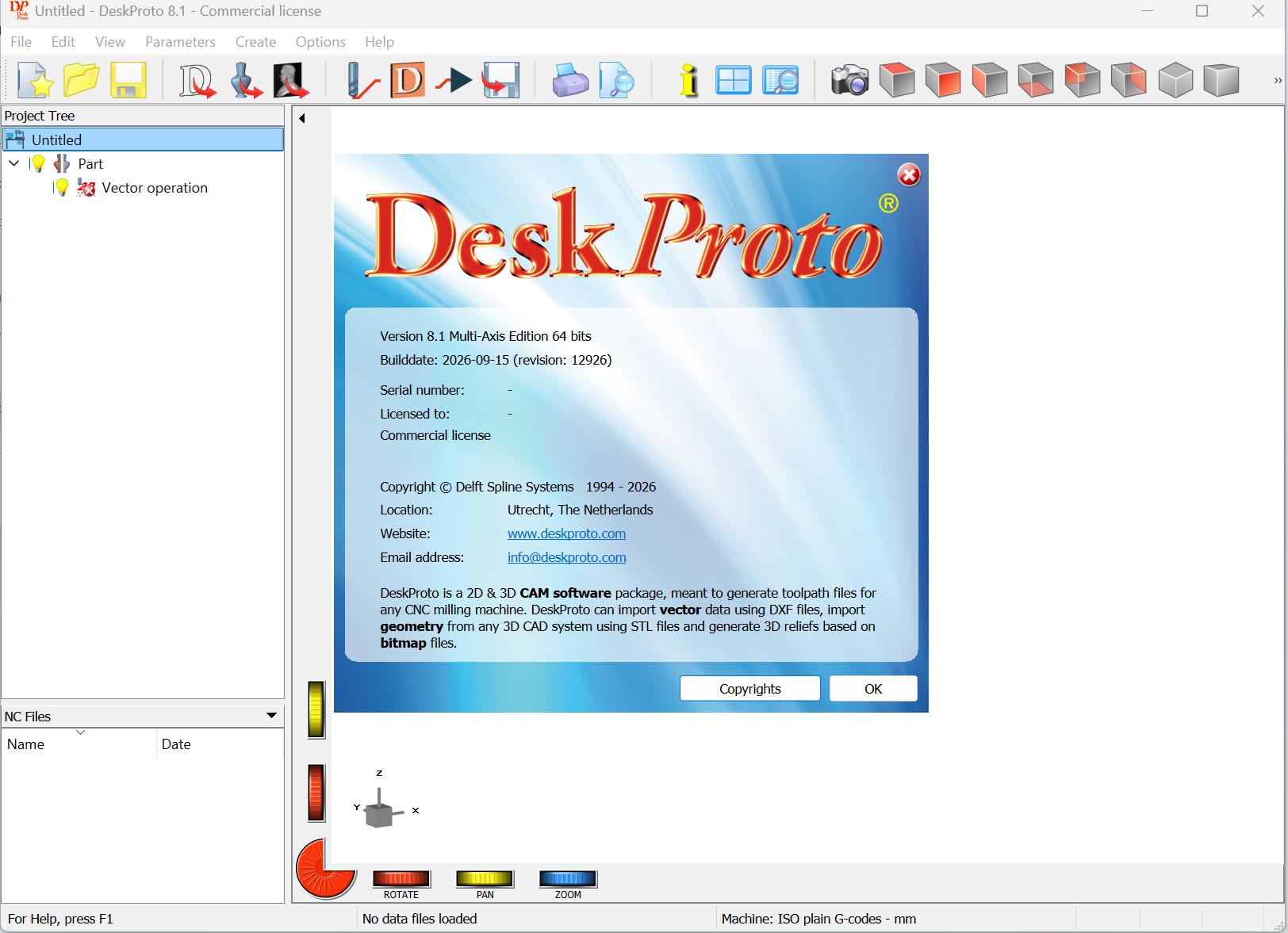
Description
DeskProto Software 2026: Features, CNC Machining Capabilities, Applications, and Performance
DeskProto is a powerful and accessible CAM software solution designed to transform digital 2D and 3D designs into practical CNC machining operations. Whether you are a product designer, engineering professional, model maker, manufacturer, or CNC enthusiast, DeskProto provides tools for converting digital models into machining instructions for CNC milling machines. Its support for 2D, 3D, and multi-axis machining makes it a useful solution for producing prototypes, custom components, artistic models, and precision parts.
What makes DeskProto particularly interesting is its focus on simplifying CNC programming without sacrificing the flexibility required for detailed manufacturing projects. Users can import digital geometry, configure machining strategies, select cutting tools, generate toolpaths, and prepare machine-ready output. Instead of manually developing complex machining instructions, users can work through a more structured CAM workflow.
For professionals and workshops looking for practical CNC machining software, DeskProto offers a combination of accessibility, flexibility, and manufacturing-oriented functionality.
1. Introduction
Computer-Aided Manufacturing (CAM) software plays an essential role in modern manufacturing. It connects digital product designs with physical production by converting CAD geometry into toolpaths that CNC machines can follow.
DeskProto is a CAM application developed for CNC milling and machining applications. It helps users prepare machining operations from digital models and generate the instructions required to manufacture physical objects.
The software is particularly relevant to small manufacturing businesses, educational institutions, engineering workshops, product development teams, and individuals working with CNC equipment.
One of the challenges in CNC machining is translating a digital design into an efficient machining process. A model might look perfect on a computer screen, but producing it requires careful consideration of cutting tools, material removal, machining directions, and tool movements.
DeskProto addresses these requirements through a workflow that allows users to configure machining operations based on the geometry and manufacturing objectives of their projects.
Whether the goal is creating a simple engraved component or machining a detailed three-dimensional model, the software provides a practical environment for preparing CNC operations.
2. Key Features of DeskProto
DeskProto includes several capabilities that make it suitable for different CNC machining requirements.
2.1 2D and 2.5D Machining
DeskProto supports machining workflows involving two-dimensional geometry and operations with controlled depth.
These capabilities are useful for projects such as:
- Engraving text and decorative patterns.
- Cutting profiles and outlines.
- Producing flat components.
- Creating pockets and recessed areas.
- Manufacturing signs and panels.
For workshops producing relatively simple components, these machining options provide an efficient starting point.
2.2 3D CNC Machining
One of the major strengths of DeskProto is its ability to generate toolpaths for three-dimensional models.
Users can prepare machining operations for objects containing curved surfaces, complex contours, organic shapes, and detailed geometry.
This functionality is especially useful for:
- Product prototypes.
- Architectural models.
- Sculptures and decorative objects.
- Custom industrial components.
- Moulds and patterns.
The ability to work with three-dimensional geometry makes DeskProto useful beyond traditional flat-profile CNC cutting.
2.3 Multi-Axis Machining
For more advanced manufacturing requirements, DeskProto provides multi-axis machining capabilities, depending on the selected edition and machine configuration.
Multi-axis machining allows users to work with complex geometries that cannot always be manufactured efficiently using conventional three-axis operations.
This can be particularly beneficial when producing components with multiple angled surfaces, curved details, and intricate shapes.
DeskProto’s multi-axis capabilities make it relevant to advanced prototyping, model manufacturing, and specialized CNC production environments.
2.4 CAD File Import
A CAM workflow usually begins with an existing digital design. DeskProto supports importing geometry from supported file formats, allowing users to prepare machining projects from externally created models.
Depending on the file format and edition, users can work with common geometry types such as STL and DXF.
This makes the software useful for professionals who create their designs using CAD applications and subsequently transfer them into a dedicated CAM environment.
2.5 Toolpath Generation
Toolpath generation is one of the most important functions in any CAM application.
DeskProto allows users to configure machining operations and calculate the movements that a CNC cutting tool must perform.
These operations help determine how material will be removed from a workpiece.
Proper toolpath planning is important for:
- Reducing unnecessary machine movements.
- Improving machining consistency.
- Producing accurate surface details.
- Managing cutting operations.
- Preparing models for physical production.
2.6 CNC Machine Compatibility
DeskProto generates machine-specific CNC output through postprocessors.
Postprocessors translate the calculated machining operations into instructions suitable for supported CNC controllers.
This is important because different CNC machines may use different control languages, commands, and machine configurations.
Before starting a production project, users should verify that their machine and controller are supported by the appropriate postprocessor.
2.7 Machining Simulation and Visualization
Visualizing machining operations before actual production can help users identify potential problems.
DeskProto provides machining visualization capabilities that help users understand how the calculated toolpaths interact with the model.
This makes it easier to review machining strategies before committing materials and machine time.
For workshops producing expensive prototypes or detailed components, reviewing the machining process beforehand can be especially valuable.
3. Practical Use Cases of DeskProto
DeskProto is suitable for several industries and manufacturing environments. Its practical value depends on the type of CNC equipment, materials, and production requirements.
Product Design and Prototyping
Product designers frequently need physical prototypes to evaluate dimensions, appearance, and functionality.
DeskProto helps convert digital product models into CNC machining operations, allowing designers to manufacture prototype components from suitable materials.
For example, a designer developing a custom enclosure can prepare the digital geometry, configure machining operations, and produce a physical sample for inspection.
This approach helps identify design issues before moving toward larger production quantities.
Engineering and Manufacturing Workshops
Small engineering workshops often handle different types of machining projects.
Some jobs involve simple profiles, while others require detailed three-dimensional components.
DeskProto offers a CAM environment for preparing these projects without necessarily requiring an extensive industrial manufacturing software setup.
It can be useful for custom parts, replacement components, and small production batches.
Architectural Model Making
Architectural model makers frequently work with complex shapes, terrain models, building components, and decorative details.
DeskProto can help transform suitable digital models into CNC machining operations.
This is particularly useful when creating physical representations of architectural concepts or landscape designs.
Educational Institutions
Engineering schools, technical colleges, and manufacturing training centers can use CAM software to introduce students to CNC programming concepts.
DeskProto provides an opportunity to understand how digital geometry becomes physical output.
Students can explore toolpath planning, cutting strategies, machine movements, and the relationship between CAD and CAM workflows.
Artistic and Custom Manufacturing
Artists and independent makers often use CNC machines to produce sculptures, decorative panels, relief models, and customized objects.
DeskProto’s three-dimensional machining capabilities can support these creative manufacturing applications.
For example, a digital sculpture can be prepared for CNC machining, allowing the maker to produce a physical version using an appropriate material and machine setup.
4. Performance Analysis
DeskProto’s performance should be evaluated according to the complexity of the model, selected machining strategy, computer hardware, and CNC machine configuration.
Workflow Efficiency
The software provides a structured approach to preparing machining operations.
Instead of manually programming every cutting movement, users can define machining parameters and generate toolpaths from imported geometry.
This can reduce repetitive programming work and make common machining tasks more manageable.
Handling Complex Geometry
Three-dimensional machining is important for producing components with curved surfaces and intricate details.
DeskProto’s support for 3D machining makes it suitable for projects that extend beyond simple profile cutting.
However, complex geometry may require additional preparation, suitable machining strategies, and careful selection of cutting tools.
Learning Experience
For new CNC users, understanding CAM software can initially be challenging.
Concepts such as tool diameter, cutting depth, machining direction, feed rate, and spindle speed require practical knowledge.
DeskProto provides a dedicated environment for working with these parameters.
Users with previous CAD or CNC experience may find it easier to understand the workflow, while beginners should allow time for learning and testing.
Production Quality
Machining quality depends on several factors, including model accuracy, cutting tool selection, material properties, machine rigidity, and machining parameters.
DeskProto helps users prepare the digital machining process, but the final physical result also depends heavily on machine setup and operator experience.
For the best results, users should test machining strategies on appropriate sample materials before beginning important production work.
Overall Performance
DeskProto is particularly attractive for users who need dedicated CAM functionality for small-to-medium-scale machining projects, model production, and prototyping.
Its practical value comes from connecting digital designs with CNC manufacturing through a manageable machining workflow.
5. Pros and Cons of DeskProto
Every CAM application has advantages and limitations. Understanding both sides helps users determine whether DeskProto matches their manufacturing requirements.
Pros
- Supports 2D, 2.5D, and 3D machining workflows.
- Provides multi-axis machining capabilities in applicable editions.
- Helps convert digital geometry into CNC toolpaths.
- Supports commonly used design geometry formats.
- Offers machining visualization for reviewing operations.
- Suitable for prototyping and custom manufacturing.
- Useful for educational CNC applications.
- Provides postprocessor-based CNC output.
- Supports creative, engineering, and industrial model-making projects.
- Offers different editions for different user requirements.
Cons
- Beginners may need time to understand CAM terminology and machining parameters.
- Advanced machining workflows require appropriate CNC equipment and experience.
- Machine compatibility depends on suitable postprocessor support.
- Complex models may require additional preparation before machining.
- Actual machining quality depends on hardware, materials, and operator settings.
- Users working with highly specialized industrial manufacturing workflows may require additional CAM capabilities.
6. Pricing and Plans
DeskProto offers different editions designed to accommodate different levels of CNC machining requirements.
Its licensing structure has historically included options such as Free, Entry, Expert, and Multi-Axis editions, although available versions, features, and commercial terms should be checked against the current release.
The editions are intended to serve different user categories.
Free Edition: A starting point for users interested in exploring DeskProto and understanding basic CNC machining workflows.
Entry Edition: Intended for users who need more practical CAM functionality for relatively straightforward machining projects.
Expert Edition: Designed for more demanding machining requirements and users who need additional capabilities.
Multi-Axis Edition: Intended for advanced CNC workflows involving multi-axis machining operations.
The most suitable edition depends on the required machining dimensions, supported operations, and intended CNC equipment.
Before purchasing a license, users should review the latest edition comparison, licensing conditions, available postprocessors, and system requirements.
For businesses, choosing an edition based on actual production requirements is generally more practical than purchasing advanced capabilities that may not be needed.
7. Who Should Use DeskProto?
DeskProto can be a suitable option for several types of users.
CNC Operators: Professionals who need to prepare machining operations from digital models.
Product Designers: Designers who want to transform CAD concepts into physical prototypes.
Mechanical Engineers: Engineers involved in manufacturing custom components and mechanical models.
Architectural Model Makers: Professionals producing physical building models and detailed design representations.
Educational Institutions: Teachers and students learning CNC machining and CAM programming.
Independent Makers: Individuals working on customized products, sculptures, and creative manufacturing projects.
However, users should evaluate the software against their specific machine requirements before making a licensing decision.
DeskProto Commercial License Developer
DeskProto 8.1 Commercial License Download
8. Final Verdict
DeskProto 2027 is a practical CAM software solution for users who want to transform digital designs into physical CNC-machined objects. Its support for 2D, 2.5D, and 3D machining, together with applicable multi-axis capabilities, makes it useful across product development, engineering, education, model making, and custom manufacturing.
Although beginners may need time to understand machining parameters and advanced operations, the software provides a useful environment for developing practical CNC manufacturing skills.
For small workshops, independent manufacturers, engineering professionals, and educational users, DeskProto deserves consideration as a dedicated CNC CAM solution.


Reviews
There are no reviews yet.