Description
PlayIt Live 2.17 Review: Professional Radio Automation Software for Broadcasters and Internet Radio Stations
PlayIt Live 2.17 is a powerful radio automation and live-assist broadcasting software designed for radio stations, internet broadcasters, DJs, and audio professionals who need reliable playlist management and on-air control. With a balance of automation and manual operation, PlayIt Live offers the flexibility required by both small online stations and larger professional broadcasting environments.
Whether you are managing a community radio station, launching an internet radio channel, or operating a commercial broadcasting setup, PlayIt Live 2.17 provides the tools necessary to schedule music, automate playback, manage advertisements, and deliver a professional listening experience. Its intuitive interface, dependable performance, and extensive customization options have made it a popular choice among broadcasters worldwide.
In this comprehensive review, we’ll explore the features, benefits, real-world applications, performance, advantages, and limitations of PlayIt Live 2.17 to help you determine whether it’s the right radio automation solution for your broadcasting needs.
Introduction to PlayIt Live 2.17
Running a radio station involves much more than simply playing songs. Broadcasters need to manage playlists, schedule advertisements, handle live shows, maintain consistent audio output, and ensure smooth transitions between content.
PlayIt Live 2.17 addresses these challenges by providing a complete radio automation platform. The software allows users to automate music playback, schedule programming, create playlists, and operate live broadcasts from a single interface.
Unlike many complex enterprise broadcasting systems that require extensive training, PlayIt Live focuses on usability while still delivering professional-grade functionality. This combination makes it suitable for:
- Internet radio stations
- Community broadcasters
- Educational institutions
- Commercial radio stations
- Podcast networks
- Event broadcasters
- Professional DJs
- Corporate audio streaming services
The software supports both fully automated broadcasting and live-assist modes, giving users complete control over how their content is delivered.
Key Features of PlayIt Live 2.17
Multi-Player Audio Management
One of the standout features of PlayIt Live 2.17 is its advanced multi-player system.
Users can:
- Load multiple audio tracks simultaneously
- Preview tracks before broadcasting
- Control playback independently
- Create seamless transitions
- Manage live and automated content efficiently
This functionality is especially useful during live broadcasts where quick access to multiple audio sources is essential.
Intelligent Playlist Scheduling
PlayIt Live offers flexible playlist creation and scheduling capabilities.
Key scheduling features include:
- Hourly music scheduling
- Automated playlist generation
- Rotational content management
- Time-based programming
- Scheduled advertisements
- Recurring broadcast events
Broadcasters can create structured programming schedules that run automatically with minimal supervision.
Live Assist Mode
Many radio stations prefer a combination of automation and human interaction.
The Live Assist mode allows broadcasters to:
- Manually control playback
- Trigger content instantly
- Adjust programming in real time
- Interact with listeners
- Handle breaking news or special events
This hybrid approach gives stations the reliability of automation while maintaining the personality of live radio.
Advertisement and Jingle Management
Revenue generation is critical for commercial radio operations.
PlayIt Live helps manage:
- Commercial breaks
- Sponsorship messages
- Station identifications
- Promotional announcements
- Audio advertisements
Scheduled insertion ensures advertisements are played accurately and consistently throughout the broadcast day.
Audio Track Management
Managing large audio libraries becomes significantly easier with PlayIt Live.
Features include:
- Audio categorization
- Metadata management
- Search functionality
- Artist separation rules
- Track rotation controls
- Content organization tools
These capabilities help maintain playlist variety and improve listener engagement.
Cart Wall Functionality
The integrated cart wall enables instant playback of frequently used audio elements.
Examples include:
- Sound effects
- Station IDs
- Advertisements
- Jingles
- News intros
- Emergency announcements
This feature is particularly valuable for live presenters who need rapid access to audio assets.
Voice Tracking Support
Voice tracking allows presenters to pre-record segments that can be inserted into automated broadcasts.
Benefits include:
- Reduced staffing requirements
- Consistent programming
- Efficient content production
- Improved scheduling flexibility
Many internet radio stations rely heavily on voice tracking to maintain professional broadcasts around the clock.
Audio Processing Integration
PlayIt Live supports integration with audio processing tools to improve broadcast quality.
Advantages include:
- Consistent volume levels
- Enhanced sound quality
- Professional audio output
- Improved listener experience
Maintaining high-quality audio is essential for listener retention and station credibility.
Practical Use Cases of PlayIt Live 2.17
Internet Radio Broadcasting
A growing number of broadcasters are launching online radio stations.
PlayIt Live provides:
- Automated playlist management
- Continuous broadcasting
- Advertisement scheduling
- Presenter support
- Professional programming tools
This makes it an ideal platform for internet radio startups.
Community Radio Stations
Community stations often operate with limited budgets and staff.
PlayIt Live helps by:
- Reducing manual workload
- Automating overnight programming
- Managing local advertisements
- Simplifying station operations
Volunteers can learn the system quickly, reducing training requirements.
Educational Institutions
Schools, colleges, and universities frequently operate student-run radio stations.
Students can use PlayIt Live to learn:
- Radio programming
- Broadcast scheduling
- Audio management
- Live presentation techniques
- Station operations
The software serves as both a broadcasting solution and an educational tool.
Corporate Broadcasting
Many organizations use internal audio streams for communication and training.
PlayIt Live can manage:
- Corporate announcements
- Employee information channels
- Training broadcasts
- Event coverage
Its automation capabilities make ongoing operation straightforward.
Event and Festival Broadcasting
Temporary event stations often require reliable broadcasting software.
PlayIt Live supports:
- Live event coverage
- Sponsor messages
- Music programming
- Public announcements
- Emergency communications
Its flexible deployment makes it suitable for short-term broadcasting projects.
User Experience and Ease of Use
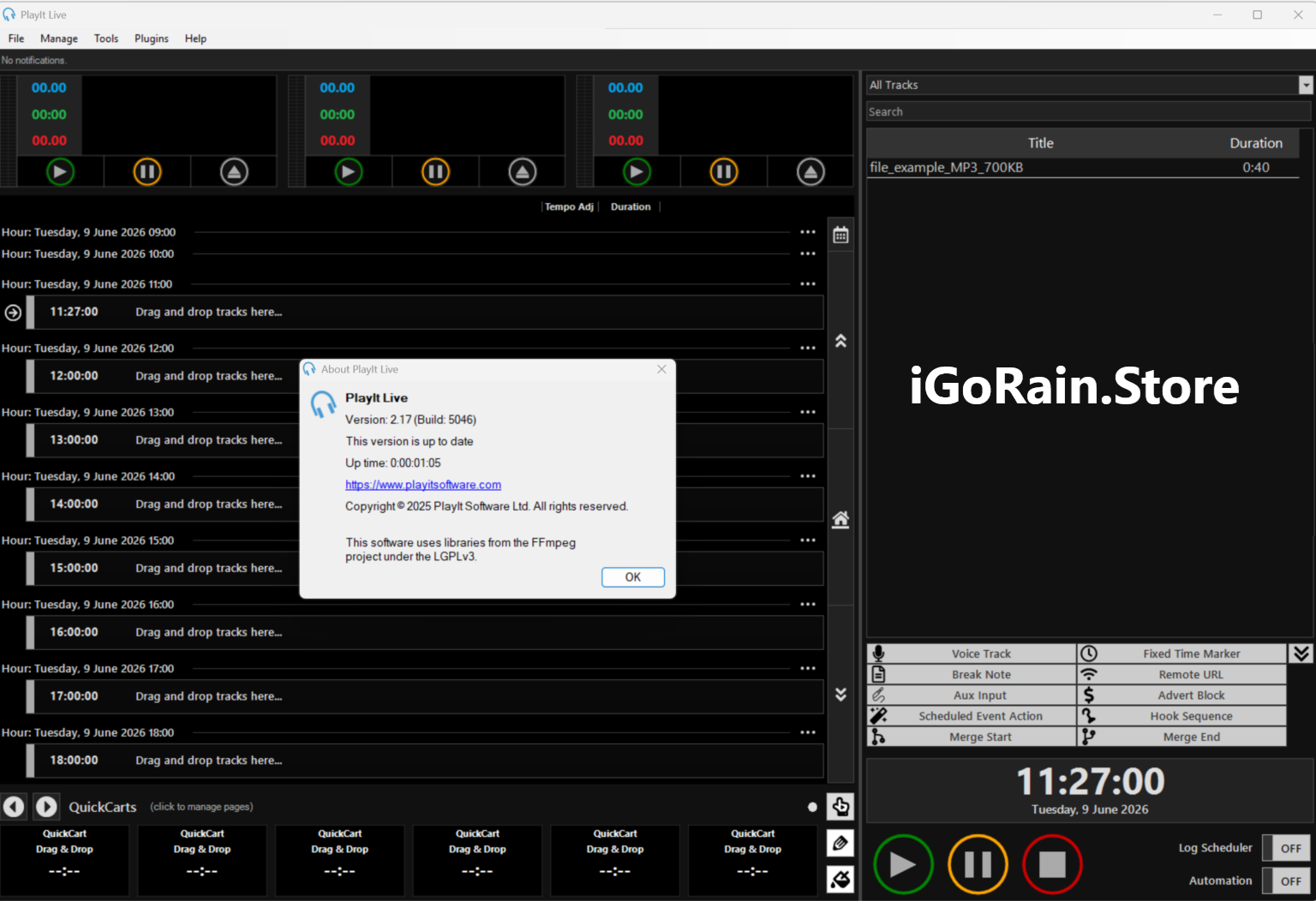
One reason many broadcasters choose PlayIt Live is its approachable user interface.
Upon launching the software, users encounter a clean workspace that provides quick access to:
- Playlist controls
- Track scheduling
- Audio players
- Cart wall functions
- Live-assist tools
Even users with limited broadcasting experience can become productive relatively quickly.
Professional broadcasters appreciate the logical workflow and customizable interface, which helps streamline daily operations.
The software strikes an effective balance between simplicity and advanced functionality.
Performance Analysis
Reliability
Reliability is critical in broadcasting.
PlayIt Live 2.17 performs exceptionally well during long-term operation and is capable of running continuously for extended periods.
Many users report stable performance during:
- 24/7 broadcasts
- Automated programming
- Live shows
- Advertisement scheduling
- Voice-tracked content delivery
This reliability is one of the software’s strongest selling points.
Resource Efficiency
Compared with some enterprise-level radio automation platforms, PlayIt Live remains relatively lightweight.
Benefits include:
- Lower hardware requirements
- Faster installation
- Efficient resource usage
- Smooth operation on standard workstations
Smaller stations can achieve professional results without investing heavily in expensive infrastructure.
Automation Accuracy
Automation performance directly affects listener experience.
PlayIt Live excels at:
- Scheduled playback
- Playlist execution
- Advertisement timing
- Content rotation
- Event triggering
Accurate automation minimizes dead air and improves overall broadcast professionalism.
Scalability
The software can support a wide range of broadcasting environments.
It works well for:
- Hobby broadcasters
- Small internet stations
- Community radio operations
- Growing commercial broadcasters
As station requirements expand, PlayIt Live can continue supporting more sophisticated workflows.
Pros and Cons
Pros
- Easy-to-use interface
- Powerful radio automation features
- Reliable long-term performance
- Excellent playlist scheduling capabilities
- Supports live-assist broadcasting
- Voice tracking functionality
- Flexible advertisement management
- Efficient audio library organization
- Suitable for both beginners and professionals
- Cost-effective compared to many enterprise alternatives
Cons
- Advanced enterprise broadcasters may require additional integrations
- Initial scheduling configuration can take time
- Some advanced broadcasting workflows may involve a learning curve
- Feature-rich environment may feel overwhelming for complete beginners initially
Pricing and Plans
PlayIt Live has historically been available with both free and premium feature options, making it attractive to broadcasters with varying budgets.
Pricing structures may vary depending on:
- Licensing requirements
- Additional modules
- Professional broadcasting needs
- Commercial usage scenarios
Organizations should review the latest licensing information and available editions to determine the best fit for their operational requirements.
The availability of a lower-cost entry point makes PlayIt Live especially appealing for startup radio stations and independent broadcasters.
Why Broadcasters Choose PlayIt Live 2.17
The radio automation market includes many solutions, but PlayIt Live continues to stand out because it focuses on practical broadcasting needs.
Users consistently highlight:
- Ease of deployment
- Stable operation
- Flexible automation
- Professional broadcast control
- Affordable implementation
Instead of overwhelming users with unnecessary complexity, the software delivers features that directly improve day-to-day broadcasting operations.
For many stations, this translates into reduced workload, increased consistency, and better listener experiences.
Final Verdict
PlayIt Live 2.17 is a highly capable radio automation software solution that successfully combines professional broadcasting tools with user-friendly operation. Whether you’re managing an internet radio station, community broadcaster, educational radio program, or commercial audio channel, the software provides the scheduling, automation, and live-assist functionality necessary to deliver high-quality broadcasts.
Its strengths lie in reliable automation, playlist management, advertisement scheduling, voice tracking, and operational flexibility. The software performs consistently under real-world broadcasting conditions and offers excellent value for both new and experienced broadcasters.
For organizations seeking dependable radio automation software without the complexity and cost of enterprise-level systems, PlayIt Live 2.17 is a compelling choice.
If you’re looking to streamline broadcasting operations, improve programming consistency, and deliver a more professional listening experience, PlayIt Live 2.17 is well worth exploring for your radio station or audio broadcasting project.



Reviews
There are no reviews yet.