Description
Mimiq Pro: A Practical Review of Shared Storage and Avid Media Collaboration Software
Summary
For professional video editors, post-production teams, and media facilities, managing shared storage can become complicated quickly. Multiple editors need access to the same projects, media files, bins, and folders, while the workflow still needs to remain stable and predictable. This is where Mimiq Pro stands out as a specialized solution for collaborative Avid Media Composer environments.
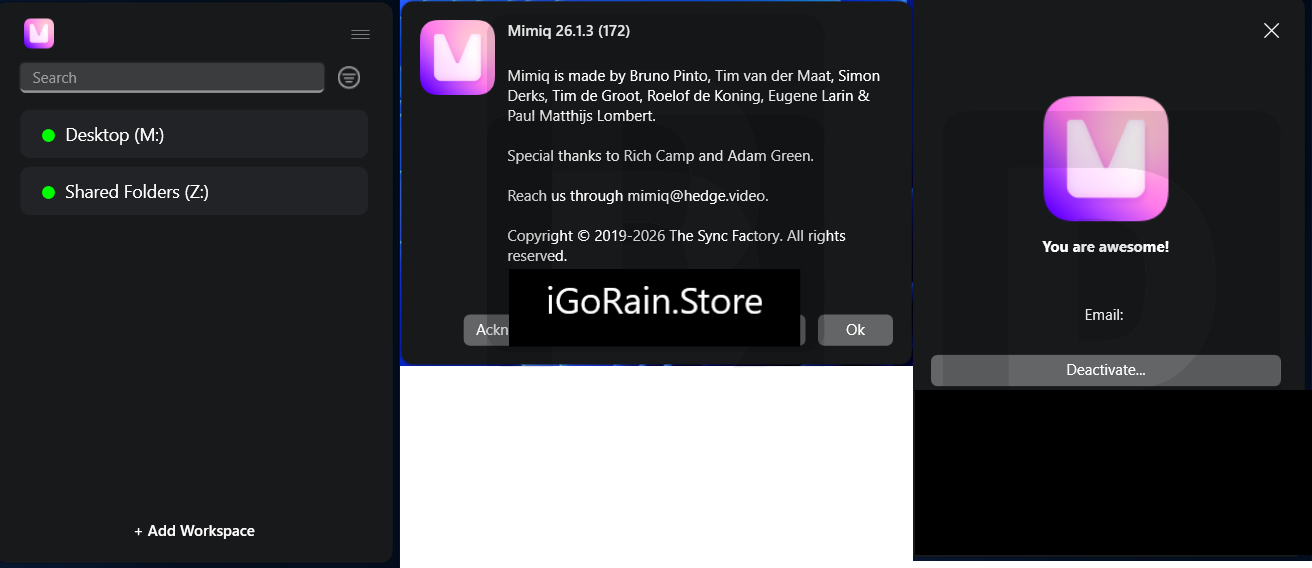
Mimiq Pro is designed to make shared storage behave more like a collaborative editing environment. Its Workspace system allows teams to create shared folders and storage locations that can be accessed consistently across machines. It also provides tools for managing shared Workspaces, searching and filtering storage, and supporting collaborative Avid workflows without requiring every workstation to be manually configured.
For editors working with NAS, SAN, DAS, or other shared storage infrastructures, Mimiq Pro can simplify the day-to-day process of connecting users to the right media and project locations. Its support for multiple storage environments and its focus on Avid workflows make it particularly interesting for professional post-production facilities.
Introduction
Imagine a post-production facility where five editors are working on the same project.
One editor is cutting the main sequence. Another is working on interviews. A third is preparing graphics, while someone else is reviewing older footage. Everyone needs access to the same storage, but manually configuring every workstation can quickly become frustrating.
This is the type of situation where Mimiq Pro becomes useful.
Rather than treating shared storage as simply a collection of network drives, Mimiq Pro introduces a more organized approach through Workspaces. According to its product information, a Workspace can be configured once and then shared with other users, reducing the need for repetitive per-machine configuration.
Mimiq Pro is especially relevant to facilities using Avid Media Composer, where collaborative access to bins, media, and project resources is an important part of the editing workflow.
The software is not designed to replace your storage hardware. Instead, it works as a layer that helps editors and facilities use existing storage infrastructure more efficiently.
What Is Mimiq Pro?
Mimiq Pro is professional media-storage and collaboration software focused heavily on post-production workflows.
Its main purpose is to help editors work with shared storage while maintaining a familiar editing environment. The software supports Workspaces that can point toward folders or shares on storage systems, allowing teams to organize and expose the resources they need.
One of its biggest advantages is that it can work with different types of storage infrastructure. Mimiq has supported environments involving NAS, SAN, DAS, SMB, NFS, AFP, and LucidLink, depending on the workflow and configuration.
Mimiq Pro has also been positioned for facilities using systems such as Quantum StorNext. Its Workspaces can allow Avid Media Composer projects to operate within shared storage environments without requiring a facility to completely redesign its infrastructure.
Key Features of Mimiq Pro
1. Shared Workspaces
Workspaces are one of the central features of Mimiq Pro.
Instead of manually configuring storage paths on every computer, an administrator can create a Workspace and share it with the team. Users can then work with the same defined storage structure.
This can be particularly useful in facilities where editors frequently join different projects.
2. Workspace Management
Mimiq Pro provides tools for managing shared storage locations and organizing how those locations are presented to users.
A practical benefit is consistency. If everyone needs access to the same project storage, the administrator can establish a common Workspace rather than repeatedly configuring individual machines.
3. Search, Sort, and Filter
Large post-production storage environments can contain thousands of files and folders.
Mimiq Pro includes search, sorting, and filtering capabilities that help users find the information they need across Workspaces. The software also provides Workspace Discovery features for locating Avid MediaFiles folders and identifying legacy SANFusion bundles.
For editors dealing with large archives, this can make storage management less time-consuming.
4. Avid-Focused Collaboration
A major reason professional users may consider Mimiq Pro is its relationship with the Avid ecosystem.
The software is designed to support workflows where multiple editors need access to shared Avid projects and media resources. Its development has also included functionality intended to bring shared-storage workflows closer to the capabilities users expect from modern Avid environments.
5. Flexible Storage Infrastructure
One of Mimiq Pro’s practical strengths is that it does not force every facility into a single storage architecture.
Depending on the deployment, teams can use different storage technologies and infrastructure. This is valuable for organizations that already have expensive storage systems and simply need a better collaboration layer.
6. Cross-Platform Licensing
Mimiq Pro has also been offered as a cross-platform solution for Windows and macOS environments. Documentation around its StorNext integration describes cross-platform licenses and options for managing activations remotely.
This makes it easier to consider in mixed post-production environments.
Practical Use Cases
Professional Video Editing Facilities
A multi-editor production house can use Mimiq Pro to provide consistent access to shared project storage.
Editors can work on different parts of a production while maintaining access to centralized media resources.
Film and Television Post-Production
Large productions generate enormous amounts of footage.
With organized Workspaces, editors can work with project-specific storage without constantly searching through unrelated folders. This can make daily media management more structured.
Advertising Agencies
Advertising workflows often involve multiple versions of a project, multiple editors, graphics artists, and frequent revisions.
Mimiq Pro can help teams maintain shared access to the storage resources associated with different campaigns.
Remote or Distributed Teams
Modern post-production is increasingly distributed.
When properly configured, shared-storage tools can help teams maintain a consistent workflow even when editors are not sitting beside one another. Mimiq Pro’s support for modern storage technologies makes it worth considering for facilities exploring flexible collaborative workflows.
Archive and Legacy Storage
Another useful scenario is working with older storage systems.
Mimiq Pro has been used in workflows involving legacy storage environments, including StorNext. This can allow facilities to extend the usefulness of existing infrastructure rather than immediately replacing everything.
Performance Analysis
The biggest performance benefit of Mimiq Pro is not necessarily raw file-transfer speed. Instead, its value comes from workflow efficiency and storage organization.
For a single editor working on a local drive, the difference may not be dramatic. But in a professional facility with several editors and a large shared storage environment, small improvements can add up.
Consider a typical working day.
An editor needs to locate a project folder, connect to the correct storage, find the required Avid media, and begin editing. If those steps are manually repeated across multiple machines, administrators and editors lose time.
Mimiq Pro attempts to reduce this friction through centralized Workspace management and shared configurations.
Its search and filtering functionality can also become increasingly useful as storage grows. Instead of treating a large storage system as one enormous directory structure, users can work through more organized Workspaces.
Another advantage is flexibility. Facilities do not necessarily need to replace their existing storage architecture simply to introduce improved Avid collaboration. Mimiq Pro has been designed to operate with different storage environments, which can make it a practical option for established facilities.
However, actual performance will depend heavily on the underlying storage hardware, network infrastructure, file system, storage configuration, number of simultaneous users, and Avid workflow. Mimiq Pro should therefore be viewed as a workflow and collaboration layer rather than a solution that automatically makes slow storage fast.
Pros and Cons
Pros
- Designed with professional post-production workflows in mind
- Strong focus on Avid Media Composer environments
- Shared Workspace management
- Search, sort, and filtering capabilities
- Supports a variety of shared-storage environments
- Can help reduce repetitive workstation configuration
- Useful for multi-editor facilities
- Suitable for Windows and macOS workflows
- Can extend the usefulness of existing storage infrastructure
- Helpful for facilities managing large media libraries
Cons
- Primarily targeted at professional media and post-production users
- Can be unnecessary for simple single-editor workflows
- Performance still depends on the underlying storage and network
- Initial configuration may require technical knowledge
- Professional facilities may need to evaluate compatibility carefully before deployment
- Pricing may be higher than basic storage-management utilities
Pricing & Plans
Mimiq Pro has historically been positioned as a professional product rather than a basic consumer application.
Pricing information has varied by version, licensing model, and distribution arrangement. Earlier published pricing listed Mimiq Pro at a higher professional software price point, while subsequent product developments have included perpetual licensing options with updates and support for specific integrations.
Because professional software pricing and licensing terms can change, buyers should verify the current Mimiq Pro licensing model, supported platforms, maintenance terms, and available storage integrations before purchasing.
For a professional editing facility, the more important question is not simply the license price. The real calculation should include administrator time, editor productivity, storage utilization, and the cost of changing or replacing existing infrastructure.
Who Should Use Mimiq Pro?
Mimiq Pro makes the most sense for users who have a genuine shared-storage requirement.
It is particularly suitable for:
- Professional video editing companies
- Avid Media Composer users
- Film and television post-production teams
- Broadcast facilities
- Advertising production houses
- Media archives
- Multi-editor environments
- Facilities using NAS, SAN, DAS, or specialized shared storage
- Teams looking to improve storage organization without replacing their entire infrastructure
For someone editing occasional videos on a personal computer, Mimiq Pro would probably be excessive. Its strengths become much more apparent when multiple users, large media libraries, and shared Avid workflows are involved.
Final Verdict
Mimiq Pro is a specialized solution for a specialized problem: making shared storage easier to manage for professional post-production workflows.
Its strongest feature is the way it approaches collaboration. Rather than forcing editors to repeatedly manage storage connections and folder structures themselves, Mimiq Pro provides a Workspace-based approach designed around the realities of professional media production.
For Avid Media Composer facilities, this can be particularly valuable. Shared storage, collaborative bins, large media libraries, and multiple editing systems can quickly become difficult to manage without the right infrastructure.
The software is not a magic solution for every storage problem. Your network, storage hardware, operating systems, and editing applications still matter. But when those components are already in place, Mimiq Pro can provide a practical management layer that makes the overall environment easier to operate.
For professional editors and post-production facilities looking for Mimiq Pro 2027 shared storage software, Avid Media Composer collaboration tools, and a more organized way to manage media Workspaces, it is certainly worth evaluating.

Reviews
There are no reviews yet.