Description
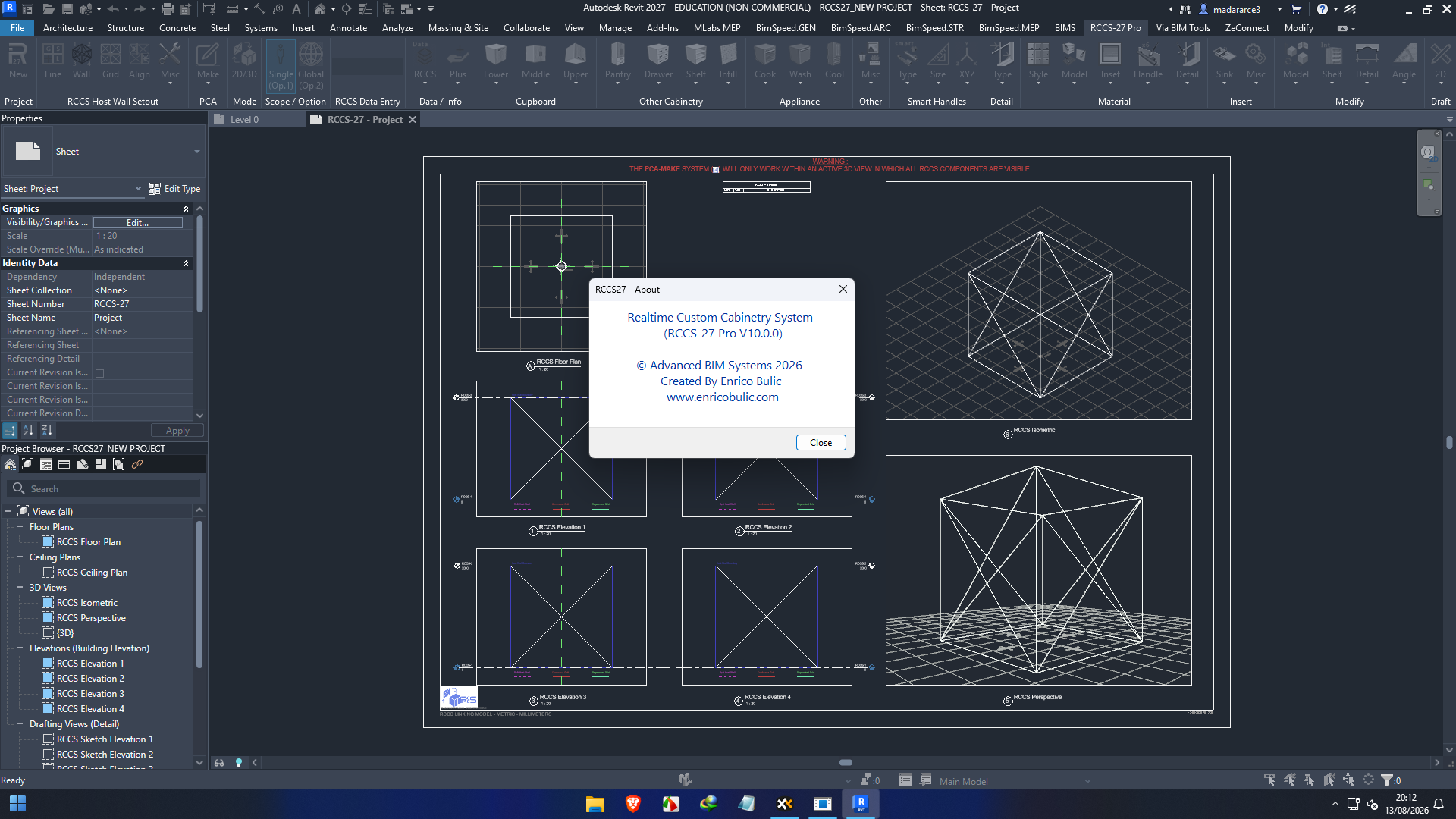
Realtime Custom Cabinetry System Pro RCCS 2027: A Practical Guide for Modern Cabinet Design and Manufacturing
Summary
Realtime Custom Cabinetry System Pro RCCS is designed for professionals who need a more organized and efficient way to handle custom cabinetry projects from design through production. Cabinet businesses often deal with complicated requirements: different cabinet sizes, materials, hardware, finishes, construction methods, and customer-specific modifications. Managing all of these details manually can quickly become time-consuming and can increase the risk of costly mistakes.
RCCS focuses on bringing cabinetry design and production-related tasks into a more structured digital workflow. For cabinet designers, manufacturers, millwork professionals, and custom furniture businesses, the software can help make repetitive work more manageable while providing a practical environment for developing customized cabinetry projects.
The real value of a cabinetry system is not simply how attractive the interface looks. It is how effectively it handles everyday work. When a customer changes cabinet dimensions, requests different materials, or wants a modified configuration, a professional system should help users adapt without rebuilding everything from scratch. This is where a specialized solution such as Realtime Custom Cabinetry System Pro RCCS can become particularly useful.
Introduction
Custom cabinetry is one of those industries where small details can have a major impact on the final result. A few inches in cabinet dimensions, an incorrect material selection, or a missing hardware specification can create problems during manufacturing or installation.
Traditional methods often involve a combination of sketches, spreadsheets, manual calculations, catalogs, and separate production documents. While these methods can work for small jobs, they become difficult to manage as project volume increases.
Realtime Custom Cabinetry System Pro RCCS is aimed at professionals who want a more structured approach to cabinetry design and project preparation. Instead of treating every cabinet as an isolated task, users can work within a dedicated cabinetry-oriented workflow.
For a small custom cabinet shop, this can mean spending less time repeating routine operations. For a larger business, it can help establish greater consistency between design and production teams.
Key Features of Realtime Custom Cabinetry System Pro RCCS
1. Custom Cabinet Design
The primary requirement of cabinetry software is flexibility. Every project is different, and customers rarely want exactly the same cabinet configuration.
RCCS is intended to support custom cabinetry workflows where dimensions, configurations, materials, and design requirements can be adjusted according to project needs.
This makes it suitable for applications such as:
- Kitchen cabinetry
- Bathroom vanities
- Built-in storage
- Residential millwork
- Commercial cabinetry
- Custom furniture components
- Specialized storage systems
The ability to work with customized cabinet configurations is particularly important for businesses that do not rely exclusively on standardized cabinet packages.
2. Streamlined Design Workflow
A major advantage of specialized cabinetry software is workflow organization.
Instead of repeatedly calculating dimensions and manually documenting every cabinet component, designers can work through a more centralized process. This can make it easier to move from an initial customer concept toward a more detailed cabinet design.
For experienced users, a streamlined workflow can reduce repetitive tasks and allow more attention to be placed on design decisions and customer requirements.
3. Cabinet Configuration and Customization
Custom cabinetry requires more than simply changing cabinet width and height. Designers may need to consider doors, drawers, shelves, panels, construction details, materials, and other project-specific requirements.
A specialized cabinetry system provides a more appropriate environment for handling these variables than generic drawing software.
This can be especially helpful when a project contains dozens or even hundreds of individual cabinet components.
4. Improved Project Consistency
Consistency is one of the less obvious benefits of cabinetry software.
When a company relies heavily on manual processes, two designers may approach the same type of cabinet differently. This can create inconsistencies in drawings, specifications, or production information.
A standardized digital workflow can help businesses establish repeatable methods for common cabinetry tasks.
For growing cabinet shops, this can be valuable because new employees can learn an established process instead of developing their own methods from scratch.
5. Support for Custom Manufacturing Workflows
Designing a cabinet is only one part of the process. The design eventually has to become a physical product.
This is why cabinetry software is most useful when it fits naturally into the wider manufacturing workflow. Designers need to think about how their digital decisions will translate into materials, components, construction, and fabrication.
RCCS is therefore best viewed as a specialized professional solution rather than simply another general-purpose drawing application.
Practical Use Cases
Residential Kitchen Design
Kitchen projects are among the most demanding cabinetry applications because they combine many individual units into one coordinated environment.
A typical kitchen may include:
- Base cabinets
- Wall cabinets
- Tall units
- Drawer configurations
- Corner cabinets
- Appliance-related cabinetry
- Decorative panels
- Specialized storage
Using a dedicated cabinetry workflow can make these projects easier to organize and revise when customers request changes.
Bathroom and Vanity Projects
Bathroom cabinetry often involves restricted spaces and unusual dimensions. Designers may need to adapt standard concepts to fit plumbing, walls, mirrors, countertops, and other fixtures.
A specialized cabinet design system can make customized dimensions and configurations easier to manage.
Custom Built-Ins
Built-in furniture presents another practical use case. Homeowners may request cabinets designed around walls, windows, entertainment systems, bookshelves, or other architectural elements.
Because these projects are rarely identical, customization becomes more important than simply selecting standard cabinet models.
Commercial Millwork
Commercial environments can involve larger quantities and stricter consistency requirements.
Offices, retail stores, hospitality spaces, and other commercial projects may contain numerous repeated cabinet configurations. Digital cabinet design workflows can help teams manage these projects more systematically.
Performance Analysis
When evaluating Realtime Custom Cabinetry System Pro RCCS, performance should be considered from a practical business perspective rather than simply focusing on technical specifications.
The most important question is:
Does the software make everyday cabinetry work faster, more organized, and less prone to mistakes?
For a professional cabinet designer, efficiency can come from reducing repetitive operations. If a task that previously required several manual steps can be handled through a structured workflow, the time savings can become significant across dozens of projects.
Another important factor is project revision.
Customer changes are normal in custom cabinetry. A client may initially approve one configuration and later request different cabinet widths, additional drawers, another finish, or a completely different layout.
A system that makes revisions manageable can provide a practical productivity advantage.
Performance also depends heavily on the user’s computer hardware, project complexity, workflow familiarity, and the way the software is integrated into the business. Therefore, users should evaluate RCCS according to their specific production environment rather than assuming identical results for every cabinet shop.
Real-World User Experience
Imagine a cabinet designer preparing a kitchen for a homeowner. The initial design is approved, but during the final discussion the customer decides that one section needs additional storage.
With a heavily manual workflow, the designer may need to recalculate dimensions, update drawings, review material requirements, and check related components.
With a specialized cabinetry workflow, the revision can be handled more systematically.
This example highlights an important point: the value of cabinetry software becomes most visible during the ordinary moments of a project. It is not only about creating the first design. It is about managing the dozens of small changes that happen before a project reaches manufacturing.
For busy cabinet businesses, those small efficiencies can accumulate into substantial time savings.
Pros and Cons
Pros
- Designed specifically around cabinetry-related workflows
- Useful for custom cabinet projects
- Can reduce repetitive design tasks
- Helps create a more consistent workflow
- Suitable for residential and commercial cabinetry applications
- Can support businesses handling frequent design revisions
- More specialized than general-purpose CAD software for cabinetry work
- Potentially useful for improving communication between design and production teams
Cons
- New users may require time to learn the software
- Specialized software may not be necessary for very simple cabinet projects
- Workflow benefits depend on how well it fits an individual business
- Users should verify compatibility with their existing manufacturing environment
- Advanced professional software can require training and process adjustment before a team reaches maximum productivity
Pricing and Plans
Pricing and licensing for Realtime Custom Cabinetry System Pro RCCS can vary depending on the edition, licensing arrangement, reseller, updates, support, and other purchasing conditions.
For this reason, it is better to confirm the current availability and pricing before making a purchasing decision rather than relying on an outdated figure.
Businesses should also consider the total value of the software. The cheapest application is not necessarily the most economical option if it requires excessive manual work. Likewise, a more specialized professional system can justify its cost when it saves designers significant time across recurring projects.
When evaluating RCCS, consider:
- Licensing terms
- Included features
- Technical support
- Update policy
- Training requirements
- Compatibility with the existing workflow
- Expected productivity improvements
- Number of designers who will use the software
Who Should Use Realtime Custom Cabinetry System Pro RCCS?
RCCS can be particularly relevant to professionals involved in:
- Custom cabinet manufacturing
- Kitchen and bathroom cabinetry
- Millwork design
- Custom furniture production
- Residential interior projects
- Commercial cabinetry
- Cabinet design and planning
- Small and medium-sized cabinet businesses
- Professional designers managing multiple custom projects
It may be less appropriate for someone who only needs basic 2D drawings or occasional simple cabinet layouts. In those situations, a general-purpose design application may already provide enough functionality.
Realtime Custom Cabinetry System Pro Developer
Realtime Custom Cabinetry System Pro 10.0.0 Download
Final Verdict
Realtime Custom Cabinetry System Pro RCCS is best understood as a specialized solution for professionals who need more control and organization in custom cabinetry workflows. Its biggest potential advantage is not simply the ability to draw cabinets, but the opportunity to create a more structured process for handling customized designs and repeated project requirements.
For a professional cabinet shop, efficiency matters. Every unnecessary calculation, repeated adjustment, or documentation mistake can consume valuable time. As project volume grows, these inefficiencies become even more noticeable.
RCCS can be worth considering for businesses that want to move beyond basic drawing tools and adopt a cabinetry-focused digital workflow. Its usefulness will ultimately depend on the user’s specific requirements, existing production process, and level of customization.
If your work involves frequent custom cabinet designs, revisions, detailed configurations, and production-oriented planning, Realtime Custom Cabinetry System Pro RCCS is a software solution worth exploring. Before adopting it for a full production environment, evaluate how its workflow fits your current design and manufacturing process and test it against the types of projects your business handles most often.


Reviews
There are no reviews yet.