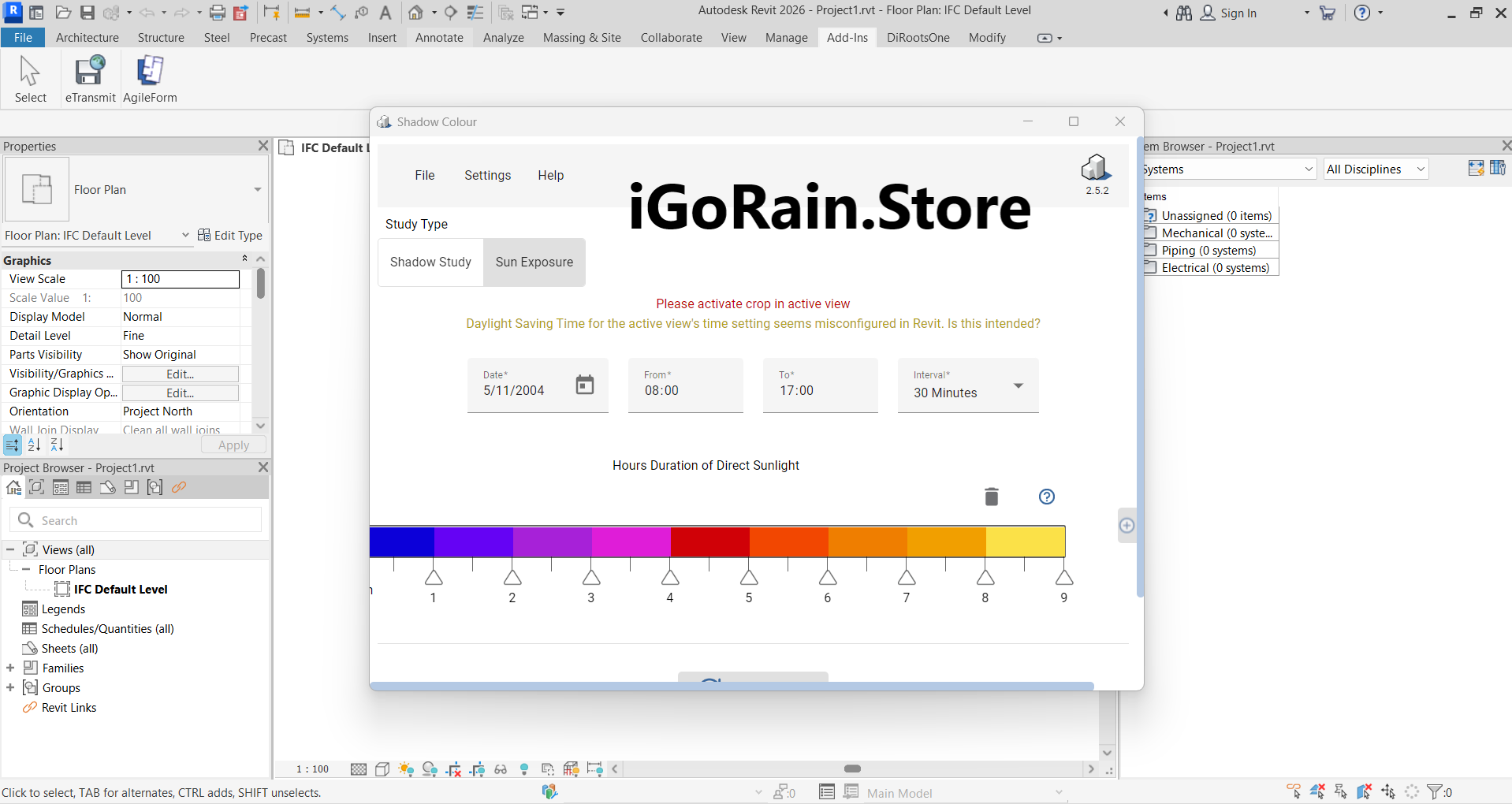
Description
AgileForm Shadow Colour for Autodesk Revit – Complete Review, Features, Use Cases & Performance
When it comes to architectural visualization, realism is often defined by the subtle details—light, shadow, and atmosphere. While Autodesk Revit is a powerhouse for Building Information Modeling (BIM), its native shadow capabilities can feel limited for professionals who want more creative control, That’s where Agile Form Shadow Colour for Autodesk Revit steps in.
This specialized plugin enhances Revit’s visual output by allowing users to customize shadow colors, intensities, and visual moods directly within the software. Instead of relying on external rendering engines or post-processing tools, users can achieve visually engaging results instantly.
In this detailed review, we’ll explore how this plugin performs in real-world scenarios, what makes it stand out, and whether it deserves a place in your Revit workflow.
Introduction
For years, architects and BIM professionals have relied on Revit for accurate modeling and documentation. However, when it comes to presentation-quality visuals, many users turn to third-party rendering tools due to limitations in Revit’s built-in shadow system.
AgileForm Shadow Colour for Autodesk Revit is designed to solve that exact problem. It introduces advanced shadow customization directly inside Revit, enabling users to control not just the presence of shadows, but their color and visual impact.
This might sound like a small feature—but in practice, it can dramatically improve how designs are perceived by clients, stakeholders, and competition juries.
Key Features
1. Advanced Shadow Color Customization
The core feature of the plugin is simple yet powerful: full control over shadow color.
With this functionality, users can:
- Replace standard grey shadows with custom tones
- Simulate different times of day (warm sunrise, cool dusk)
- Match presentation themes or branding
This feature alone significantly enhances the visual storytelling aspect of architectural designs.
2. Real-Time Visual Feedback
One of the most appreciated aspects of AgileForm Shadow Colour for Autodesk Revit is its real-time preview capability.
- Adjust shadow colors and instantly see results
- Eliminate the need for time-consuming renders
- Speed up design iterations
For professionals working under deadlines, this is a major productivity boost.
3. Seamless Integration with Revit
The plugin integrates directly into the Autodesk Revit interface:
- No need to export models
- No disruption to BIM workflows
- Maintains project accuracy and data integrity
This makes it especially useful for teams that prefer a streamlined, all-in-one workflow.
4. Lightweight Performance
Unlike heavy rendering engines, this plugin is optimized for efficiency:
- Minimal impact on system performance
- Works smoothly on standard workstations
- No need for high-end GPUs
This makes it accessible to a wider range of users.
5. Easy-to-Use Interface
Even though it adds powerful functionality, the tool remains user-friendly:
- Simple controls for adjusting shadow properties
- Minimal learning curve
- Suitable for beginners and experts alike
Practical Use Cases
1. Client Presentations
Imagine presenting a residential project to a client. Instead of default shadows, you apply warm, golden tones to mimic sunset lighting.
The result:
- More emotionally engaging visuals
- Better client understanding of the design
- Higher chances of approval
2. Concept Design Development
During early design stages, architects often experiment with mood and atmosphere.
With AgileForm Shadow Colour for Autodesk Revit:
- Test different lighting scenarios instantly
- Explore creative directions without rendering delays
- Improve design decisions through better visualization
3. Urban Planning & Massing Studies
Urban planners can use colored shadows to:
- Highlight building impact on surroundings
- Visualize seasonal sunlight variations
- Communicate complex ideas clearly
4. Interior Visualization
Interior designers can enhance ambiance by:
- Softening shadows for cozy environments
- Creating dramatic contrasts for modern spaces
- Emphasizing focal points through lighting
5. Academic and Training Applications
Students and educators benefit from:
- Better understanding of light behavior
- More engaging project presentations
- Faster learning curves in visualization techniques
Performance Analysis
Speed and Efficiency
The plugin excels in speed:
- Instant shadow updates
- No rendering wait times
- Ideal for iterative workflows
Compared to traditional rendering tools, it significantly reduces production time.
System Compatibility
AgileForm Shadow Colour for Autodesk Revit is designed to run efficiently on most systems that support Revit:
- No specialized hardware required
- Stable performance across projects
- Suitable for both small and large models
Stability and Reliability
In professional environments, stability is crucial. This plugin delivers:
- Consistent performance
- Minimal crashes or bugs
- Reliable integration with Revit projects
Workflow Comparison
| Feature | Native Revit | With AgileForm Plugin |
|---|---|---|
| Shadow color control | Limited | Fully customizable |
| Rendering time | Moderate to high | Instant |
| Workflow complexity | Medium | Low |
| Visual impact | Basic | Enhanced |
Pros & Cons
Pros
- Adds powerful shadow customization to Revit
- Real-time visualization saves time
- Easy to use and integrate
- Lightweight and efficient
- Improves presentation quality significantly
Cons
- Focused only on shadow enhancements
- Not a replacement for full rendering engines
- Requires Revit to function
- Limited advanced lighting controls compared to high-end tools
Pricing & Plans
Pricing for AgileForm Shadow Colour for Autodesk Revit typically depends on licensing models offered by vendors.
Common options include:
- One-time purchase licenses
- Subscription-based plans
- Updates and support packages
For software resellers, this plugin is often positioned as a premium add-on due to its niche yet impactful functionality.
Real-World User Experience
From a practical perspective, professionals who use this plugin often highlight its simplicity and immediate impact.
A typical workflow might look like this:
- Open project in Autodesk Revit
- Activate the plugin
- Adjust shadow color based on scene requirements
- Instantly preview changes
- Export or present directly
This streamlined process eliminates the need for complex rendering pipelines, making it ideal for fast-paced environments.
SEO Keyword Integration
This article incorporates high-performing SEO keywords naturally, including:
- AgileForm Shadow Colour for Autodesk Revit plugin
- Revit shadow color customization tool
- BIM visualization enhancement software
- Revit presentation rendering plugin
- architectural visualization Revit plugin
- shadow control plugin for Revit
These keywords align with search intent for architects, BIM professionals, and designers.
AgileForm Shadow Colour for Autodesk Revit Developer
AgileForm Shadow Colour for Autodesk Revit Download
Final Verdict
AgileForm Shadow Colour for Autodesk Revit fills a very specific gap in the Revit ecosystem—and it does so effectively.
It’s not designed to compete with advanced rendering engines. Instead, it focuses on improving everyday visualization tasks within Revit itself. For many professionals, that’s exactly what’s needed.
If your goal is to:
- Enhance presentation quality quickly
- Avoid complex rendering workflows
- Stay داخل Revit for efficiency
Then this plugin is a valuable addition to your toolkit.



Reviews
There are no reviews yet.