Description
AllyCAD Professional Review 2026: A Powerful CAD Solution for Architects, Engineers, and Designers
AllyCAD Professional – Quick Summary
AllyCAD Professional is a feature-rich Computer-Aided Design (CAD) software developed to meet the needs of architects, engineers, surveyors, construction professionals, and technical drafters. Designed as a cost-effective alternative to some of the industry’s premium CAD platforms, AllyCAD Professional offers comprehensive 2D drafting, 3D modeling, mapping, rendering, and customization capabilities within a familiar working environment.
For professionals seeking precision drafting tools without committing to expensive subscription-based ecosystems, AllyCAD Professional provides an appealing solution. Its support for multiple file formats, advanced editing tools, and industry-specific workflows makes it particularly attractive for small firms, independent consultants, educational institutions, and engineering teams.
Whether you’re preparing architectural floor plans, civil engineering layouts, topographical maps, or manufacturing drawings, AllyCAD Professional delivers a balanced combination of flexibility, performance, and affordability.
Introduction to AllyCAD 9.0 Professional
The CAD industry has traditionally been dominated by a handful of major software vendors, often requiring businesses to invest heavily in licenses and ongoing subscription costs. This has led many professionals to explore alternatives that can offer similar productivity without sacrificing quality.
AllyCAD Professional has steadily built a reputation as one such alternative.
Developed specifically to support technical drawing and design workflows, the software caters to users who need reliable drafting tools, efficient project handling, and compatibility with common industry standards.
One of AllyCAD Professional’s strongest advantages is its ability to bridge the gap between affordability and professional-grade functionality. It allows designers to maintain productivity while reducing software overhead costs.
For many architecture studios, land survey companies, and engineering consultants, AllyCAD Professional serves as a practical solution that handles everyday CAD requirements effectively.
Key Features of AllyCAD Professional
1. Advanced 2D Drafting Tools
At its core, AllyCAD Professional excels in precision drafting.
Users can create:
- Technical drawings
- Construction documentation
- Floor plans
- Mechanical layouts
- Electrical schematics
- Infrastructure plans
Common drafting tools include:
- Lines
- Polylines
- Splines
- Hatching
- Dimensions
- Text annotations
- Leader notes
- Tables
- Blocks
The drafting environment feels intuitive, especially for users transitioning from traditional CAD platforms.
2. 3D Modeling Capabilities
While many users rely on AllyCAD primarily for 2D work, its 3D functionality offers additional flexibility.
Capabilities include:
- Surface modeling
- Solid modeling
- Extrusions
- Revolves
- Boolean operations
- 3D visualization
Designers can better understand project geometry and identify conflicts before construction or manufacturing begins.
This significantly reduces errors during later project stages.
3. DWG Compatibility
File compatibility remains a critical concern for CAD professionals.
AllyCAD Professional supports industry-standard formats such as:
- DWG
- DXF
- DWF
- SHP files
- Various GIS datasets
This allows seamless collaboration between teams using different software platforms.
Architects can exchange plans with consultants, contractors can review project drawings, and engineers can import legacy files without extensive conversion work.
4. GIS and Mapping Integration
One feature that distinguishes AllyCAD Professional from many competing CAD packages is its GIS integration.
Surveyors and mapping professionals can utilize:
- Coordinate systems
- Topographical information
- Spatial datasets
- Land parcel mapping
- Survey plotting
These capabilities are particularly beneficial for:
- Municipal planning departments
- Land development firms
- Utility companies
- Environmental consultants
5. Customizable User Interface
Productivity often depends on personal workflow preferences.
AllyCAD Professional allows users to customize:
- Toolbars
- Menus
- Workspace layouts
- Keyboard shortcuts
- Scripts
Organizations can create tailored environments that align with internal standards and project requirements.
6. Rendering and Visualization Tools
Presentation quality matters when sharing concepts with clients.
AllyCAD Professional includes rendering options for:
- Architectural presentations
- Design previews
- Concept development
- Material visualization
These visual outputs help stakeholders better understand project proposals before construction begins.
7. Extensive Block Libraries
Reusable design components can save substantial drafting time.
Professionals gain access to libraries containing:
- Furniture symbols
- Doors
- Windows
- Fixtures
- Survey symbols
- Mechanical elements
Custom blocks can also be created for frequently used objects.
Practical Use Cases
Architectural Design Firms
Architects frequently need software capable of producing detailed plans while remaining budget-friendly.
A small architecture office designing residential homes may use AllyCAD Professional to produce:
- Site plans
- Floor layouts
- Roof plans
- Elevations
- Sections
- Construction details
Because of DWG support, consultants using alternative CAD systems can still participate in the project without compatibility issues.
Civil Engineering Projects
Civil engineers often work with large infrastructure datasets.
Typical projects include:
- Road alignments
- Drainage systems
- Utility networks
- Bridge layouts
- Earthworks planning
AllyCAD’s mapping functions simplify the integration of survey information into engineering drawings.
Surveying Companies
Survey professionals appreciate software that supports geospatial workflows.
Survey teams commonly utilize AllyCAD Professional for:
- Boundary surveys
- Subdivision plans
- Contour generation
- Coordinate plotting
- Land registration diagrams
The software’s GIS-oriented features reduce dependence on separate mapping applications.
Educational Institutions
Technical colleges and universities require affordable CAD solutions for teaching purposes.
Students benefit from learning:
- Drafting fundamentals
- Design principles
- CAD standards
- Technical documentation methods
Institutions can provide students with access to professional tools without overwhelming software budgets.
Manufacturing and Fabrication
Manufacturers use CAD software to produce accurate component drawings.
Examples include:
- Machine parts
- Sheet metal layouts
- Fabrication assemblies
- Workshop drawings
AllyCAD Professional’s precision tools help maintain dimensional accuracy throughout production.
User Experience and Workflow Efficiency
Many users transitioning from other CAD environments report that AllyCAD Professional feels familiar after only a short learning period.
Several workflow improvements stand out.
Fast Editing Tools
Commands such as:
- Copy
- Offset
- Mirror
- Trim
- Extend
- Rotate
- Scale
Allow designers to make revisions quickly.
This becomes especially useful during client review cycles where multiple drawing changes may be requested.
Reduced Software Costs
One recurring theme among small businesses is software affordability.
Subscription fatigue has become a growing concern in the design industry.
Companies that previously struggled with annual licensing renewals often find AllyCAD Professional provides a more sustainable long-term investment.
Stable Performance
For everyday drafting projects, AllyCAD Professional performs efficiently.
Users working on medium-sized projects generally experience:
- Smooth navigation
- Responsive editing
- Reliable file handling
- Minimal lag
Hardware requirements remain manageable compared to some high-end BIM platforms.
Performance Analysis
Speed
AllyCAD Professional handles standard drafting workloads effectively.
Tasks such as:
- Opening drawings
- Editing layouts
- Updating dimensions
- Managing layers
Are completed quickly on modern workstations.
Accuracy
CAD professionals prioritize precision.
AllyCAD offers:
- Snap controls
- Coordinate input
- Measurement tools
- Dimension styles
These features support highly accurate design production.
Compatibility
One of the software’s strongest areas remains interoperability.
Professionals working within mixed-software environments benefit significantly from its support for widely used CAD formats.
Learning Curve
Compared to highly specialized BIM software, AllyCAD Professional is relatively approachable.
Experienced CAD users often adapt rapidly.
Beginners may require some initial practice but can usually become productive within a reasonable timeframe.
Pros and Cons
Pros
Affordable Alternative
Offers professional CAD functionality at a competitive price point.
Excellent DWG Support
Facilitates collaboration across different design platforms.
GIS Capabilities
Useful for surveying, mapping, and land development projects.
Flexible Interface
Customization options enhance productivity.
Strong 2D Drafting Tools
Suitable for architects, engineers, and technical designers.
Lower Hardware Requirements
Runs efficiently on many standard office workstations.
Cons
Limited BIM Functionality
Organizations heavily invested in Building Information Modeling may require additional software.
Smaller User Community
Training resources and online tutorials may not be as abundant as those available for larger CAD ecosystems.
Rendering Features Are Basic
Advanced visualization specialists may prefer dedicated rendering software.
Pricing and Plans
AllyCAD Professional licensing structures can vary depending on region, distributor, and business requirements.
Potential purchasing options may include:
- Perpetual licenses
- Commercial licenses
- Educational licenses
- Upgrade programs
Organizations considering deployment should consult authorized sales channels to obtain the most current pricing information, licensing terms, and maintenance options.
Evaluating total ownership costs, including training and upgrades, can help businesses determine whether AllyCAD Professional aligns with their long-term operational goals.
Who Should Use AllyCAD 9.0 Professional?
AllyCAD Professional is particularly well-suited for:
- Architectural firms
- Civil engineers
- Surveying professionals
- Construction consultants
- Manufacturing companies
- Educational institutions
- Independent CAD designers
- Municipal planning departments
Businesses seeking professional CAD drafting software without high recurring expenses may find AllyCAD Professional especially compelling.
AllyCAD Professional Developer
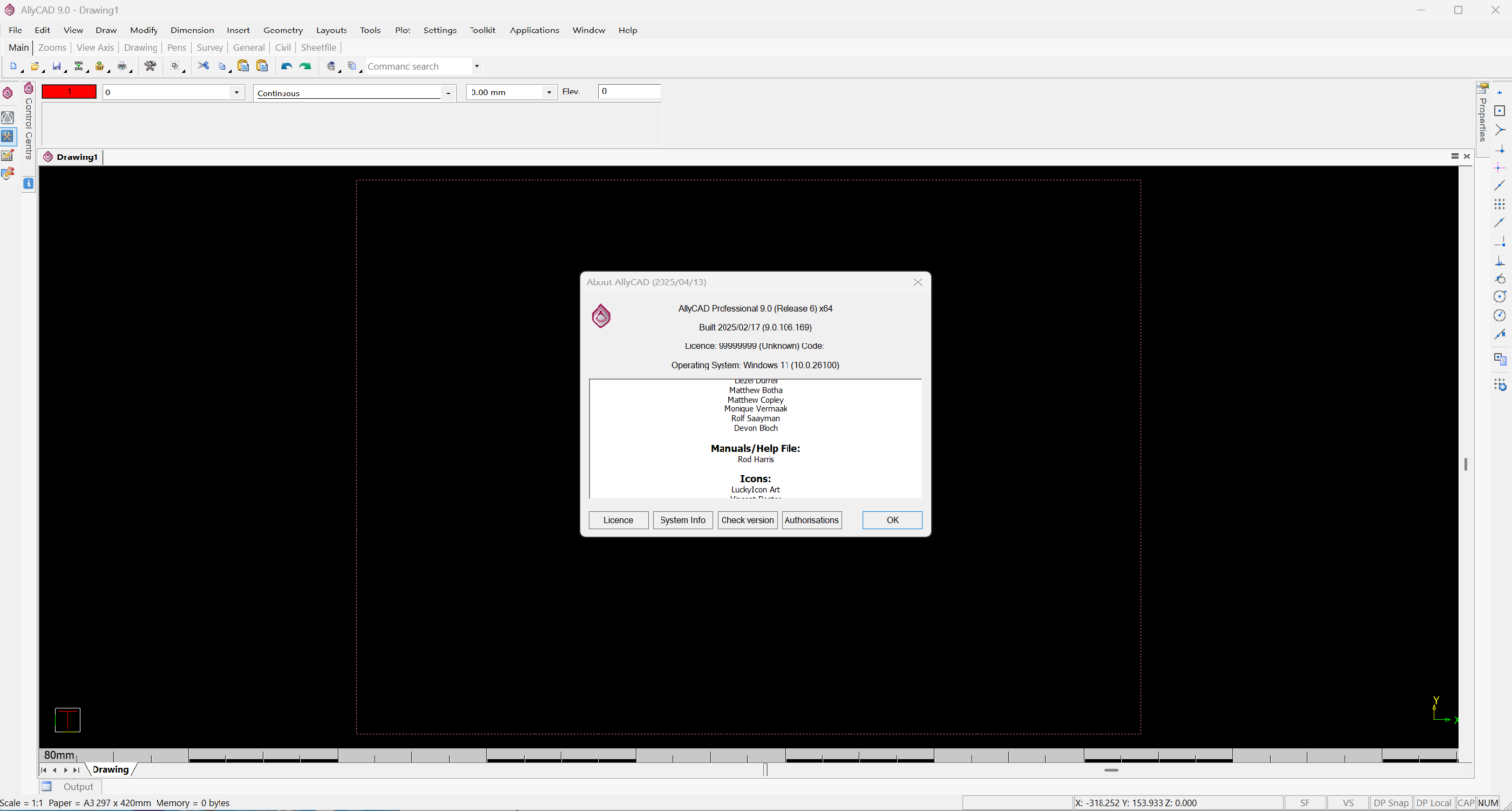
AllyCAD Professional 9.0 Build 2025
Final Verdict
AllyCAD Professional succeeds in delivering a capable and versatile CAD environment for professionals who need dependable drafting, mapping, and design tools at a reasonable cost. Its combination of advanced 2D drafting features, practical 3D capabilities, GIS integration, and broad file compatibility makes it a strong contender among affordable CAD software solutions.
While it may not fully replace specialized BIM platforms or high-end rendering applications, AllyCAD Professional provides substantial value for architects, engineers, surveyors, and technical designers focused on producing accurate drawings and managing efficient workflows.
For businesses looking to reduce software expenses while maintaining professional standards, AllyCAD Professional deserves serious consideration. Exploring its features through a demonstration, trial version, or consultation can help determine whether it fits your organization’s design process and long-term productivity goals.



Reviews
There are no reviews yet.