Description
Be.Smart T4R Tools for Autodesk Revit 4.3.0.1: Complete Review, Features, Benefits & Performance
Summary
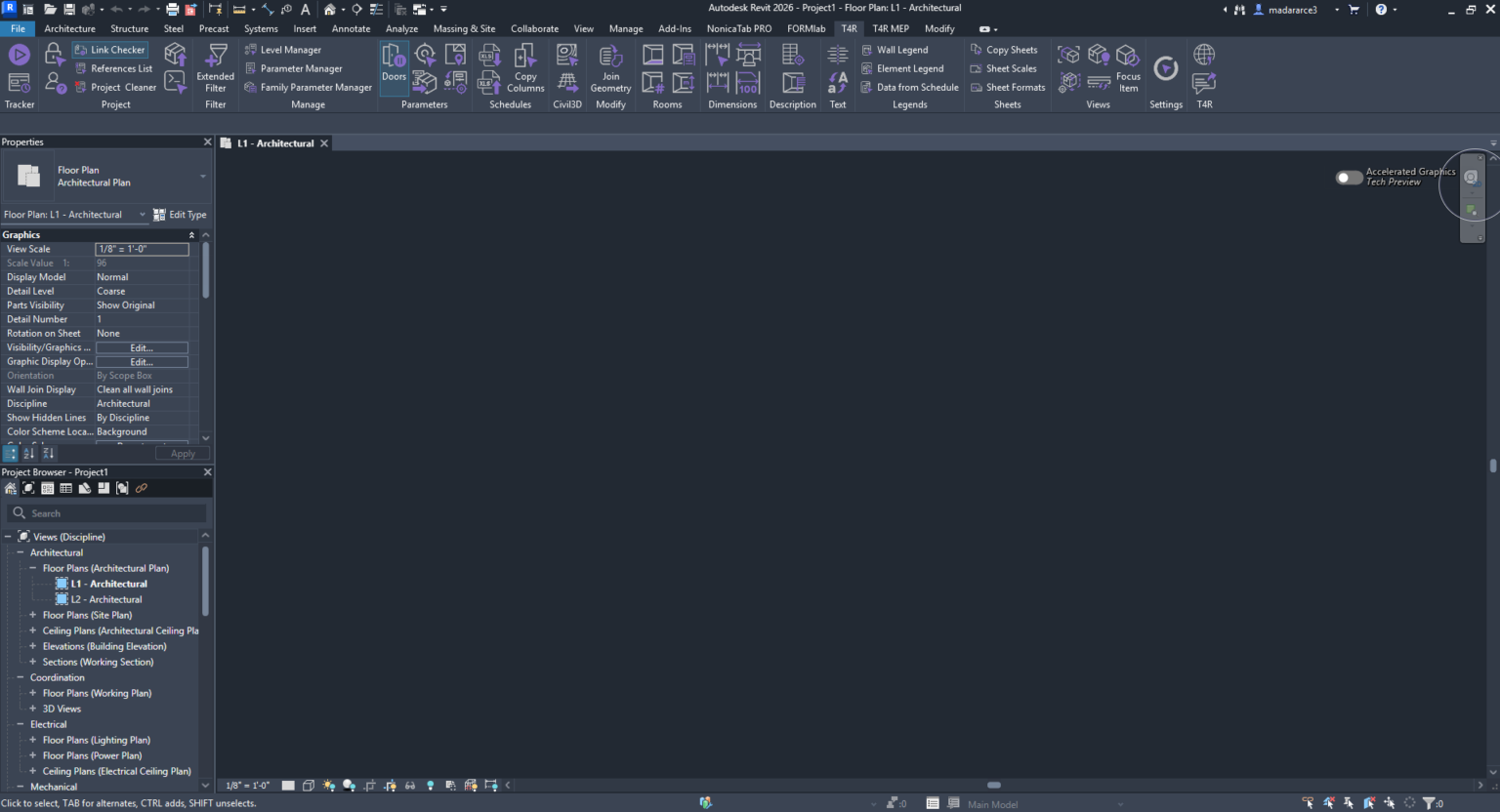
Be.Smart T4R Tools for Autodesk Revit is a productivity-focused toolset designed to reduce repetitive work and make everyday BIM tasks faster and more consistent. Instead of relying entirely on Revit’s native commands for searching, filtering, numbering, dimensions, project management, MEP coordination, and data handling, T4R brings a broad collection of specialized tools directly into the Revit workflow.
The biggest advantage is simple: it helps Revit users spend less time performing repetitive clicks and more time working on actual design and coordination. The toolset includes utilities for project management, element filtering, parameters, views, dimensions, text, rooms, MEP workflows, references, and other common BIM tasks. The official documentation describes more than 50 time-saving tools across the broader T4R productivity environment, while its free edition provides a selection of core design-management features.
For architects, BIM managers, MEP engineers, structural engineers, and Revit-heavy design teams, Be.Smart T4R can be particularly useful when repetitive operations begin consuming a noticeable portion of the working day.
Introduction
Autodesk Revit is powerful, but experienced users know that productivity is not always determined by the software’s headline features. A large amount of project time can disappear into small operations: finding specific elements, checking references, renumbering rooms, managing views, adjusting dimensions, checking who modified an element, or performing the same operation across multiple objects.
This is where Be.Smart T4R Tools for Autodesk Revit becomes interesting.
T4R is built as a collection of productivity tools that extend Revit rather than attempting to replace it. Its purpose is to simplify repetitive workflows and provide shortcuts for tasks that may otherwise require several native Revit commands or manual processes.
The result is a workflow that can feel more streamlined, especially on large BIM projects where even a small improvement in a frequently repeated task can translate into meaningful time savings.
The current T4R documentation identifies separate free and extended productivity offerings, with the free version providing design-management tools and the broader package adding additional productivity functionality.
Key Features of Be.Smart T4R
1. Extended Filtering and Element Selection
One of the most practical features is Extended Filter. Instead of manually searching through a complicated model, users can apply more detailed criteria to identify drawing elements.
This can be valuable when working with large architectural or MEP models containing hundreds or thousands of objects.
Typical benefits include:
- Faster element selection
- More precise model searches
- Easier project auditing
- Reduced manual navigation
- Better control over large BIM models
The free edition documentation specifically highlights Extended Filter as a tool for detailed selection and reports potential time savings when searching for objects.
2. Project and Reference Management
External references can become difficult to track as projects grow. T4R includes tools such as References List and Link Checker to help users understand referenced content and identify changes to external references.
This is particularly useful for BIM coordinators managing linked architectural, structural, and MEP models.
Instead of discovering a reference problem later during coordination, users can make reference management part of their regular project-checking workflow.
3. Job Time Tracker
Time tracking is another useful component for professional teams.
The Job Time Tracker can automatically track time spent editing a project. This can provide a more realistic understanding of where project hours are being consumed.
For companies managing multiple projects, this type of information can support:
- Project planning
- Productivity analysis
- Resource allocation
- Internal workflow reviews
- Better understanding of BIM production time
4. BIMSign and Project Protection
BIMSign provides an invisible signature for BIM documents. The purpose is to help identify and protect project information without placing an obvious visible mark across the model.
This can be useful for organizations that exchange BIM files between teams and need an additional way to identify project ownership or document origin.
5. Who Did That?
Large BIM projects can involve many users editing the same model. When an element needs investigation, knowing who performed the last editing operation can be extremely helpful.
The Who Did That? tool displays information about the authors of the last editing operation on selected elements.
This does not replace formal BIM management procedures, but it can make everyday troubleshooting much easier.
6. Parameter and Level Management
T4R also includes tools for handling Revit parameters and element information.
For example, Element ID can write an element ID to a selected parameter, while Element Level can write information about the level associated with an element.
These tools can be helpful when project information needs to be organized consistently for schedules, documentation, or downstream workflows.
7. Room and View Management
Room-heavy projects can benefit from tools such as Renumber Rooms, which supports sequential numbering with prefix and suffix options.
View management is also supported through utilities such as Duplicate Views, Quick Section Box, Reset Graphics Overrides, Unhide Hidden Elements, and Focus on Item.
These are not necessarily glamorous features, but they address exactly the type of repetitive work that slows down BIM production.
8. MEP Productivity Tools
MEP professionals are another major audience for Be.Smart T4R.
The toolset includes functions related to connectors, route lengths, units, levels, piping, ducts, and other MEP workflows. More recent releases have also introduced features such as Split Elbows, Move & Join, and Join Systems.
The Split Elbows feature, for example, can divide an elbow into two equal-size elbows, while Move & Join helps align and move one MEP element toward another before joining the resulting system.
These functions can be especially valuable when MEP coordination involves frequent adjustments to piping and ductwork.
Practical Use Cases
Architectural BIM Projects
An architectural team working on a large commercial building may need to manage hundreds of views, rooms, tags, dimensions, and model elements.
Instead of repeatedly performing these operations manually, T4R can provide shortcuts for filtering, renumbering, view duplication, text management, and element identification.
The practical advantage becomes more noticeable as project complexity increases.
BIM Coordination
BIM coordinators frequently move between linked models, investigate elements, check references, and resolve coordination issues.
Tools such as Link Checker, References List, Extended Filter, and Who Did That? can make these investigative tasks more efficient.
MEP Design
For MEP engineers, repetitive pipe and duct operations can quickly become a productivity bottleneck.
T4R’s MEP-focused tools are designed to reduce some of that manual work, particularly when working with connectors, routes, levels, units, elbows, and joined systems.
Large Revit Models
Large models are where productivity extensions often make the greatest difference.
If a task takes only 10 seconds but is repeated several hundred times, those small delays become significant. A dedicated command that reduces several steps to one operation can therefore provide a measurable benefit over the course of a project.
Performance Analysis
From a workflow perspective, Be.Smart T4R’s strongest characteristic is breadth. Rather than concentrating on one specialized Revit function, it provides a toolbox covering many everyday activities.
The official product information claims potential time savings of 50% for managing, searching, and filtering objects and reductions in manual tasks of up to 80%. These should be treated as vendor-stated productivity claims rather than guaranteed results for every user or project.
In practical use, performance will depend on several factors:
- Project size
- Revit version
- Number of linked models
- Model complexity
- Hardware configuration
- User familiarity with T4R
- Frequency of repetitive tasks
The software is most likely to demonstrate its value when users repeatedly perform the same operations throughout the day.
Another positive point is compatibility. Be.Smart T4R 4.2 introduced full support for Autodesk Revit 2026, alongside compatibility with Revit 2025, 2024, and 2023.
The release history also shows ongoing maintenance, including fixes and workflow improvements, which is important for a Revit add-in that needs to remain reliable as Autodesk’s platform evolves.
Pros and Cons
Pros
- Large collection of Revit productivity tools
- Reduces repetitive manual operations
- Useful for architecture and MEP workflows
- Strong filtering and selection capabilities
- Helpful project and reference-management utilities
- Time tracking functionality
- Element and editing-history utilities
- Useful room, view, dimension, and text tools
- Regular feature updates
- Support for recent Revit versions
Cons
- The large number of tools may take time to learn
- Some features are more valuable to advanced Revit users than beginners
- Productivity benefits depend heavily on the type of project
- Licensing and available functionality vary between editions
- Users working on simple models may not need the full toolset
Pricing and Plans
Be.Smart T4R is offered in different versions rather than as one identical package for every user.
The official documentation describes Be.Smart T4R Free as a free collection of design-management tools, while the broader productivity version is associated with ARKANCE customer access.
Because licensing arrangements can vary by edition, customer status, and current product offering, businesses should confirm the applicable plan before purchasing or deploying T4R across a team.
For a software-selling store, this is also an important point to communicate clearly: users should check the specific edition and licensing terms associated with the version they require rather than assuming that every T4R feature is included in the free edition.
Installation and User Experience
Installation is designed around the T4R/TOOLS 4 BIM environment. The documented process involves installing the supporting dock, selecting the appropriate Revit version, installing Be.Smart T4R, restarting Revit, and completing licensing or authentication when required.
Once installed, T4R integrates into the Revit workflow rather than functioning as a completely separate application.
That matters because professionals generally do not want to switch between several programs just to perform a simple BIM operation. Keeping productivity commands close to the Revit environment makes the toolset easier to incorporate into an established workflow.
Final Verdict
Be.Smart T4R Tools for Autodesk Revit is a strong productivity extension for professionals who spend significant amounts of time working inside Revit.
Its greatest strength is not one individual feature. It is the combination of many small utilities that address the everyday friction of BIM production: searching for elements, managing references, tracking changes, handling parameters, renumbering rooms, managing views, creating dimensions, and coordinating MEP elements.
For occasional Revit users, some of these tools may feel unnecessary. For architects, BIM managers, MEP engineers, and production teams who work in Revit for hours every day, however, the cumulative productivity benefits can be much more significant.
The best way to evaluate Be.Smart T4R is to focus on your team’s repetitive tasks. Identify the operations that consume the most time, then determine whether T4R provides a faster alternative. If your workflow involves large models, frequent coordination, detailed documentation, or repetitive MEP operations, this Revit productivity toolkit deserves serious consideration.
For professionals looking to make Autodesk Revit more efficient without changing their core BIM platform, Be.Smart T4R offers a practical collection of tools that can help turn repetitive clicks into streamlined workflows.




Reviews
There are no reviews yet.