Description
CaptionMaker Enterprise Review 2026: Professional Captioning Software for Broadcast, Media, and Accessibility
CaptionMaker Enterprise is a professional-grade captioning and subtitle creation solution designed for broadcasters, video production studios, educational institutions, government organizations, and businesses that require accurate, standards-compliant captions. It combines automated workflows, advanced editing tools, and support for multiple caption formats to help organizations produce accessible, high-quality video content.
Whether you’re preparing television broadcasts, online training videos, corporate presentations, or streaming content, CaptionMaker Enterprise offers a comprehensive workflow for creating, editing, synchronizing, and exporting captions with precision. Its flexibility, support for industry standards, and reliable performance make it a preferred choice for professionals who manage large volumes of multimedia content.
In this detailed CaptionMaker Enterprise review, we’ll explore its features, real-world applications, performance, advantages, limitations, pricing considerations, and why it continues to be a trusted solution for enterprise-level caption production.
Introduction
Video content has become one of the most important communication tools across industries. From television networks and universities to online learning platforms and corporate marketing teams, organizations increasingly need accurate captions to improve accessibility, comply with regulations, and reach global audiences.
Creating professional captions manually can be time-consuming and prone to errors. CaptionMaker Enterprise addresses this challenge by providing an all-in-one caption authoring platform that streamlines every step of the captioning process.
Unlike basic subtitle editors, CaptionMaker Enterprise supports professional broadcast standards, multiple file formats, speech recognition integration, and detailed editing capabilities. These features allow organizations to create captions suitable for television, streaming platforms, educational videos, and archived media.
Its enterprise-focused capabilities make it especially valuable for teams handling high-volume production environments where consistency and accuracy are essential.
Key Features of CaptionMaker Enterprise
Professional Caption Authoring
CaptionMaker Enterprise provides advanced tools for creating highly accurate captions.
Core capabilities include:
- Frame-accurate caption synchronization
- Easy caption timing adjustments
- Multi-line caption editing
- Automatic caption formatting
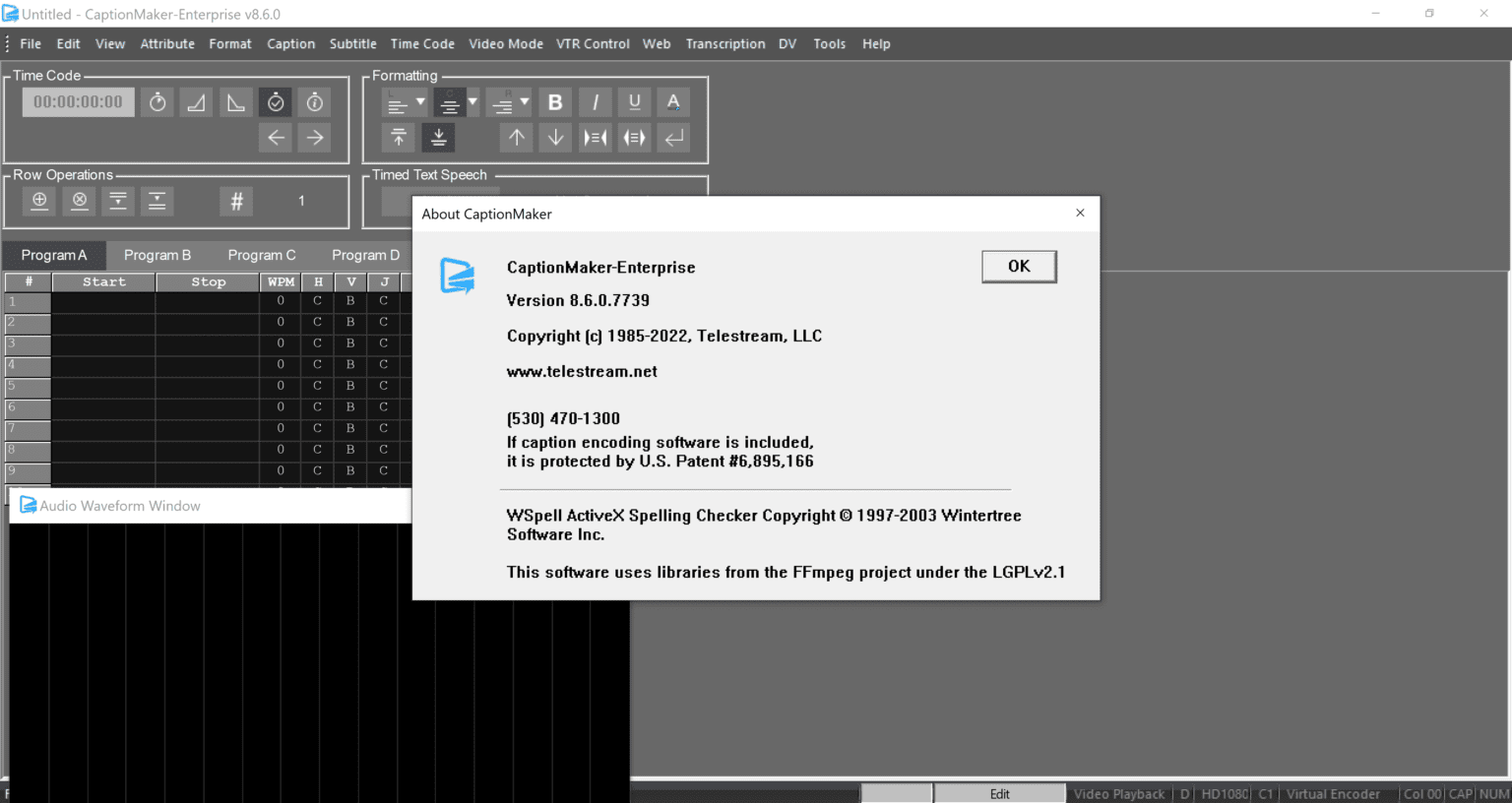
- Professional editing workspace
Editors can quickly refine captions while maintaining broadcast-quality timing.
Wide Format Compatibility
One of the software’s strongest advantages is its support for numerous caption and subtitle standards.
Supported formats typically include:
- SCC
- SRT
- WebVTT
- STL
- TTML
- EBU formats
- Broadcast caption formats
- Closed caption standards
- Open caption exports
This flexibility makes it suitable for television, streaming, education, and online publishing.
Speech Recognition Integration
CaptionMaker Enterprise helps accelerate production through automated speech recognition workflows.
Benefits include:
- Faster caption generation
- Reduced manual typing
- Improved production efficiency
- Easy editing after automatic transcription
- Time savings for large projects
Editors maintain complete control while benefiting from AI-assisted caption creation.
Advanced Caption Editing Tools
Professional editing tools help users refine every detail.
Features include:
- Text correction
- Timing adjustments
- Speaker identification
- Caption splitting
- Reading speed optimization
- Quality assurance checks
These tools ensure captions remain accurate and easy to read.
Accessibility Compliance
Accessibility is a major focus of CaptionMaker Enterprise.
The software supports workflows designed to help organizations comply with accessibility regulations by creating captions that improve content usability for viewers with hearing impairments.
Organizations producing educational or public-facing content benefit significantly from these compliance-oriented capabilities.
Enterprise Workflow Management
Large production teams often work on multiple projects simultaneously.
CaptionMaker Enterprise supports enterprise workflows through:
- Batch processing
- Project management tools
- Collaborative editing
- Template support
- Consistent formatting
- Reusable workflows
These capabilities improve productivity across departments.
Video Preview and Synchronization
Users can preview captions alongside video playback in real time.
Benefits include:
- Immediate quality checking
- Better synchronization accuracy
- Faster revisions
- Improved viewer experience
- Reduced export errors
Real-time preview significantly improves editing efficiency.
Multiple Language Support
Organizations serving international audiences can produce multilingual subtitle projects more efficiently.
CaptionMaker Enterprise assists localization workflows by supporting various subtitle standards and multilingual editing.
This makes it useful for global businesses and educational organizations.
Practical Use Cases
CaptionMaker Enterprise serves professionals across multiple industries.
Television Broadcasting
Television stations use CaptionMaker Enterprise to prepare:
- News broadcasts
- Sports coverage
- Entertainment programs
- Documentaries
- Live production workflows
Its compatibility with broadcast caption standards makes it well suited for professional media environments.
Educational Institutions
Universities and online learning platforms increasingly require accessible educational content.
CaptionMaker Enterprise helps educators create captions for:
- Online courses
- Lecture recordings
- Training sessions
- Student learning materials
- Virtual classrooms
Accessible content improves learning experiences for all students.
Corporate Video Production
Businesses frequently create videos for employees and customers.
Examples include:
- Employee onboarding
- Product demonstrations
- Internal communications
- Marketing campaigns
- Compliance training
Professional captions increase viewer engagement while supporting accessibility initiatives.
Government Agencies
Government organizations often publish public information videos that must meet accessibility standards.
CaptionMaker Enterprise provides tools for producing compliant caption files suitable for official communication channels.
Media Production Companies
Production studios handling multiple clients benefit from the software’s scalability.
Editors can efficiently manage:
- Commercials
- Promotional videos
- Feature productions
- Streaming content
- Documentary projects
Its workflow automation reduces turnaround times without sacrificing quality.
Performance Analysis
Performance is one of the reasons CaptionMaker Enterprise remains popular among professional users.
Fast Processing
Large video projects can be processed efficiently, allowing editors to maintain production schedules.
Batch processing capabilities reduce repetitive work, particularly for organizations managing extensive video libraries.
Stable Editing Environment
Professional editing software must remain reliable during long production sessions.
CaptionMaker Enterprise provides a stable workspace that supports complex caption editing without frequent interruptions.
High Caption Accuracy
When combined with speech recognition and manual review, users can achieve highly accurate captions suitable for broadcast and professional publishing.
The detailed editing controls allow precise adjustments that improve readability and synchronization.
Flexible Export Options
Exporting captions into multiple industry-standard formats is straightforward.
Organizations working with different distribution platforms can prepare caption files without requiring multiple software solutions.
Productivity Improvements
Teams often report increased efficiency due to:
- Automated workflows
- Faster editing
- Simplified synchronization
- Reusable project settings
- Reduced manual formatting
These improvements become increasingly valuable in enterprise environments with continuous production schedules.
User Experience
One of CaptionMaker Enterprise’s strengths is balancing professional capabilities with an organized interface.
While beginners may require some initial training, experienced editors appreciate the logical workflow and extensive customization options.
Users generally value:
- Clean editing layout
- Responsive timeline controls
- Efficient keyboard shortcuts
- Flexible project organization
- Professional-grade editing precision
Once familiar with the interface, teams can complete captioning projects significantly faster than using manual methods.
Pros and Cons
Pros
- Professional broadcast-grade captioning tools
- Supports numerous caption and subtitle formats
- Frame-accurate synchronization
- Speech recognition integration
- Excellent accessibility support
- Enterprise workflow capabilities
- Batch processing features
- High-quality export options
- Reliable performance for large projects
- Suitable for television, education, corporate, and government use
Cons
- Learning curve for new users
- Advanced features may exceed the needs of casual creators
- Enterprise licensing may represent a significant investment for smaller organizations
- Some automated captions still require manual quality review
Pricing & Plans
CaptionMaker Enterprise is generally offered through professional licensing rather than consumer-focused subscription plans. Pricing may vary depending on:
- Organization size
- Licensing requirements
- Enterprise deployment
- Optional support services
- Additional workflow integrations
Because enterprise software pricing often differs based on business needs, organizations should contact an authorized reseller or the software provider for the most current licensing information and customized quotes.
Although the upfront investment may be higher than entry-level caption editors, many organizations find that the productivity gains, professional features, and scalability justify the cost over time.
Why CaptionMaker Enterprise Stands Out
Several factors distinguish CaptionMaker Enterprise from many standard subtitle editors.
These include:
- Broadcast-quality caption production
- Industry-standard format compatibility
- Enterprise-ready scalability
- Accessibility-focused workflows
- Professional editing precision
- Automated caption generation support
- Efficient collaboration capabilities
Rather than focusing solely on subtitle creation, the software delivers a complete caption production environment suitable for demanding professional workflows.
Who Should Use CaptionMaker Enterprise?
CaptionMaker Enterprise is ideal for:
- Television broadcasters
- Video production companies
- Educational institutions
- Government agencies
- Corporate communication teams
- Accessibility professionals
- Streaming media providers
- Post-production studios
- Digital media organizations
- Large enterprises managing multimedia content
Organizations producing high volumes of professional video content will gain the greatest value from its advanced capabilities.
CaptionMaker Enterprise 2026 Developer
Final Verdict
CaptionMaker Enterprise is a powerful and dependable captioning solution built for professional media production, enterprise accessibility, and broadcast-quality workflows. Its comprehensive feature set, extensive format support, accurate synchronization tools, and enterprise-ready capabilities make it an excellent choice for organizations that require consistent, high-quality caption production.
Although new users may need time to master its advanced functionality, the long-term benefits include faster production, improved accuracy, streamlined collaboration, and compliance with accessibility standards. Whether you’re managing television broadcasts, educational content, corporate training materials, or multimedia archives, CaptionMaker Enterprise delivers the tools needed to create polished and reliable captions efficiently.
If your organization values professional-quality captioning, scalable workflows, and industry-standard compatibility, CaptionMaker Enterprise is well worth exploring. Evaluate its capabilities, compare its licensing options to your production needs, and consider how it can help you deliver accessible, engaging, and professionally captioned video content with confidence.


Reviews
There are no reviews yet.