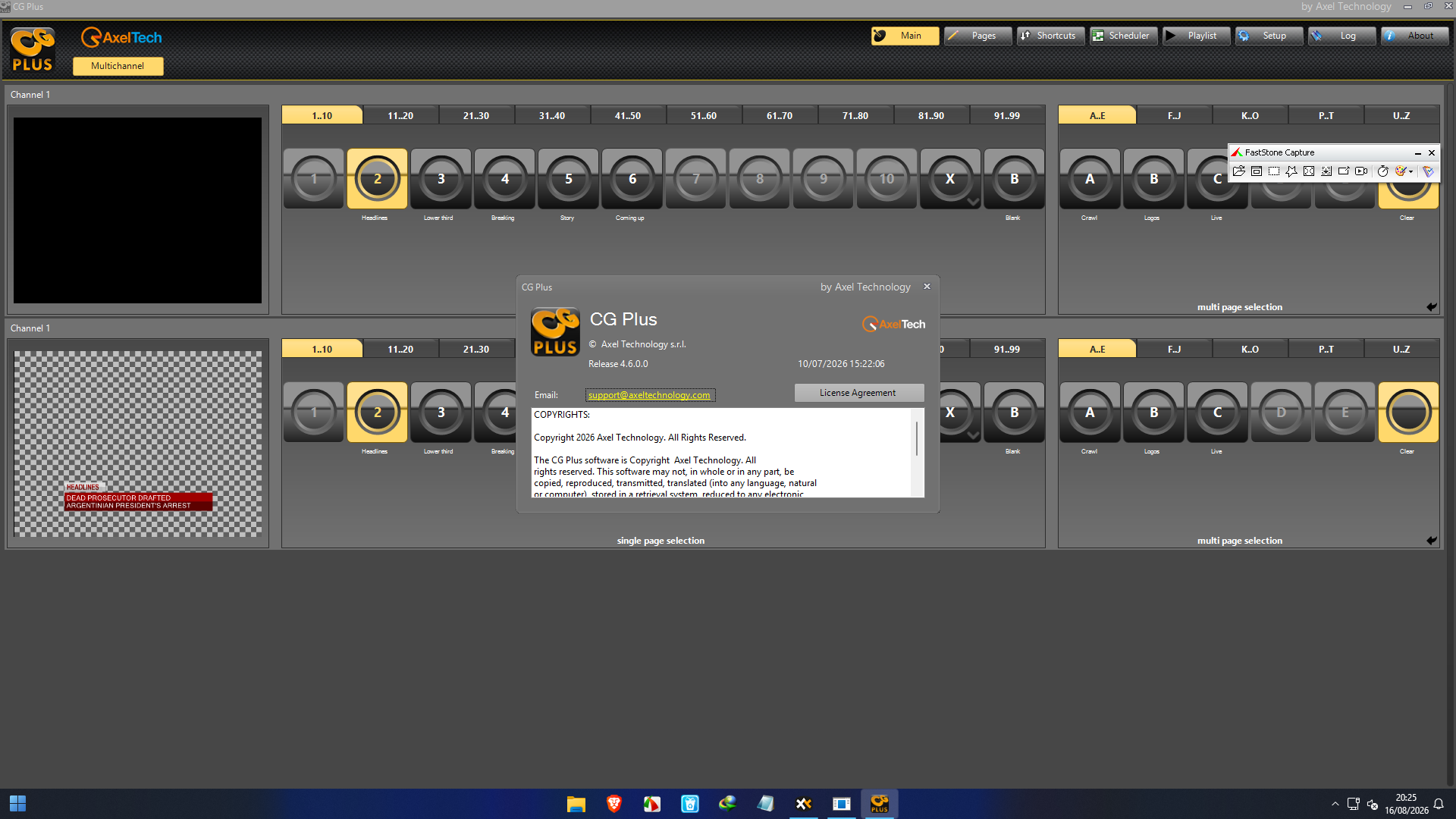
Description
AxelTech CG Plus: Professional Broadcast Graphics and Channel Branding Software
Summary
AxelTech CG Plus is a professional real-time broadcast graphics solution designed for television channels, live production studios, newsrooms, sports broadcasters, and entertainment workflows. It brings character generation, channel branding, animated graphics, live data, crawls, tickers, logos, and multimedia elements into a single production environment.
What makes CG Plus particularly interesting is its balance between broadcast-grade output and practical day-to-day operation. Instead of requiring an operator to build every graphic from scratch during a live show, the software provides a Composer-based workflow for preparing pages and templates in advance, then lets operators manage those graphics quickly during transmission.
CG Plus supports SDI and NDI workflows and can handle graphics from SD through 4K, depending on the configured system and output hardware. Its 32-bit compositing engine provides accurate transparency and alpha-channel handling, while live data support makes it suitable for constantly changing information such as news tickers, sports scores, clocks, and other dynamic content.
For broadcasters looking for a professional live graphics and channel branding solution, AxelTech CG Plus deserves serious consideration.
Introduction
Modern television graphics are no longer limited to a station logo placed in the corner of the screen. Viewers expect polished lower thirds, animated logos, breaking-news banners, scrolling information, live statistics, clocks, promotional graphics, and consistent channel branding.
The challenge is keeping all of these elements visually consistent while operating them reliably during a live broadcast.
This is where AxelTech CG Plus fits into the workflow.
CG Plus is the successor to AxelTech’s DLG Plus channel-branding solution and CG Live character generator, combining capabilities from both into a broader graphics workflow. The software is designed around real-time graphics production, with support for text, images, animations, clocks, crawls, rolls, tickers, logos, and other media objects.
It is also designed to be approachable. AxelTech describes the software as requiring no specific training, while its interface uses concepts familiar to video production operators, including preview and program controls.
For a small television station, this can mean a shorter learning curve. For a larger broadcast operation, it can mean faster template preparation and smoother live operation.
Key Features of AxelTech CG Plus
1. Real-Time Broadcast Graphics
The central strength of CG Plus is real-time character generation and graphics playback.
Operators can create and display:
- Text and lower-thirds
- Station and program logos
- Animated backgrounds
- Digital clocks
- Dates and counters
- Crawls and rolls
- News tickers
- Images and video
- Animated graphic elements
- Dynamic metadata
This makes the software useful for both everyday channel branding and live production.
2. SDI and NDI Workflow Support
CG Plus is built for modern broadcast environments where both traditional SDI and IP-based NDI workflows may coexist.
The software can deliver graphics through SDI video boards as well as NDI, providing flexibility when integrating it into different production infrastructures. Current product information also highlights SDI and NDI support for broadcast graphics workflows.
For broadcasters gradually moving toward IP production, this flexibility can be especially useful.
3. 32-Bit Compositing
Graphics quality is critical when the output goes directly to television.
CG Plus manages layers using 32-bit processing, supporting accurate alpha channels and transparency. This is important when combining text, logos, video, animations, and other graphic objects without producing distracting edges or transparency problems.
The result is cleaner compositing for professional broadcast output.
4. Customizable Composer
The Composer environment is one of the most practical parts of the software.
Operators can position objects, adjust transparency, apply effects, configure transitions, and build complete graphic pages before they are required on air.
This approach changes the live-production experience. Instead of designing graphics while a presenter is speaking, the production team can prepare templates ahead of time and make controlled changes during the show.
5. Dynamic Data Integration
Live information is where a character generator can become genuinely valuable.
CG Plus can work with external data sources such as RSS, text files, and Microsoft Excel files. This allows information to be updated without manually rebuilding every graphic.
Potential examples include:
- News headlines
- Sports information
- Election-style data displays
- Financial information
- Event schedules
- Program information
- Live announcements
For a newsroom, this type of automation can save significant operator time.
6. Adobe After Effects Integration
Graphic designers often want the creative capabilities of Adobe After Effects while broadcasters need real-time control.
CG Plus addresses this with background rendering for After Effects projects. An After Effects project can be imported into the Composer environment, while editable data tags can allow text, bitmap, or animation information to be changed dynamically.
This creates a useful bridge between the design department and the live production team.
7. MOS Protocol Support
News production environments often depend on newsroom computer systems and standardized workflows.
CG Plus supports MOS integration, making it more suitable for professional newsroom environments where graphics need to interact with news production systems. AxelTech has specifically highlighted MOS compatibility as one of the newer capabilities of CG Plus.
Practical Use Cases
Television News
A newsroom may need to update lower thirds, breaking-news banners, headlines, crawls, and other graphics throughout the day.
With prepared templates and dynamic data support, CG Plus can help operators maintain a consistent visual identity while rapidly updating information.
Sports Broadcasting
Sports production is another strong use case.
A live match may require constantly changing scores, team information, clocks, player information, announcements, and promotional graphics. A real-time graphics system allows these elements to be updated without interrupting the video feed.
Talk Shows
Talk shows frequently use guest names, segment titles, promotional messages, social information, and animated transitions.
CG Plus can provide a centralized environment for managing those graphics while keeping the channel’s visual identity consistent.
Channel Branding
Not every graphic needs to be connected to a live event.
Television channels can use CG Plus for persistent branding elements such as animated logos, promotional graphics, program information, clocks, and scheduled channel graphics.
Entertainment Production
Entertainment programs often depend on attractive transitions, animated backgrounds, titles, and supporting visual elements.
The combination of Composer tools and After Effects integration can give creative teams considerable flexibility while retaining live-production control.
Performance Analysis
The real performance of any broadcast graphics system depends partly on the hardware, graphics workload, resolution, output configuration, and complexity of the projects being rendered.
That is particularly important with advanced After Effects projects. AxelTech notes that rendering time for background-rendered After Effects content depends on system resources and project complexity.
For conventional broadcast graphics, however, CG Plus is designed around real-time operation. Its 32-bit compositing, animated graphics, text rendering, crawls, tickers, and SDI/NDI output capabilities make it appropriate for demanding live environments.
A sensible production setup should therefore be built around the intended output resolution, number of channels, graphics complexity, storage requirements, and chosen video hardware.
The biggest practical advantage is workflow efficiency. Once templates are prepared, operators can concentrate on live control rather than repeatedly designing graphics during production.
User Experience and Ease of Use
Broadcast software can be powerful but frustrating when operators need extensive technical knowledge just to perform basic tasks.
CG Plus takes a different approach.
Its interface includes preview and program areas and is designed around familiar production concepts. The software also offers customizable GUI layouts, allowing users to organize panels such as video preview, video program, page buttons, live data tags, and playlists according to their workflow.
For experienced broadcast operators, this can make the transition relatively straightforward.
For smaller stations, the emphasis on usability can also reduce dependence on highly specialized graphics operators for routine tasks.
Pros and Cons
Pros
- Professional real-time broadcast graphics
- SDI and NDI workflow support
- Support for SD, HD, and 4K workflows depending on configuration
- 32-bit compositing and alpha-channel handling
- Animated logos and graphic elements
- Crawls, rolls, tickers, clocks, and counters
- External data integration
- Customizable Composer environment
- Adobe After Effects workflow integration
- MOS protocol support
- Suitable for news, sports, entertainment, and channel branding
- Designed for live-production environments
Cons
- Professional broadcast functionality can make the system more complex than basic graphics software
- Hardware configuration is important for demanding production environments
- Advanced After Effects projects can require significant system resources
- Pricing is generally positioned toward professional broadcast buyers rather than casual users
- Some organizations may need time to establish templates and production workflows before getting maximum value
Pricing & Plans
AxelTech CG Plus 2027 is positioned as professional broadcast software, so pricing can vary according to the required configuration, channel count, output format, hardware, and licensing arrangement.
Publicly listed configurations demonstrate that the product is available in different channel and hardware setups, including single-channel software and multi-channel broadcast systems.
For this reason, there is no single universal price that accurately represents every CG Plus deployment.
Businesses should evaluate the required number of channels, SDI or NDI workflow, resolution, control requirements, hardware platform, support, and update arrangements before selecting a configuration.
Who Should Use AxelTech CG Plus?
CG Plus 2026 is particularly suitable for:
- Television stations
- News broadcasters
- Sports production companies
- Live event producers
- Talk-show studios
- Entertainment channels
- Cable and satellite broadcasters
- Production control rooms
- Master control environments
- Organizations requiring professional channel branding
It may be excessive for someone who only needs occasional titles for social-media videos. Its real value appears when graphics are part of a continuous professional broadcast workflow.
AxelTech CG Plus 2026 Developer
Download AxelTech CG Plus 4.6.0.0 Software Full Version 2026
Final Verdict
AxelTech CG Plus is a serious broadcast graphics solution built around a simple idea: professional television graphics should look impressive without making live operation unnecessarily difficult.
Its combination of real-time graphics, channel branding, SDI and NDI support, 32-bit compositing, dynamic data, customizable templates, After Effects integration, and MOS compatibility gives it a broad range of applications.
The strongest advantage is not simply the number of features. It is how those features work together in a production environment.
A newsroom can prepare templates and update information. A sports producer can manage changing graphics during a live match. A television station can maintain consistent branding throughout its programming. A creative team can use After Effects while operators retain control over live output.
For organizations that need dependable, professional broadcast graphics rather than a basic title generator, AxelTech CG Plus is a capable and flexible choice.
If your workflow involves live television, channel branding, news graphics, sports information, animated logos, or dynamic on-screen data, exploring AxelTech CG Plus can be a practical next step. Evaluate your channel requirements, output workflow, hardware configuration, and graphics workload first, then choose the CG Plus configuration that best fits your production environment.




Reviews
There are no reviews yet.