Description
Clash Tracker Review: A Practical Tool for Managing Design Conflicts, Coordination Issues, and Project Quality
When a project involves multiple teams, models, drawings, systems, and technical Clash Tracker requirements, conflicts are almost unavoidable. The real challenge is not finding a clash; it is tracking it properly, assigning responsibility, monitoring progress, and making sure the same issue does not appear again in the next coordination meeting. This is where Clash Tracker can provide valuable support.
Designed around the concept of organized clash management, Clash Tracker helps teams move beyond simple issue discovery and create a more structured workflow for reviewing, documenting, and resolving conflicts. Whether a project involves architectural elements, structural systems, MEP services, construction coordination, or complex digital models, a dedicated clash tracking workflow can significantly improve communication and reduce wasted time.
For professionals working in BIM coordination, design review, construction planning, engineering, and project management, Clash Tracker can be especially useful when multiple issues need to be monitored simultaneously. Instead of relying on scattered spreadsheets, emails, screenshots, and meeting notes, teams can use a centralized approach to keep track of what has been found, who is responsible, what needs to happen next, and whether the problem has actually been resolved.
Introduction
Modern construction and engineering projects are becoming increasingly complex. A single project may involve architects, structural engineers, MEP designers, contractors, consultants, and project managers, all working with different types of information.
This complexity creates a familiar problem: clashes.
A duct may interfere with a beam. A pipe may occupy the same space as an electrical service. A structural element may conflict with an architectural design. Sometimes the issue is not a physical conflict but a coordination problem involving specifications, dimensions, locations, or design changes.
Finding these issues is only the first step.
The real work begins afterward. Teams need to record each clash, prioritize it, assign it to the correct person, discuss possible solutions, update the design, and verify the result. Without a reliable system, even a small project can quickly become difficult to manage.
ClashTracker is intended to support this important part of the project coordination process. Its core value lies in helping users organize clash-related information in a way that makes follow-up easier and more transparent.
For users who regularly participate in coordination meetings or manage design review workflows, this type of software can help transform clash management from a reactive task into a repeatable process.
What Is Clash Tracker?
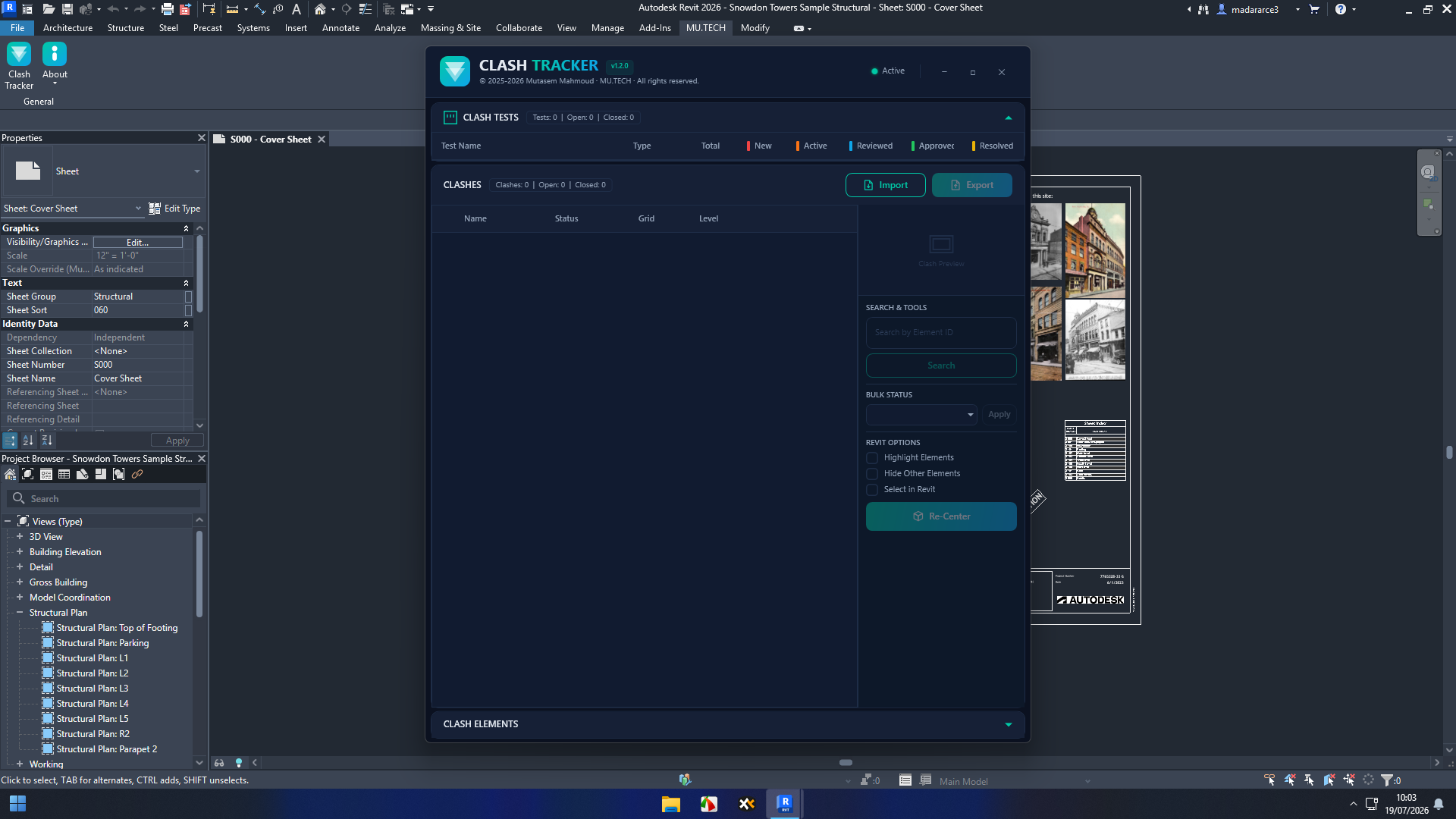
Clash Tracker is a clash management and coordination-focused software solution designed to help users monitor design conflicts and track their progress toward resolution.
Rather than treating each clash as an isolated problem, the software approach focuses on creating a structured record for every issue. This allows project teams to maintain better visibility throughout the coordination lifecycle.
A typical clash tracking workflow may include:
- Identifying a design or model conflict
- Recording the issue and relevant information
- Assigning responsibility
- Setting a priority or status
- Tracking communication and updates
- Monitoring resolution progress
- Reviewing completed issues
- Confirming that the clash has been properly resolved
This organized approach is particularly useful for projects where hundreds or even thousands of coordination issues may be identified during different stages of development.
Key Features of Clash Tracker
Organized Clash Management
One of the most important advantages of ClashTracker 2026 is the ability to organize clash information systematically.
Instead of keeping issue details in multiple locations, users can create a more centralized workflow. This makes it easier to understand which clashes are open, which are being reviewed, and which have already been resolved.
For large projects, this visibility can make a significant difference.
Issue Status Tracking
Not every clash has the same level of importance. Some issues require immediate attention, while others may be reviewed during a later coordination cycle.
A structured status system helps teams understand the current condition of each issue. Common workflow stages may include:
- New
- Open
- Assigned
- In Review
- In Progress
- Resolved
- Closed
This type of organization makes project meetings more productive because team members can quickly focus on unresolved issues rather than reviewing every historical problem.
Responsibility and Accountability
A clash is much easier to resolve when it has a clearly assigned owner.
Clash Tracker can support a workflow in which issues are associated with specific team members, disciplines, or project responsibilities. This reduces uncertainty and helps prevent the common situation where everyone knows about a problem but nobody is clearly responsible for solving it.
In practical terms, this can improve accountability across architecture, structural engineering, MEP coordination, and construction teams.
Prioritization of Critical Issues
Not all clashes create the same level of risk.
A minor coordination issue may have a simple solution, while a major conflict involving structural systems or critical building services may affect the entire project schedule.
Prioritization allows teams to focus their attention where it matters most. A useful clash management workflow can help distinguish between:
- High-priority conflicts
- Medium-priority coordination issues
- Low-priority or non-critical issues
This helps reduce the risk of spending too much time on minor problems while more serious conflicts remain unresolved.
Better Coordination Documentation
Good documentation is essential in professional project environments.
A clear record of a clash can help explain:
- What the original issue was
- Where it occurred
- Which disciplines were involved
- Who was assigned to address it
- What solution was proposed
- Whether the issue was resolved
This information can be valuable during design reviews, coordination meetings, construction planning, and project handovers.
Practical Use Cases
BIM Coordination
BIM teams regularly deal with a high volume of model-based conflicts. Clash Tracker can help coordinators organize these issues and monitor the progress of each one.
For example, a BIM coordinator may identify several conflicts between mechanical ductwork and structural elements. Instead of simply reporting the clashes, the coordinator can organize them according to priority, assign them to the appropriate team, and track their progress during subsequent coordination cycles.
This creates a more reliable process than depending entirely on meeting notes or manually maintained lists.
Architectural and Structural Coordination
Architectural designs and structural systems must work together closely. A change to a wall, opening, floor layout, or structural element can create additional conflicts elsewhere in the model.
A structured clash tracking process helps teams document these problems and keep communication organized.
This is particularly useful during design development, when changes occur frequently.
MEP Coordination
Mechanical, electrical, and plumbing systems often compete for limited ceiling and service spaces. As a result, MEP coordination can generate a large number of potential conflicts.
Clash Tracker can help teams manage these issues in a more systematic manner. Rather than treating coordination as a series of disconnected conversations, users can create a workflow for monitoring each conflict until the issue has been properly addressed.
Construction Planning
Clash management is not limited to design offices.
Contractors and construction teams can also benefit from better visibility into coordination issues before work reaches the site. Resolving conflicts digitally before installation can help reduce rework, delays, and unnecessary material costs.
For construction professionals, the ability to track unresolved coordination problems can support more effective pre-construction planning.
Coordination Meetings
Weekly coordination meetings can become inefficient when teams spend too much time trying to understand the current status of old issues.
A structured tracking system allows meetings to focus on:
- New conflicts
- Overdue issues
- High-priority clashes
- Decisions requiring management input
- Items awaiting confirmation
This makes the meeting process more focused and easier to manage.
Performance Analysis
The practical performance of Clash Tracker depends heavily on project size, workflow complexity, and the way a team uses the software. However, the main performance advantage of a dedicated clash management tool is workflow efficiency.
A well-organized clash tracking system can reduce the time spent searching for information. Instead of asking multiple team members for updates, coordinators can review issue status in a more structured environment.
The software can also help reduce administrative repetition. When issue information is consistently recorded, teams spend less time recreating the same details in emails, spreadsheets, and meeting documents.
From a user experience perspective, the greatest benefit is likely to appear on projects with frequent coordination cycles. Teams that only manage a small number of clashes may not need a dedicated tracking solution. However, as project complexity increases, structured issue management becomes increasingly valuable.
The effectiveness of Clash Tracker is also influenced by team discipline. Software can organize information, but users still need to record issues accurately, update statuses, and follow established project procedures.
Real-World User Experience
Imagine a coordination team preparing for a weekly project meeting. Before using a structured tracking process, the team may have several spreadsheets, email conversations, screenshots, and separate notes.
One team member believes a clash has been resolved. Another person still considers it open. A third team member is unsure who was responsible for the correction.
This type of confusion is common in complex projects.
With a centralized clash tracking workflow, the team can review the current status of each issue more clearly. Open conflicts remain visible, assigned responsibilities are easier to identify, and resolved items can be reviewed before being closed.
For many users, this organizational improvement may be more valuable than any individual feature.
Pros and Cons
Pros
- Helps organize clash-related information
- Supports structured issue tracking
- Improves visibility across project teams
- Can help clarify responsibilities
- Useful for BIM and design coordination workflows
- Supports better coordination meeting preparation
- Helps reduce dependence on scattered manual records
- Suitable for projects with multiple disciplines and frequent design changes
Cons
- The value depends on consistent team adoption
- Smaller projects may not require advanced clash tracking
- Users may need time to establish an effective workflow
- Exact capabilities can vary depending on the specific version or implementation
- Teams may need additional tools for full BIM model analysis or visualization
Pricing and Plans
Pricing and licensing for Clash Tracker may vary depending on the specific product version, developer, licensing model, and available distribution options.
Potential software licensing structures in this category may include:
- Individual licenses
- Professional plans
- Team or multi-user licenses
- Subscription-based access
- Enterprise solutions
Before purchasing, users should confirm the current licensing terms, supported platforms, available features, update policy, and technical requirements.
For professional teams, the most important consideration is not simply the initial software price. The real value should be measured against the potential cost of unresolved clashes, design rework, construction delays, and inefficient coordination.
Who Should Use Clash Tracker?
Clash Tracker may be a strong fit for:
- BIM coordinators
- Architects
- Structural engineers
- MEP professionals
- Construction managers
- General contractors
- Design coordination teams
- Project managers
- Engineering consultants
- Organizations managing complex multi-discipline projects
It may be less necessary for users working on very small projects with limited coordination requirements.
Final Verdict
Clash management is one of those project responsibilities that can appear simple at first but become increasingly difficult as project complexity grows. Finding a clash is only the beginning. The real challenge is making sure the issue is properly documented, assigned, discussed, corrected, and verified.
Clash Tracker offers a practical approach to this problem by focusing on the organization and monitoring of coordination issues. Its greatest potential value lies in helping teams create a clearer workflow for managing conflicts across design, engineering, BIM, and construction environments.
For professionals who currently rely on scattered spreadsheets, emails, screenshots, and meeting notes, a dedicated clash tracking solution can provide a more organized alternative. The benefits become especially noticeable when multiple disciplines are working together and the number of coordination issues begins to grow.
If your projects involve frequent design reviews, BIM coordination, MEP conflicts, structural coordination, or complex construction workflows, exploring Clash Tracker may be a worthwhile step. A more structured approach to clash management can help teams improve communication, reduce confusion, and keep important coordination issues moving toward resolution.



Reviews
There are no reviews yet.