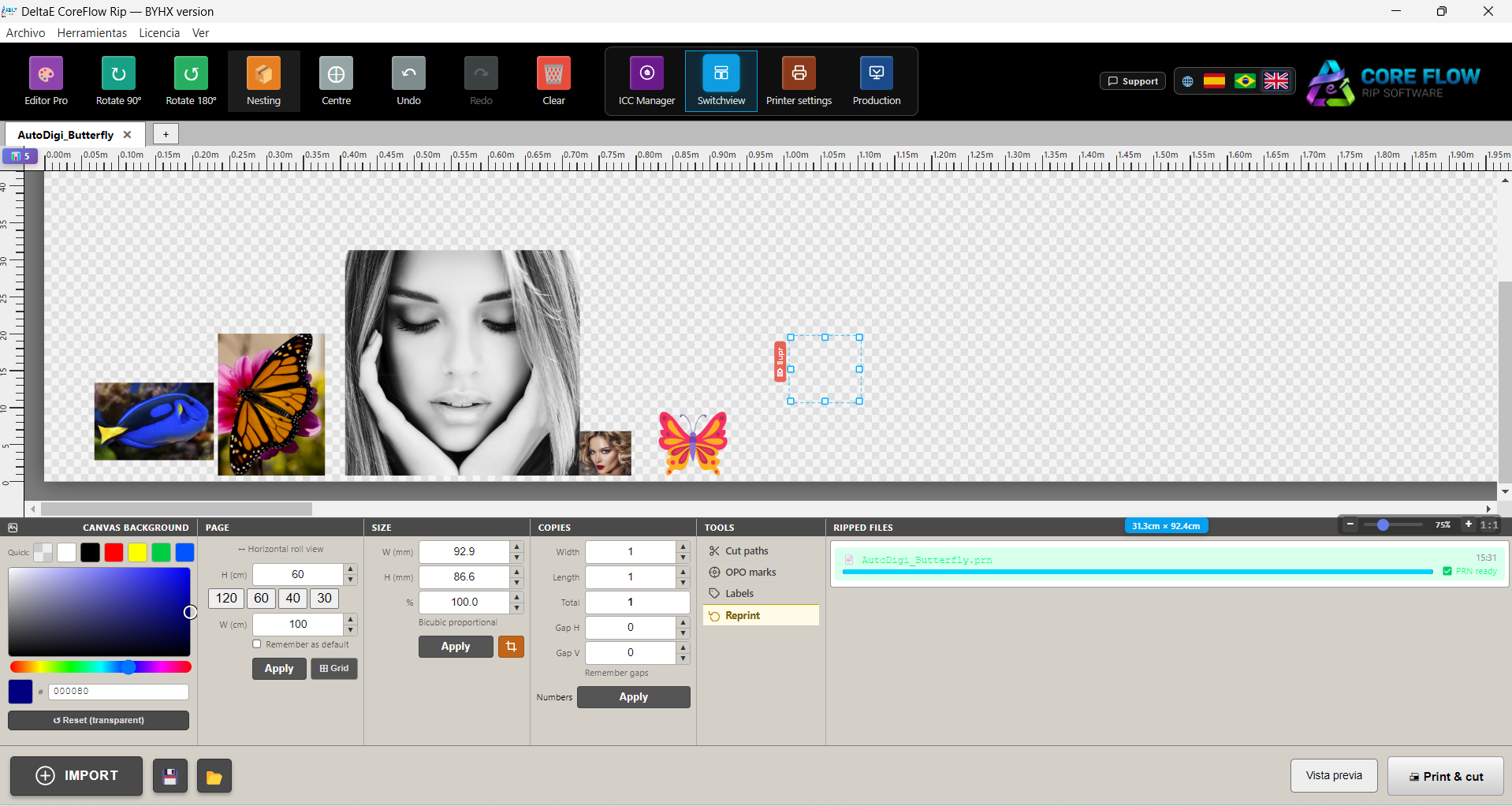
Description
DeltaE CoreFlow RIP 4.0: A Practical Guide to Professional RIP Workflow and Color Management
For print professionals, the quality of the final output often DeltaE CoreFlow RIP 4.0 depends on what happens before the printer starts working. A powerful printer is important, but the RIP software controlling the workflow can have an equally significant impact on color accuracy, production efficiency, media usage, and overall consistency. This is where DeltaE CoreFlow RIP becomes a valuable solution for print shops, digital production environments, sign makers, and professionals who need more control over their printing workflow.
Designed around the needs of modern print production, DeltaE CoreFlow RIP helps users manage complex print jobs through a centralized workflow that can improve production organization and color consistency. Instead of treating RIP software as just a tool for sending files to a printer, experienced operators often view it as the control center of the entire output process.
In this DeltaE CoreFlow RIP v4.0, we will examine its workflow capabilities, practical benefits, potential use cases, performance considerations, advantages, limitations, and the type of professional environment where it may deliver the most value. Whether you manage a busy print production department or are looking for a more structured RIP workflow, understanding what this software offers can help you make a more informed decision.
Introduction to DeltaE CoreFlow RIP
The modern printing environment is rarely simple. A single production workflow may involve different file formats, multiple printers, various media types, custom color profiles, and clients who expect reliable results from one job to the next.
Without a well-organized workflow, small problems can quickly become expensive. Colors may vary between jobs, operators may spend too much time preparing files, and production queues can become difficult to manage.
DeltaE CoreFlow RIP is designed to address this type of challenge by providing a RIP-based workflow environment for managing print production tasks. RIP, or Raster Image Processor, software converts digital artwork into data that a printer can interpret. However, modern RIP solutions typically go beyond basic file processing.
They can help with:
- Print job preparation
- Color management
- Output control
- Media and printer workflows
- Production queue organization
- Image processing
- Workflow automation
- Print consistency
For professionals, the real value of a RIP solution is often found in how much time and uncertainty it removes from the production process.
Key Features of DeltaE CoreFlow RIP
Professional RIP Workflow
At its core, DeltaE CoreFlow RIP is built to support professional print production. A reliable RIP workflow can help transform artwork into print-ready output while giving operators more control over the final result.
Instead of manually handling every stage of a print job, users can organize their production process in a more structured way. This can be especially useful when multiple jobs are being prepared or when different output requirements must be managed simultaneously.
Color Management and Consistency
Color accuracy is one of the most important factors in professional printing. A design may look perfect on a monitor but produce a different result when printed due to differences in color spaces, media, ink systems, and printer behavior.
A professional RIP workflow helps manage these challenges through color processing and profile-based output control. For businesses producing branding materials, product graphics, signage, packaging-related work, or high-quality promotional materials, color consistency can directly influence customer satisfaction.
The practical benefit is simple: when a repeat customer orders the same design again, the production team has a better opportunity to achieve a consistent result.
Flexible Print Production Management
Busy print environments need more than basic file conversion. They need a way to organize jobs efficiently.
A structured RIP workflow can help users manage production tasks according to their specific requirements. Operators can prepare files, adjust settings, and process jobs in a way that fits the workflow of their print environment.
This can be particularly valuable for companies working with:
- Large-format printing
- Sign and display graphics
- Commercial digital printing
- Promotional materials
- Custom print production
- Multiple media types
- High-volume print queues
Support for Professional Output Workflows
One of the biggest advantages of using dedicated RIP software is the ability to create a more controlled bridge between design files and physical output.
Designers may work with applications such as graphics or layout software, while production operators are responsible for preparing the final print. A capable RIP solution helps connect these two stages.
This separation can improve the workflow because designers can focus on artwork while production specialists concentrate on print preparation, color control, and output requirements.
Improved Production Organization
A print shop can lose significant time when jobs are handled in an inconsistent manner. Files may be stored in different locations, settings may be repeated manually, and operators may need to rebuild workflows for similar jobs.
A centralized RIP workflow can reduce unnecessary repetition. Once a production team becomes familiar with its processes, recurring jobs can often be handled more efficiently.
For a small print business, this may mean less time spent preparing individual jobs. For a larger operation, better workflow organization can help improve production coordination.
Practical Use Cases for DeltaE CoreFlow RIP
Digital Print Shops
A digital print shop may handle dozens or even hundreds of different files in a typical week. These jobs can vary in size, media, color requirements, and finishing specifications.
DeltaE CoreFlow RIP can serve as a central workflow tool for preparing and managing this type of production. The main benefit is having a more organized process from incoming artwork to final output.
Sign and Display Production
Sign makers and display production companies often work with large graphics, custom materials, and demanding color requirements.
A professional RIP workflow can help operators manage large-format print production more systematically. Whether the job involves promotional graphics, displays, branded visuals, or other wide-format applications, the ability to manage output settings carefully is essential.
Branding and Marketing Materials
Brand colors need to remain consistent across different materials and production runs. A logo that appears slightly different from one printed item to another can create an unprofessional impression.
For businesses producing branded graphics, a reliable color management workflow can help improve consistency. This is one of the areas where professional RIP software can provide practical value beyond simply processing files.
Repetitive Production Jobs
Many print businesses produce recurring materials. A customer may order the same artwork every month, or a company may repeatedly print similar promotional items.
When the workflow is properly organized, recurring production can become more predictable. Operators spend less time starting from the beginning and can focus more on verifying the job and completing production.
Multi-Operator Print Environments
When several people work on the same production workflow, consistency becomes especially important.
A structured RIP environment can help standardize how jobs are prepared and processed. This may reduce differences between individual operators and make it easier for new team members to learn established production procedures.
Performance Analysis: How Does DeltaE CoreFlow RIP Perform?
The performance of any RIP solution depends on more than the software itself. Computer hardware, printer configuration, file complexity, image resolution, color profiles, and production volume can all affect the final experience.
However, the main performance advantage of a professional RIP workflow is often efficiency.
Processing Complex Print Files
High-resolution graphics can require substantial processing power. Large images, complex vector artwork, transparency effects, and multiple color elements may increase processing demands.
A well-designed RIP environment can help transform these files into printer-ready data while giving production operators greater control over the workflow.
For users working with demanding files, hardware optimization is still important. A modern workstation with sufficient memory and storage can contribute significantly to a smooth experience.
Workflow Efficiency
The biggest productivity improvement may come from reducing manual steps.
Instead of repeatedly adjusting the same settings or handling each job in a completely different way, print operators can develop more consistent workflows. Over time, this can improve production speed and reduce the risk of avoidable mistakes.
Color Reproduction
For professional print production, color reproduction is often more important than raw processing speed. A fast workflow that produces inconsistent color can still create problems.
DeltaE CoreFlow RIP is most valuable when it helps production teams establish a repeatable color workflow. The actual result will depend on the printer, ink, media, profiles, calibration, and operator experience, but a dedicated RIP environment can provide the necessary control for professional output.
Real-World User Experience
Imagine a small print business receiving a rush order for a set of branded promotional graphics. The artwork arrives in a large, high-resolution format, and the customer expects the colors to match previous materials.
In an unorganized workflow, the operator may spend considerable time checking the file, adjusting settings, preparing the output, and trying to reproduce the correct colors.
With a structured RIP workflow, the process can become more predictable. The operator can prepare the file, apply the appropriate production settings, verify the output requirements, and send the job through the established workflow.
This does not eliminate the need for professional knowledge. In fact, experienced operators remain extremely important. However, the right RIP software can help turn individual expertise into a more repeatable production process.
That is one of the most practical benefits of software like DeltaE CoreFlow RIP: it can help reduce workflow uncertainty while giving professionals more control over the production stage.
Pros and Cons of DeltaE CoreFlow RIP
Pros
- Designed for professional print production workflows
- Helps organize complex print jobs
- Supports a more structured approach to color management
- Useful for digital and large-format printing environments
- Can improve repeatability for recurring print jobs
- Helps bridge the gap between design files and printer output
- Suitable for businesses that require greater production control
- Can support more efficient operator workflows
Cons
- May require time to learn for users new to professional RIP software
- The final output depends heavily on printer, media, and color-profile configuration
- Professional RIP solutions may be more complex than basic printer software
- Hardware performance can influence processing speed
- Users with simple home-printing needs may not need advanced RIP capabilities
Pricing and Plans
The pricing structure for DeltaE CoreFlow RIP can vary depending on the licensing model, version, supported workflow, and professional requirements. Businesses should evaluate the available licensing options based on the number of workstations, production needs, printer environment, and long-term usage.
When comparing RIP software, price should not be the only consideration. A more useful evaluation includes:
- The time saved during production
- The value of improved color consistency
- The reduction of manual workflow steps
- Compatibility with the production environment
- Support for future growth
- The cost of production errors and reprints
For a professional print business, even a small improvement in workflow efficiency can have a meaningful impact over time.
Who Should Use DeltaE CoreFlow RIP?
DeltaE CoreFlow RIP may be a strong choice for users who need more control than standard printer software can provide.
It can be particularly relevant for:
- Professional print shops
- Digital printing businesses
- Sign and display companies
- Production departments
- Branding and marketing print providers
- Operators handling demanding print files
- Businesses focused on color consistency
- Teams managing repeatable print workflows
For occasional personal printing, a full professional RIP solution may be unnecessary. The software is most likely to deliver value in environments where production efficiency, consistency, and workflow control are important.
Final Verdict
DeltaE CoreFlow RIP represents the type of professional workflow software that can make a significant difference behind the scenes. It may not be the most visible part of the printing process, but the RIP stage plays a crucial role in determining how efficiently and consistently digital artwork becomes physical output.
Its biggest strength is the ability to support a more organized approach to professional print production. By combining print processing, workflow management, and color-focused control, it can help businesses reduce unnecessary manual work and improve production consistency.
The real value of DeltaE CoreFlow RIP will depend on the user’s equipment, workflow, production volume, and level of experience. However, for print professionals who need a reliable environment for managing demanding output requirements, it is worth exploring as part of a modern printing workflow.
If your current process involves repeated manual adjustments, inconsistent output, difficult job management, or limited control between design and printing, DeltaE CoreFlow RIP 4.0 may offer a more structured solution. The best way to evaluate it is to consider your existing workflow, identify the areas where production slows down, and determine whether a dedicated RIP environment can improve those stages.

Reviews
There are no reviews yet.