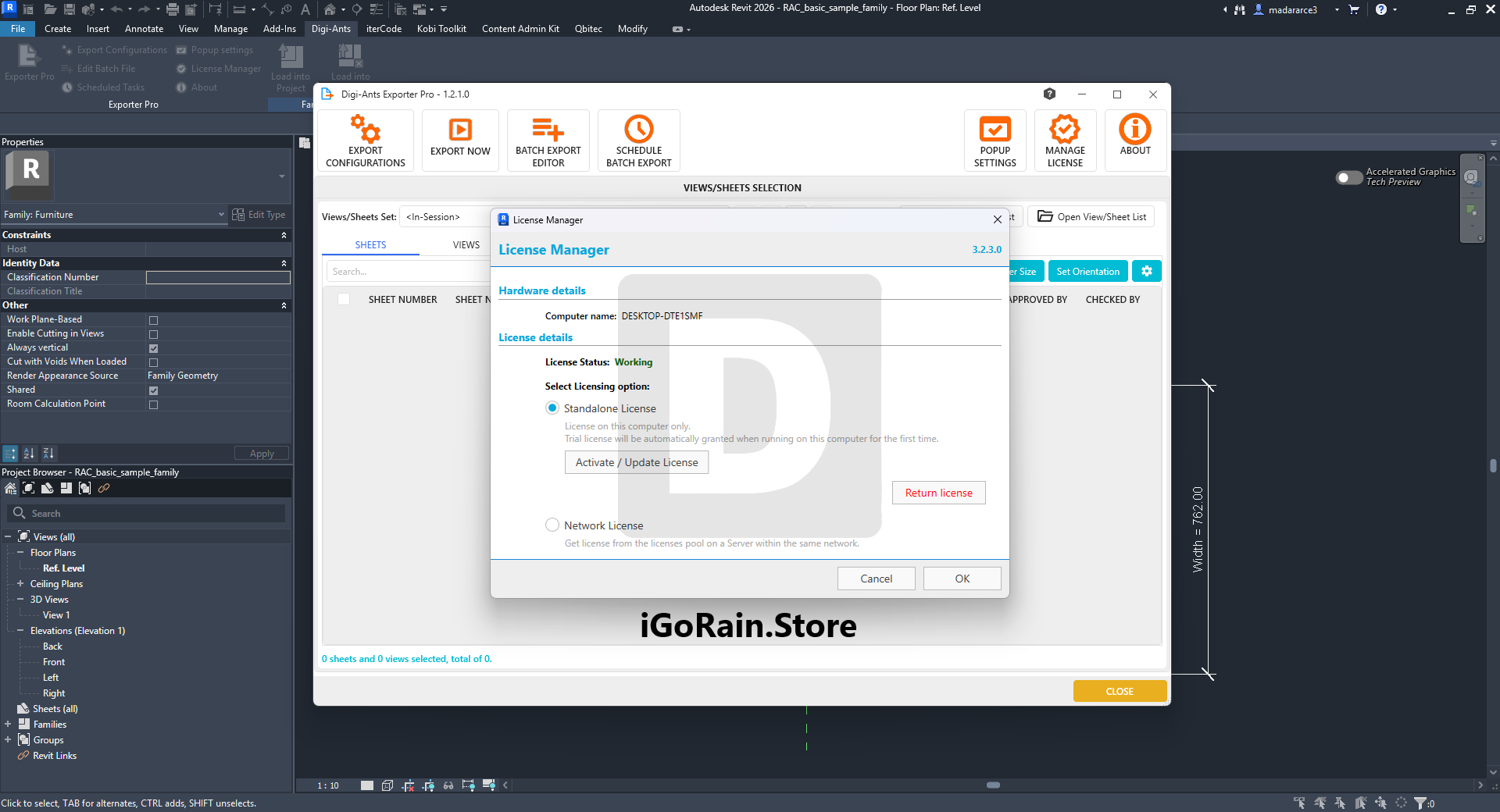
Description
Digi-Ants Exporter Pro Review: A Powerful Data Export Solution for Autodesk Revit Professionals
Quick Summary
Digi-Ants Exporter Pro is a specialized productivity tool designed to simplify and automate data export workflows within Autodesk Revit environments. For BIM managers, architects, engineers, and construction professionals who regularly need to extract project information from Revit models, this software offers a streamlined approach that saves time, reduces manual work, and improves data accuracy.
Instead of relying on repetitive export processes or complex custom scripts, Digi-Ants Exporter Pro provides an efficient method for exporting model data into structured formats that can be shared with stakeholders, project teams, consultants, and external systems. Whether you’re managing large-scale construction projects or coordinating multidisciplinary BIM workflows, this tool helps transform Revit data into usable business information with minimal effort.
In this detailed Digi-Ants Exporter Pro review, we’ll explore its features, performance, practical applications, advantages, limitations, and overall value for professionals seeking better BIM data management.
Introduction
Building Information Modeling (BIM) projects generate enormous amounts of data. Every Revit model contains critical information related to architectural elements, structural components, MEP systems, schedules, parameters, quantities, and project metadata.
While Revit excels at creating and managing BIM models, extracting project data in a structured and reusable format often becomes a challenge. Teams frequently spend hours exporting schedules, collecting parameters, validating data, and preparing reports for project stakeholders.
This is where Digi-Ants Exporter Pro becomes particularly valuable.
Developed to enhance Revit data extraction workflows, Digi-Ants Exporter Pro enables users to export model information efficiently while maintaining consistency and accuracy. The software helps BIM professionals automate repetitive tasks, reduce manual errors, and improve overall project productivity.
For organizations managing multiple projects simultaneously, the ability to standardize export procedures can significantly improve coordination and reporting efficiency.
Key Features of Digi-Ants Exporter Pro
Advanced Revit Data Export
One of the primary strengths of Digi-Ants Exporter Pro is its ability to export extensive Revit model data quickly and efficiently.
Users can extract:
- Element parameters
- Project information
- Category-based data
- Schedule information
- Custom parameters
- BIM metadata
- Quantities and measurements
This allows project teams to convert complex model information into structured datasets for analysis and reporting.
Automated Export Workflows
Manual data exports can become time-consuming, especially on large BIM projects.
Digi-Ants Exporter Pro helps automate repetitive export processes by enabling users to configure export settings and reuse them across projects.
Benefits include:
- Reduced manual effort
- Consistent data outputs
- Faster project reporting
- Improved workflow standardization
For BIM managers overseeing multiple projects, automation can significantly reduce administrative workload.
Customizable Export Options
Every project has unique reporting requirements.
Digi-Ants Exporter Pro offers flexible export configurations that allow users to:
- Select specific categories
- Filter required parameters
- Define export structures
- Customize output formats
- Control data organization
This flexibility makes the software suitable for various project types and organizational standards.
Improved Data Accuracy
Manual data extraction often introduces mistakes that can affect project coordination and decision-making.
By automating the export process, Digi-Ants Exporter Pro helps ensure:
- Consistent parameter mapping
- Reduced human error
- Reliable reporting outputs
- Better data integrity
Accurate project information is critical for construction planning, procurement, cost estimation, and facility management.
BIM Coordination Support
Data sharing is a major component of BIM collaboration.
Digi-Ants Exporter Pro enables teams to distribute project information more effectively among:
- Architects
- Engineers
- Contractors
- Consultants
- Owners
- Facility managers
This improves communication and helps ensure all stakeholders are working with current project data.
User-Friendly Interface
A common challenge with BIM utilities is complexity.
Digi-Ants Exporter Pro focuses on usability, allowing both experienced BIM managers and less technical users to perform exports without extensive training.
The straightforward interface helps teams adopt the software quickly and integrate it into existing workflows.
Practical Use Cases
BIM Management and Project Coordination
A BIM manager responsible for coordinating several disciplines often needs regular data exports for quality control and reporting.
Using Digi-Ants Exporter Pro, project information can be exported automatically and distributed to relevant stakeholders, reducing the time spent gathering data manually.
Benefits:
- Faster reporting cycles
- Improved coordination
- Better project visibility
- Reduced administrative work
Quantity Takeoff and Cost Estimation
Estimators rely on accurate project quantities to generate reliable budgets and procurement plans.
Digi-Ants Exporter Pro can export relevant model information for:
- Material quantities
- Component counts
- Equipment schedules
- Cost analysis datasets
This helps improve estimating accuracy and project planning.
Facility Management Handover
At project completion, building owners often require structured asset information.
Digi-Ants Exporter Pro assists teams in extracting:
- Asset data
- Equipment information
- Maintenance parameters
- Building component records
The resulting datasets support facility management systems and long-term building operations.
Quality Assurance and BIM Auditing
BIM coordinators frequently audit models to ensure compliance with project standards.
By exporting project parameters and metadata, Digi-Ants Exporter Pro enables:
- Data validation
- Parameter verification
- Model compliance reviews
- Quality control reporting
This supports higher BIM standards and project consistency.
Digi-Ants Exporter Pro 1.2.1.0 Developer
Digi-Ants Exporter Pro 1.2.1.0 Download
Construction Documentation Support
Construction teams often require updated project information throughout various project phases.
With efficient export capabilities, Digi-Ants Exporter Pro helps provide:
- Progress reports
- Procurement data
- Construction schedules
- Coordination documentation
The result is improved information flow between design and construction teams.
Performance Analysis
Speed and Efficiency
One of the most noticeable advantages of Digi-Ants Exporter Pro is the reduction in time required to export Revit data.
Instead of manually creating schedules and compiling information, users can generate structured exports much faster.
Performance benefits include:
- Faster data extraction
- Reduced repetitive tasks
- Improved workflow efficiency
- Increased productivity
For large BIM projects containing thousands of elements, these time savings can become substantial.
Reliability
Reliable data export is essential in BIM environments where decisions depend on accurate information.
Digi-Ants Exporter Pro demonstrates strong consistency when exporting large datasets, helping organizations maintain dependable reporting processes.
Users generally appreciate the predictable and repeatable results that reduce uncertainty in project workflows.
Scalability
The software is suitable for:
- Small architectural firms
- Engineering consultancies
- BIM service providers
- Large construction organizations
As project complexity grows, the benefits of automated exports become even more valuable.
Organizations managing enterprise-level BIM workflows can particularly benefit from standardized export processes.
Learning Curve
Compared with developing custom export scripts or using advanced database solutions, Digi-Ants Exporter Pro offers a more accessible learning experience.
Most users can become productive relatively quickly thanks to:
- Simple configuration options
- Familiar Revit integration
- Intuitive workflow design
- Clear export controls
This reduces implementation barriers and accelerates adoption.
Pros and Cons
Pros
Efficient Revit Data Extraction
Exports project information quickly and accurately.
Workflow Automation
Reduces repetitive manual export tasks.
Improved Data Consistency
Helps standardize reporting across projects.
Flexible Export Configuration
Supports different project requirements and reporting needs.
User-Friendly Interface
Easy to learn and integrate into existing BIM workflows.
Better Collaboration
Facilitates information sharing among project stakeholders.
Time Savings
Significantly reduces administrative effort for BIM teams
Digi-Ants Exporter Pro Developer
Digi-Ants Exporter Pro 1.2.1.0 Download
.
Cons
Revit-Focused Functionality
Most valuable for users working heavily within Autodesk Revit environments.
Initial Setup Required
Organizations may need time to establish standardized export templates.
Advanced Requirements May Need Customization
Highly specialized workflows may require additional configuration depending on project standards.
Pricing & Plans
Pricing for Digi-Ants Exporter Pro may vary depending on:
- License type
- Subscription model
- Organizational requirements
- Version compatibility
- Vendor-specific purchasing options
Potential buyers should consult the software provider or authorized reseller for the most current pricing information and licensing details.
Before purchasing, organizations should evaluate:
- Number of Revit users
- Export frequency requirements
- BIM workflow complexity
- Reporting needs
The productivity gains often justify the investment for teams handling data-intensive BIM projects.
Why BIM Professionals Choose Digi-Ants Exporter Pro
Many BIM professionals struggle with the same challenge: transforming Revit model data into useful business information.
Digi-Ants Exporter Pro addresses this challenge by providing:
- Automated Revit data export
- BIM reporting efficiency
- Improved project transparency
- Reduced manual workload
- Better data accuracy
- Consistent information management
These capabilities make it a valuable addition to modern BIM technology stacks.
As BIM adoption continues to grow across architecture, engineering, and construction industries, tools that improve data accessibility and workflow automation become increasingly important.
Final Verdict
Digi-Ants Exporter Pro is a practical and highly useful solution for Revit professionals seeking faster, more reliable, and more organized BIM data exports. Its combination of automation, flexibility, accuracy, and ease of use makes it an attractive option for BIM managers, architects, engineers, estimators, and construction teams.
The software excels at simplifying one of the most common challenges in BIM workflows: extracting project data efficiently without sacrificing accuracy. By reducing manual effort and improving consistency, Digi-Ants Exporter Pro helps organizations save time, enhance collaboration, and make better-informed project decisions.
For firms that regularly work with Autodesk Revit and require structured project data exports, Digi-Ants Exporter Pro represents a valuable productivity investment that can improve workflow efficiency across the entire project lifecycle.
If your team spends significant time exporting, organizing, and validating Revit data, exploring Digi-Ants Exporter Pro could be an effective step toward a more streamlined and scalable BIM workflow.



Reviews
There are no reviews yet.