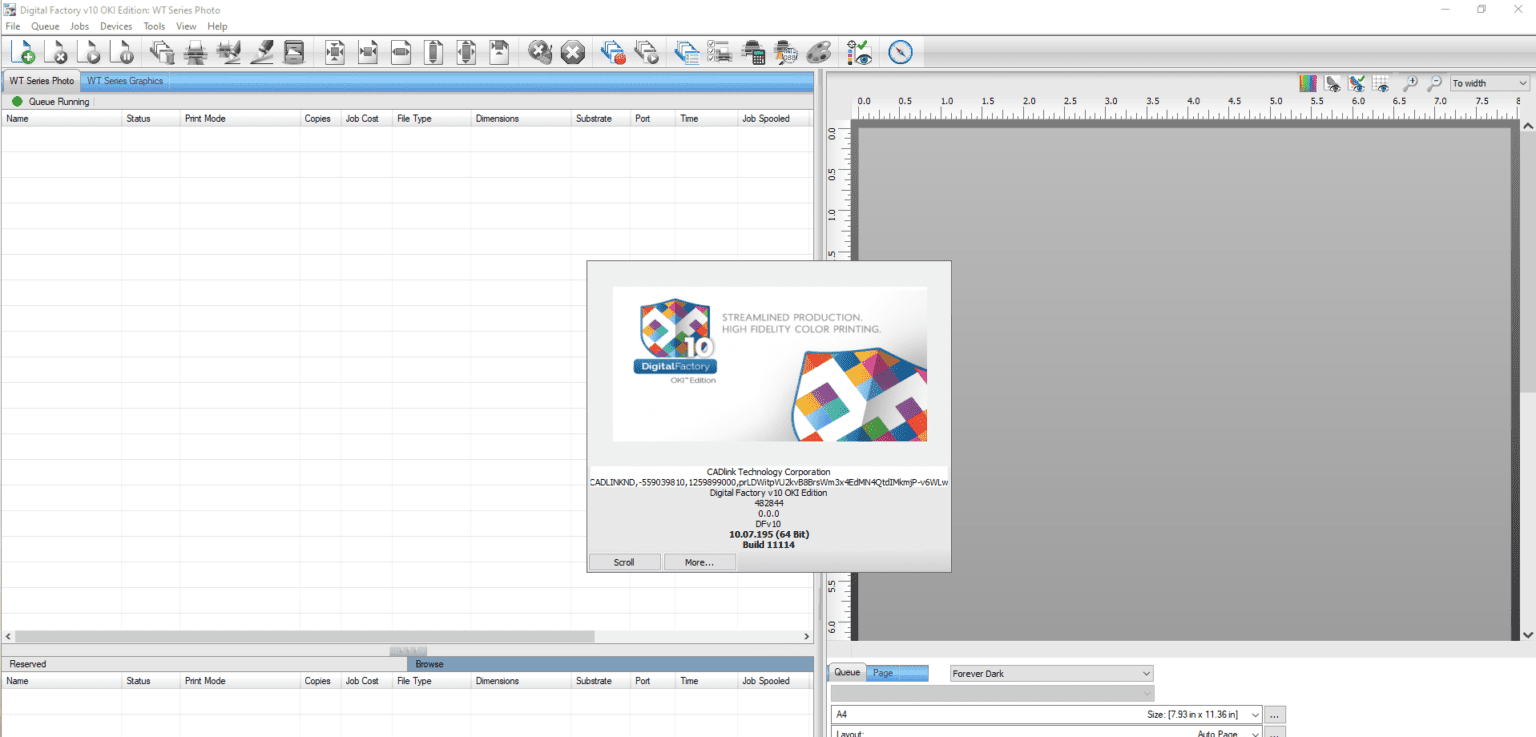
Description
Digital Factory OKI Edition Review: A Complete Guide to Advanced Label Design and Printing Software
Digital Factory Summary
Businesses that rely on high-quality label production need software that combines accuracy, flexibility, and ease of use. Digital Factory OKI Edition is designed specifically to maximize the capabilities of OKI color label printers, helping businesses produce vibrant labels, product packaging, barcode labels, and industrial signage with consistent professional results.
Whether you’re a small business creating product labels, a manufacturing company managing inventory, or a print service provider handling custom jobs, Digital Factory OKI Edition offers an efficient workflow that reduces errors while improving print quality.
This review explores everything you need to know about Digital Factory OKI Edition v, including its features, real-world applications, performance, advantages, limitations, pricing information, and why it remains a trusted solution for professional label printing.
Introduction
Modern businesses require fast, reliable, and professional printing solutions. Traditional label creation methods often involve multiple software applications, manual adjustments, and time-consuming print calibration.
Digital Factory OKI Edition streamlines the entire process by offering an integrated environment for label creation, color management, job preparation, and print production.
Built specifically for OKI label printers, the software helps users achieve accurate color reproduction, better media compatibility, and simplified production workflows. Instead of spending hours adjusting printer settings, users can focus on designing labels and completing projects faster.
Its intuitive interface makes it suitable for beginners while offering enough advanced functionality for experienced graphic designers and production professionals.
Key Features of Digital Factory OKI Edition v
Professional Color Management
One of the strongest aspects of Digital Factory OKI Edition v10 is its advanced color management engine.
It helps users:
- Produce consistent brand colors
- Improve color accuracy
- Reduce color variation between print jobs
- Optimize output for different label materials
This feature is especially valuable for businesses where brand consistency is essential.
Optimized for OKI Label Printers
Unlike generic RIP software, Digital Factory OKI Edition is specifically designed to work with OKI printing hardware.
Benefits include:
- Better printer communication
- Faster processing
- Optimized print settings
- Reliable output quality
This hardware-specific optimization minimizes compatibility issues and improves overall productivity.
Easy Label Design Workflow
Creating labels becomes significantly easier thanks to the organized interface.
Users can quickly:
- Import artwork
- Arrange layouts
- Resize graphics
- Add product information
- Insert logos
- Create multiple label variations
The software simplifies production without sacrificing professional-quality results.
Variable Data Printing
Businesses producing personalized labels benefit from variable data printing support.
Users can automatically print:
- Serial numbers
- Product codes
- QR codes
- Barcodes
- Batch numbers
- Customer information
This feature saves considerable time compared to manual editing.
Advanced Print Queue Management
Production teams can manage multiple print jobs efficiently.
Useful functions include:
- Job scheduling
- Print queue monitoring
- Batch processing
- Job prioritization
- Print history management
These capabilities improve workflow in busy printing environments.
High-Resolution Output
Digital Factory OKI Edition 10 supports high-resolution printing that delivers:
- Sharp text
- Smooth gradients
- Crisp graphics
- Accurate fine details
- Professional product labels
The result is packaging that enhances product presentation and brand credibility.
Flexible Media Support
The software supports numerous printable materials, including:
- Gloss labels
- Matte labels
- Waterproof media
- Synthetic labels
- Packaging materials
- Specialty stocks
This flexibility allows businesses to expand their product offerings without changing software.
Practical Use Cases
Digital Factory OKI Edition serves many industries where reliable label printing is essential.
Product Packaging
Small businesses producing cosmetics, candles, beverages, supplements, or food products can create premium-looking labels in-house.
Instead of outsourcing every printing project, companies gain greater control over quality, production speed, and inventory.
Manufacturing
Manufacturers frequently print:
- Equipment labels
- Safety warnings
- Compliance labels
- Identification stickers
- Asset tracking labels
Digital Factory OKI Edition helps ensure durability and consistent quality across large production runs.
Retail Businesses
Retail stores often require promotional labels, pricing stickers, shelf labels, and seasonal product branding.
The software enables quick updates without complicated design processes.
Warehousing and Logistics
Warehouses benefit from accurate barcode and inventory label printing.
Employees can generate:
- Shipping labels
- Inventory labels
- Storage location labels
- Tracking labels
This improves inventory accuracy and operational efficiency.
Print Service Providers
Commercial printing companies can use Digital Factory OKI Edition to manage multiple customer projects while maintaining excellent print quality.
Variable data printing and queue management features allow businesses to handle higher production volumes efficiently.
Performance Analysis
Performance is one of the software’s strongest qualities.
During regular production workloads, Digital Factory OKI Edition processes print jobs quickly while maintaining excellent color consistency.
Large graphics render smoothly, and the optimized communication with OKI printers reduces unnecessary delays.
Even complex label designs containing gradients, vector graphics, and high-resolution images print accurately without noticeable quality loss.
The interface remains responsive during extended production sessions, making it suitable for businesses with continuous daily printing requirements.
Another advantage is workflow stability. Production environments benefit from fewer interruptions because the software is designed specifically for compatible OKI hardware.
Overall, users experience:
- Fast job processing
- Stable performance
- Excellent print consistency
- Reliable production workflow
- Reduced printing errors
User Experience
Many users appreciate how Digital Factory OKI Edition simplifies professional label production.
New users typically find the interface organized enough to begin creating labels after a short learning period.
Experienced designers appreciate the software’s color management capabilities and production-oriented workflow.
Businesses often report improvements in:
- Production speed
- Label consistency
- Print accuracy
- Customer satisfaction
- Operational efficiency
The ability to control printing internally also helps organizations reduce outsourcing costs and shorten delivery times.
Advantages of Digital Factory OKI Edition v
The software offers numerous practical benefits.
Pros
- Designed specifically for OKI label printers
- Excellent color accuracy
- Professional print quality
- Reliable production workflow
- Variable data printing support
- High-resolution output
- Efficient print queue management
- Easy-to-use interface
- Supports multiple media types
- Suitable for businesses of all sizes
Limitations
Like any professional software, Digital Factory OKI Edition has some limitations.
Cons
- Best suited for compatible OKI printers
- Advanced features may require some learning
- Premium functionality may exceed the needs of occasional home users
- Some enterprise workflows may require additional software integration
Despite these considerations, the software performs exceptionally well within its intended printing environment.
Pricing & Plans
Digital Factory OKI Edition pricing may vary depending on:
- Software edition
- Licensing model
- Business requirements
- Regional availability
- Included technical support
Some businesses purchase the software as part of an OKI printer package, while others obtain standalone licenses through authorized software providers.
Organizations considering deployment should evaluate their production volume and printing requirements before selecting the appropriate licensing option.
Why Businesses Choose Digital Factory OKI Edition v
Several factors contribute to the software’s popularity among professional users.
Improved Productivity
Automation reduces repetitive tasks, allowing employees to complete more print jobs in less time.
Better Brand Consistency
Accurate color management ensures that logos and product packaging maintain a professional appearance across every production run.
Lower Production Costs
In-house label production minimizes outsourcing expenses while providing greater control over scheduling and quality.
Reliable Printing
Stable software performance reduces print failures, material waste, and production downtime.
Scalable Workflow
As businesses grow, Digital Factory OKI Edition can support increasing production demands without requiring major workflow changes.
Digital Factory OKI Edition v10 Developer
Digital Factory OKI Edition v10
Final Verdict
Digital Factory OKI Edition is a powerful and dependable solution for businesses that rely on professional color label printing. Its optimized integration with OKI printers, advanced color management, high-resolution output, and streamlined workflow make it an excellent choice for manufacturers, retailers, warehouses, and commercial print providers.
The software successfully balances ease of use with advanced production capabilities, making it suitable for both growing businesses and experienced printing professionals. While it is primarily intended for OKI printing environments, its specialized optimization delivers consistent, high-quality results that generic printing software often cannot match.
If your organization values accurate color reproduction, efficient production workflows, and professional-quality labels, Digital Factory OKI Edition is a worthwhile investment that can improve productivity while maintaining exceptional print standards.
Conclusion
Digital Factory OKI Edition v provides the tools businesses need to produce high-quality labels with confidence and efficiency. From product packaging and barcode labels to industrial identification and custom print jobs, the software offers reliable performance and professional results across a wide range of applications.
If you’re looking for a specialized label printing solution that enhances workflow, reduces production challenges, and delivers consistent output, Digital Factory OKI Edition v is well worth exploring for your printing operations.
Reviews
There are no reviews yet.