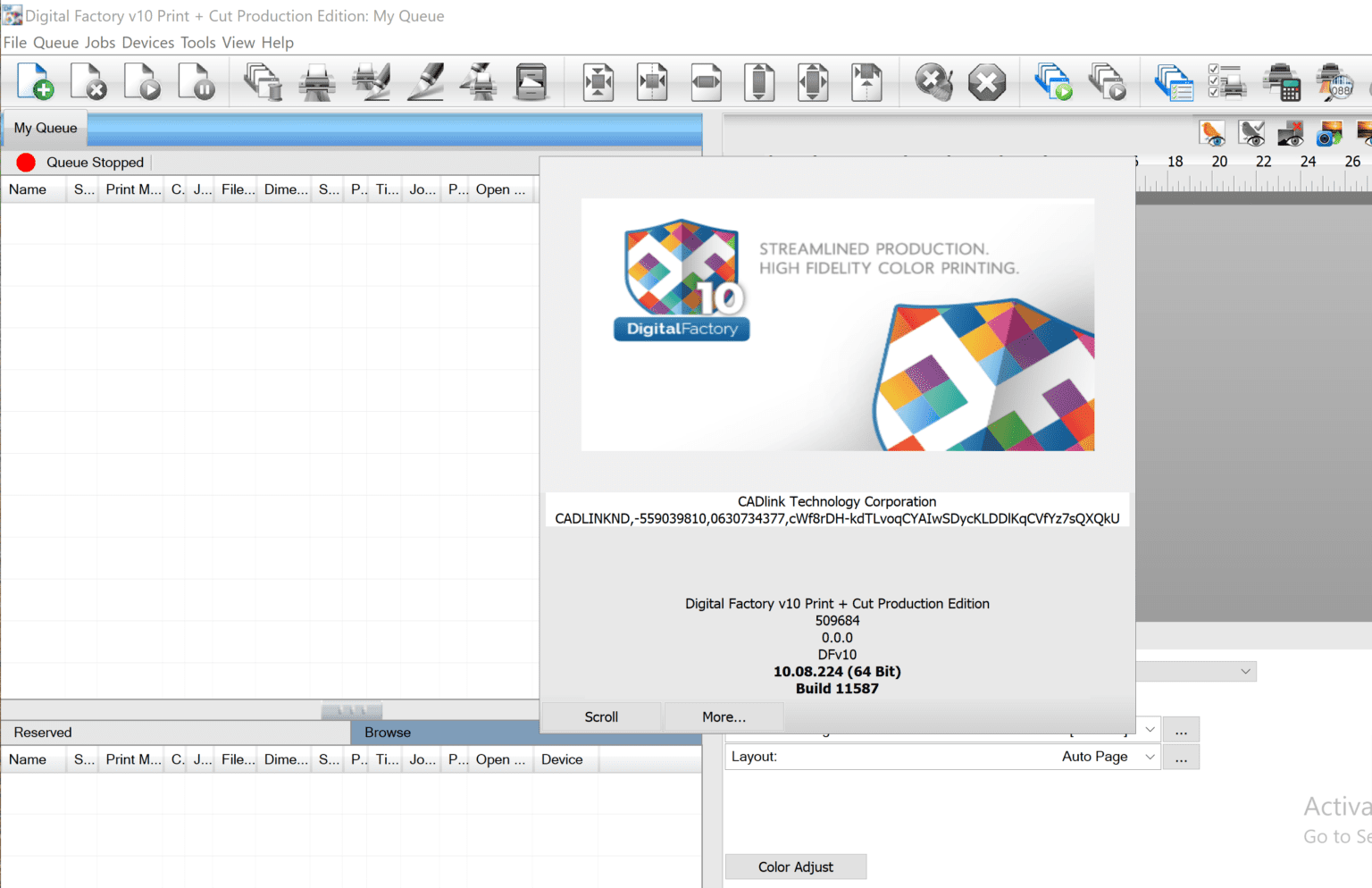
Description
Digital Factory Print Cut Production Edition 10 Review: Complete Production Workflow for Professional Print & Cut Businesses
Digital Factory Print Cut Production Edition – Quick Overview
Digital Factory Print Cut Production Edition is an advanced RIP and production workflow software designed for businesses that rely on high-volume printing and precision cutting. Whether you’re producing vinyl decals, vehicle graphics, promotional signage, apparel transfers, or custom labels, this software combines color management, print optimization, nesting, and cutting workflows into one centralized platform.
Unlike basic RIP solutions that focus only on printing, Digital Factory Print Cut Production Edition streamlines the entire production process from artwork preparation to final cutting. Its compatibility with a wide range of printers and cutting devices makes it an excellent solution for sign shops, commercial print providers, and production facilities seeking greater efficiency and consistent output.
If your business depends on fast turnaround times, accurate color reproduction, and automated production workflows, Digital Factory Print + Cut Production Edition is built to handle demanding print environments.
Introduction
Modern print businesses face increasing pressure to deliver high-quality products while reducing production time and material waste. Customers expect vibrant colors, precise cuts, and quick delivery regardless of order size.
Digital Factory Print Cut Production Edition 2026 addresses these challenges by providing an integrated production platform that manages every stage of print and cut operations. Instead of switching between multiple software applications, production teams can prepare artwork, manage color profiles, optimize layouts, send jobs to printers, and control cutting devices from one professional interface.
This streamlined workflow not only saves valuable production time but also improves consistency across every project.
Whether you’re producing hundreds of stickers daily or large-format commercial signage, Digital Factory Print + Cut Production Edition helps simplify complex production tasks.
Key Features
Complete Print and Cut Workflow
One of the biggest strengths of Digital Factory Print + Cut Production Edition is its end-to-end production workflow. Users can import artwork, prepare print files, generate cut paths, and send jobs directly to compatible printers and cutters without unnecessary manual steps.
This integrated workflow minimizes production errors while increasing operational efficiency.
Professional RIP Engine
The software includes a high-performance Raster Image Processor (RIP) that converts artwork into print-ready data with exceptional accuracy.
Benefits include:
- High-resolution image processing
- Smooth gradients
- Sharp text rendering
- Accurate vector handling
- Optimized print quality
This ensures consistent output across various print materials.
Advanced Color Management
Color consistency is critical for commercial printing.
Digital Factory Print + Cut Production Edition offers professional color management tools that help operators maintain accurate color reproduction throughout production.
Key capabilities include:
- ICC profile support
- Device calibration
- Spot color matching
- Color correction
- Consistent branding colors
These features reduce costly reprints while improving customer satisfaction.
Intelligent Nesting
Material costs represent a significant expense for print businesses.
The software’s intelligent nesting engine automatically arranges multiple jobs to maximize media usage.
Advantages include:
- Less material waste
- Higher productivity
- Faster batch production
- Reduced operator intervention
- Lower production costs
For businesses handling large job queues, intelligent nesting can generate substantial long-term savings.
Wide Device Compatibility
Digital Factory Print + Cut Production Edition supports numerous large-format printers and cutting plotters from major manufacturers.
This broad compatibility allows businesses to integrate existing hardware into one unified production environment instead of replacing equipment.
Automated Job Queue Management
Production teams often process dozens or even hundreds of jobs daily.
The software includes job queue management tools that allow operators to:
- Prioritize urgent orders
- Schedule production
- Monitor print status
- Reprint previous jobs
- Organize completed projects
Automation helps reduce bottlenecks and improves workflow organization.
Barcode Workflow Integration
Many professional print shops use barcode automation to simplify production.
Digital Factory Print + Cut Production Edition supports barcode workflows that automatically connect printed jobs with cutting devices.
This reduces manual setup while improving production accuracy.
Precision Cut Line Management
Accurate cutting is just as important as high-quality printing.
The software generates clean cut paths that ensure finished products align precisely with printed graphics.
This feature is especially valuable for:
- Stickers
- Labels
- Window graphics
- Heat transfer vinyl
- Vehicle decals
Practical Use Cases
Sign Making Businesses
Sign manufacturers benefit from the software’s ability to manage wide-format printing, contour cutting, and batch production efficiently.
Operators can quickly produce banners, posters, wall graphics, retail displays, and promotional materials.
Vehicle Wrap Production
Vehicle graphics require accurate color matching and extremely precise cutting.
Digital Factory Print + Cut Production Edition simplifies wrap production by maintaining print consistency while ensuring accurate contour cuts.
This reduces installation issues and material waste.
Sticker and Label Manufacturing
Custom sticker businesses often process hundreds of small jobs every week.
The intelligent nesting tools allow multiple customer orders to be combined into a single print run, significantly improving production efficiency.
Apparel Decoration
Print shops producing heat transfer graphics for apparel can use the software to prepare, print, and cut transfer designs with minimal manual adjustments.
The result is faster turnaround and cleaner production.
Promotional Product Printing
Businesses creating custom promotional products benefit from automated workflows that reduce repetitive tasks and improve consistency across product lines.
Performance Analysis
In real production environments, Digital Factory Print + Cut Production Edition performs exceptionally well under demanding workloads.
Large print files process efficiently without slowing production.
The RIP engine handles complex vector artwork, gradients, transparency, and high-resolution graphics with excellent reliability.
Operators frequently appreciate:
- Stable software performance
- Fast RIP processing
- Reliable printer communication
- Efficient workflow automation
- Professional output quality
Production managers often notice improvements in overall productivity after implementing automated workflows, especially when handling high-volume orders.
Another practical advantage is reduced operator workload.
Instead of manually configuring every job, many production tasks can be automated, allowing staff to focus on quality control and customer service.
User Experience
Although Digital Factory Print + Cut Production Edition offers many advanced capabilities, the interface remains organized and production-focused.
Experienced print professionals generally become comfortable with the workflow quickly.
Daily production tasks such as:
- Importing artwork
- Adjusting layouts
- Creating cut paths
- Managing queues
- Monitoring printers
can be completed from one centralized environment.
For businesses transitioning from multiple disconnected software packages, the unified workflow often leads to noticeable efficiency gains.
Pros and Cons
Pros
- Complete print and cut production solution
- Professional RIP processing engine
- Excellent color management capabilities
- Intelligent nesting reduces material waste
- Barcode automation support
- Wide printer and cutter compatibility
- Efficient job queue management
- Reliable production performance
- Suitable for high-volume commercial printing
- Streamlined workflow from design to finishing
Cons
- Learning advanced features may take time for new users
- Some specialized capabilities may only benefit larger production environments
- Hardware compatibility depends on supported printer and cutter models
- Initial workflow setup may require proper device configuration
Pricing & Plans
Digital Factory Print + Cut Production Edition pricing may vary depending on:
- Software edition
- License type
- Supported printer configuration
- Optional production modules
- Business requirements
Some vendors offer perpetual licenses, while others may provide subscription or upgrade options.
Before purchasing, businesses should verify:
- Supported printer models
- Cutter compatibility
- Included features
- Upgrade eligibility
- Technical support availability
Selecting the appropriate edition ensures the software aligns with current production needs while allowing room for future expansion.
Why Businesses Choose Digital Factory Print + Cut Production Edition
Many commercial printing companies adopt Digital Factory Print + Cut Production Edition because it helps simplify production without sacrificing quality.
Key business advantages include:
- Faster production cycles
- Reduced manual labor
- Better color consistency
- Lower material waste
- Improved job accuracy
- Scalable workflow management
- Increased production capacity
- Professional-grade output
These improvements contribute to higher customer satisfaction and more efficient day-to-day operations.
SEO Highlights
Digital Factory Print + Cut Production Edition is frequently searched by businesses looking for:
- Digital Factory Print + Cut Production Edition software
- Professional RIP software for print and cut
- Large format print production software
- Commercial print workflow solution
- Print and cut RIP software
- Wide format printing software
- Color management software for printing
- Vinyl cutting workflow software
- Production RIP software
- Industrial print management solution
These search terms reflect the software’s role in helping commercial print providers manage complex production environments efficiently.
Digital Factory Print + Cut Production Edition Developer
Digital Factory Print + Cut Production Edition v10
Final Verdict
Digital Factory Print Cut Production Edition is a comprehensive production workflow solution that combines professional RIP processing, advanced color management, intelligent nesting, and precision cutting into one powerful platform. It is well suited for sign makers, commercial printers, vehicle wrap specialists, label manufacturers, and apparel decorators who require dependable, high-quality output at scale.
Its ability to automate repetitive tasks, reduce material waste, and maintain consistent print quality makes it a valuable investment for businesses focused on productivity and professional results. While new users may need some time to learn its advanced capabilities, the long-term gains in efficiency and workflow management can make the effort worthwhile.
If your goal is to streamline print and cut production while maintaining accuracy and reliability, Digital Factory Print + Cut Production Edition is a strong choice. Explore its features, confirm compatibility with your existing equipment, and evaluate how it can enhance your production workflow to deliver faster turnaround times and consistently high-quality finished products.


Reviews
There are no reviews yet.