Description
Dolphin SuperNova Screen Reader Review: A Complete Accessibility Solution for Low Vision Users
Strong Summary
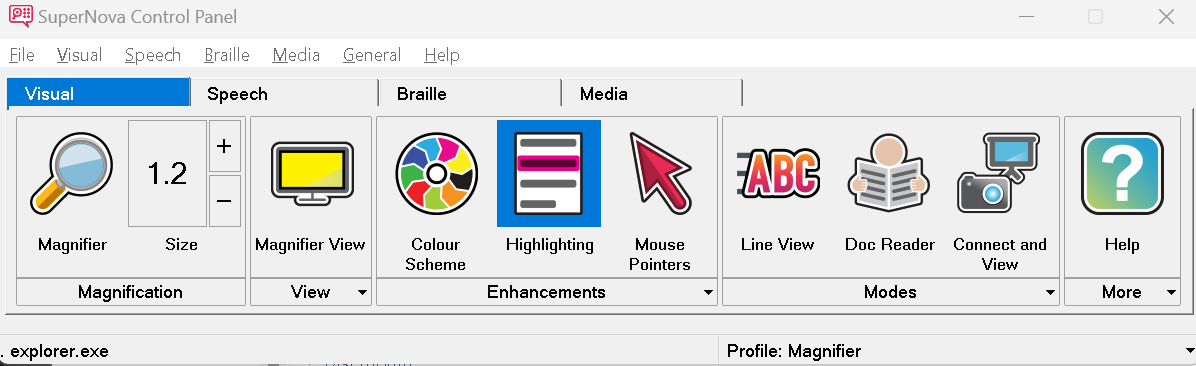
Dolphin SuperNova Screen Reader is a comprehensive accessibility software designed for individuals with visual impairments, low vision, and reading difficulties. It combines screen reading, screen magnification, and Braille support into a single unified platform, making digital environments more accessible and easier to navigate. Unlike basic assistive tools, Dolphin SuperNova focuses on delivering a customizable and professional-grade experience for both personal and educational use. With its advanced speech output, flexible magnification controls, and compatibility with modern applications, it stands out as a reliable solution for users who require consistent digital accessibility support.
Introduction
In today’s digital-first world, accessibility software plays a critical role in ensuring equal access to information, communication, and productivity tools. Dolphin SuperNova Screen Reader is one of the established names in this space, offering a robust suite of assistive technologies designed specifically for users with visual challenges.
Unlike simple screen readers that only convert text to speech, Dolphin SuperNova provides a multi-layered accessibility environment. It integrates screen reading, magnification, and Braille output in a single package, reducing the need for multiple tools. This makes it particularly valuable for students, professionals, and elderly users who need a reliable and consistent assistive solution.
Built with flexibility and ease of use in mind, the software adapts to different levels of vision impairment. Whether a user needs full screen reading or partial magnification support, Dolphin SuperNova delivers a tailored experience.
Key Features
Dolphin SuperNova Screen Reader includes a wide range of accessibility-focused features designed to enhance usability and independence.
1. Advanced Screen Reading Engine
The core screen reader converts on-screen text into natural-sounding speech. It supports:
- Web pages
- Documents
- Emails
- Applications
- System menus
The voice output is designed to be clear, adjustable, and easy to understand even during long sessions.
2. Integrated Screen Magnification
Users with low vision can zoom into content without losing clarity. Key magnification features include:
- Adjustable zoom levels
- Smooth screen transitions
- Color contrast customization
- Focus tracking for cursor and text
3. Braille Display Compatibility
For users who rely on tactile feedback, Dolphin SuperNova supports refreshable Braille displays, allowing seamless integration with assistive hardware.
4. Multi-Mode Accessibility System
One of its strongest features is the ability to switch between:
- Screen reader mode
- Magnifier mode
- Combined mode
This flexibility allows users to choose the best setup for their specific needs.
5. Web Accessibility Optimization
The software is optimized for browsing modern websites, supporting:
- HTML navigation shortcuts
- Form reading assistance
- Table navigation
- Structured content reading
6. Customizable Voice Settings
Users can adjust:
- Speech speed
- Voice type
- Pronunciation style
- Volume control
This ensures a personalized experience for different learning preferences.
7. Application Compatibility
Dolphin SuperNova works with a wide range of software, including:
- Microsoft Office applications
- Web browsers
- Email clients
- Educational platforms
Practical Use Cases
Dolphin SuperNova Screen Reader is widely used across different environments, each benefiting from its accessibility-first design.
1. Academic Learning Environment
Students with visual impairments can:
- Read digital textbooks
- Navigate online learning portals
- Complete assignments independently
- Participate in virtual classrooms
This improves educational inclusion and reduces dependency on external assistance.
2. Workplace Productivity
Professionals use the software for:
- Reading emails and reports
- Managing spreadsheets
- Attending online meetings
- Using enterprise software systems
It helps maintain productivity in office environments that rely heavily on digital tools.
3. Personal Daily Use
For everyday users, Dolphin SuperNova supports:
- Social media browsing
- Online shopping
- News reading
- Communication apps
This allows greater independence in digital life.
4. Rehabilitation and Vision Loss Adaptation
Individuals adjusting to vision loss benefit from:
- Gradual learning curves
- Scalable magnification
- Speech guidance for navigation
It serves as a supportive tool during vision rehabilitation processes.
Performance Analysis
When evaluating assistive software, performance consistency and responsiveness are critical factors. Dolphin SuperNova Screen Reader performs reliably across most modern systems.
Responsiveness
The screen reader reacts quickly to user input, with minimal delay in speech output. Navigation through menus and applications remains smooth under normal system loads.
System Resource Usage
While feature-rich, the software is optimized to balance performance and system usage. It runs efficiently on standard Windows systems without requiring high-end hardware.
Stability
Long-term usage shows stable performance with minimal crashes or interruptions. This is particularly important for users who depend on continuous accessibility support.
Accuracy of Reading
Text interpretation is generally accurate, especially in standard documents and structured web pages. Complex layouts may require occasional navigation adjustments, but overall reliability remains strong.
Pros and Cons
Pros
- Combines screen reader, magnifier, and Braille support in one platform
- Highly customizable accessibility settings
- Strong compatibility with common applications
- Suitable for education, work, and personal use
- Clear and adjustable speech output
- Supports modern web navigation
Cons
- Learning curve for first-time users
- Advanced features may require initial configuration
- Performance may vary on older systems
- Some complex web layouts may require manual navigation
Pricing and Plans
Dolphin SuperNova Screen Reader is typically offered in multiple licensing options depending on user requirements. These may include:
- Individual license for personal use
- Educational licensing for students and institutions
- Professional or enterprise licensing for workplace deployment
Pricing can vary based on selected features such as magnification level, Braille support, and additional accessibility modules. Organizations often opt for bulk licensing when deploying across multiple users.
Users are encouraged to choose a plan based on their specific accessibility needs, as the software is modular and scalable.
Dolphin SuperNova Screen Reader Developer
Dolphin SuperNova Screen Reader
Final Verdict
Dolphin SuperNova Screen Reader stands out as a powerful and well-integrated accessibility solution designed for users with visual impairments. Its combination of screen reading, magnification, and Braille support makes it more versatile than many single-function alternatives in the market.
From academic environments to professional workplaces, the software delivers meaningful improvements in independence and productivity. While it may take some time to learn its full capabilities, the long-term benefits significantly outweigh the initial learning curve.
For users seeking a dependable and feature-rich accessibility tool, Dolphin SuperNova Screen Reader remains a strong and trustworthy choice that supports both everyday tasks and advanced digital workflows.
Conclusion
Dolphin SuperNova Screen Reader provides a complete accessibility experience that enhances digital independence across multiple use cases. Users looking to improve screen navigation, reading efficiency, and overall usability will find it a practical and long-term solution worth exploring for personal, educational, or professional needs.


Reviews
There are no reviews yet.