Description
DV Play Review: A Reliable Digital Video Playback Solution for Professional Media Workflows
DV Play is a powerful digital video playback solution designed for professionals who require stable, high-quality media playback in production, broadcasting, presentations, digital signage, and live event environments. Whether you’re managing video content during corporate events or delivering seamless playback in a studio, DV Play focuses on reliability, performance, and ease of use. Its efficient playback engine, flexible media support, and user-friendly interface make it a practical choice for organizations seeking dependable multimedia software.
Unlike many consumer-grade media players, DV Play is built with professional workflows in mind. It helps reduce playback interruptions, improves media organization, and ensures smooth performance even during demanding presentations. In this review, we’ll explore its features, practical applications, strengths, limitations, and overall value to help you determine whether DV Play is the right solution for your media playback needs.
Introduction
Professional media playback software plays an essential role in industries where timing, reliability, and high-quality video output are critical. From television studios and event production companies to educational institutions and corporate meeting rooms, dependable playback software helps ensure every presentation runs without unexpected interruptions.
DV Play is designed specifically to meet these professional demands. Rather than focusing solely on entertainment playback, it offers tools that simplify media management while maintaining consistent playback quality across various environments.
Whether you’re a video producer, event technician, content creator, or AV professional, DV Play provides an efficient solution for handling multimedia presentations with confidence.
Key Features of DV Play
Professional Video Playback Engine
The core strength of DV Play lies in its optimized playback engine, which is designed to deliver smooth, uninterrupted video performance.
Benefits include:
- Stable playback during live events
- Reduced frame drops
- High-quality video rendering
- Reliable long-duration playback
This makes it suitable for mission-critical presentations where reliability matters.
Broad Media Format Compatibility
Modern media workflows involve numerous video and audio formats. DV Play supports a wide range of commonly used file types, minimizing the need for time-consuming conversions.
Supported media often includes:
- HD videos
- Full HD content
- Audio files
- Presentation media
- Various professional video formats
This flexibility helps production teams work more efficiently.
User-Friendly Interface
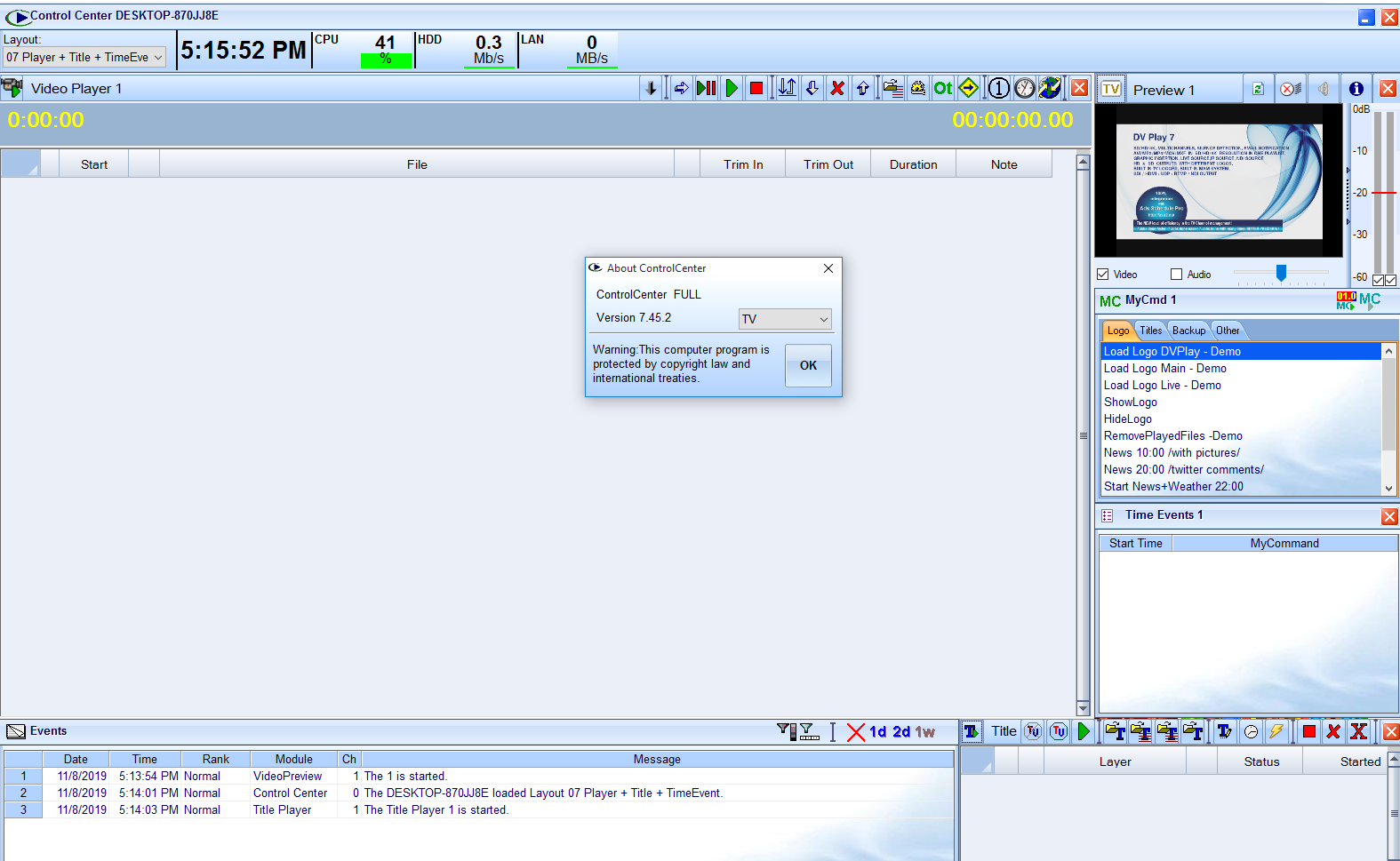
One of the most appreciated aspects of DV Play v8 is its clean and intuitive interface.
Users can quickly:
- Load media
- Create playlists
- Organize playback
- Control video output
- Monitor playback status
Even first-time users can become comfortable with the DV Play 7.45.2 software after only a short learning period.
Playlist Management
Managing multiple media files during presentations becomes much easier with playlist functionality.
Users can:
- Arrange playback order
- Schedule video sequences
- Prepare event playlists
- Modify playlists before live sessions
This feature reduces manual intervention during important presentations.
High-Quality Playback
Professional environments require crisp visuals without playback artifacts.
Digital Video DV Play focuses on:
- Smooth frame rendering
- Accurate video synchronization
- Clear audio playback
- Consistent playback quality
This helps deliver polished presentations that leave a professional impression.
Performance Optimization
Unlike standard media players designed primarily for home users, DV Play is optimized for continuous professional operation.
Performance improvements include:
- Efficient memory usage
- Stable CPU utilization
- Long-session reliability
- Minimal playback interruptions
Practical Use Cases
Live Event Production
One of the most common uses of DV Play is during live events.
Event production companies often rely on it to:
- Play opening videos
- Display sponsor advertisements
- Show promotional content
- Deliver award ceremony videos
- Run conference presentations
Reliable playback reduces the risk of technical failures during important moments.
Corporate Presentations
Businesses frequently use multimedia during meetings, conferences, and product launches.
DV Play helps presenters:
- Switch between videos quickly
- Deliver polished presentations
- Avoid playback delays
- Maintain professional quality
Large organizations appreciate the software’s stability during executive presentations.
Broadcasting Studios
Television and broadcasting professionals require dependable playback systems.
DV Play can assist with:
- Pre-recorded video segments
- Promotional clips
- Training videos
- Internal broadcasting workflows
Its consistent performance supports professional broadcasting operations.
Educational Institutions
Schools, colleges, and universities increasingly rely on digital media for teaching.
DV Play enables educators to:
- Present educational videos
- Deliver multimedia lectures
- Play instructional content
- Organize classroom presentations
Its simplicity makes it suitable for instructors with varying technical experience.
Digital Signage
Organizations using digital displays benefit from reliable playback software.
Common examples include:
- Hotel information displays
- Retail advertising
- Museum exhibits
- Visitor centers
- Corporate lobbies
DV Play helps ensure content plays continuously without interruptions.
Real-World User Experience
Many professionals value software that simply works when needed.
Imagine an event technician preparing a conference attended by hundreds of guests. Before the keynote begins, multiple promotional videos, sponsor messages, and opening animations need to play flawlessly.
With DV Play, the technician creates a playlist beforehand, verifies playback, and confidently starts the presentation. Videos transition smoothly, audio remains synchronized, and the audience experiences a polished production without technical distractions.
Similarly, an educational institution can prepare lecture videos in advance, allowing instructors to focus on teaching rather than troubleshooting media playback.
These practical advantages demonstrate why dependable playback software remains valuable across industries.
Performance Analysis
Performance is one of DV Play’s strongest selling points.
Speed
Media loads quickly, allowing operators to prepare presentations without unnecessary waiting.
Playback Stability
The software is designed to minimize crashes and playback interruptions, even during extended sessions.
Resource Efficiency
DV Play generally operates efficiently without placing excessive demands on modern hardware.
This enables organizations to deploy it across various systems without requiring expensive workstation upgrades.
Reliability During Live Events
For professional users, reliability is often more important than having dozens of advanced editing tools.
DV Play focuses on delivering dependable playback, making it suitable for live production environments where errors are unacceptable.
Pros and Cons
Pros
- Professional-grade video playback
- Clean and intuitive interface
- Reliable long-duration performance
- Broad media format support
- Smooth high-quality playback
- Easy playlist management
- Suitable for corporate and broadcasting environments
- Optimized for professional workflows
Cons
- May include more features than casual users require
- Advanced configurations may take time to master
- Pricing details may vary depending on licensing and deployment options
Pricing & Plans
DV Play licensing may vary depending on:
- Commercial requirements
- Professional deployment
- Organizational licensing
- Enterprise usage
Some organizations may require customized licensing packages based on the number of users or installations.
Prospective buyers should evaluate the available licensing options to determine which plan best fits their operational needs and budget.
Why Businesses Choose DV Play
Organizations often prioritize software that delivers predictable performance every day.
DV Play stands out because it offers:
- Professional media playback
- Consistent reliability
- Easy deployment
- Efficient workflow management
- Stable long-term operation
These qualities make it an attractive choice for businesses where uninterrupted playback is essential.
Who Should Use DV Play?
DV Play is well suited for:
- Broadcasting companies
- Event production teams
- Corporate AV departments
- Educational institutions
- Government organizations
- Digital signage operators
- Conference organizers
- Media production professionals
Its balance of simplicity and professional functionality allows both experienced technicians and newer users to benefit from its capabilities.
Final Verdict
DV Play delivers a dependable, professional-grade digital video playback experience for organizations that require stable and high-quality multimedia presentations. Rather than overwhelming users with unnecessary complexity, it focuses on the essentials that matter most: reliable playback, broad media compatibility, efficient playlist management, and smooth performance.
Whether you’re coordinating a live event, running digital signage, supporting classroom instruction, or managing media in a broadcast environment, DV Play provides the stability and flexibility needed for consistent results. Its intuitive interface shortens the learning curve, while its optimized performance helps minimize technical disruptions during critical presentations.
If you’re looking for a trusted digital video playback solution that combines professional performance with ease of use, DV Play is well worth considering. Evaluate its features against your workflow requirements, test it in your production environment, and see how it can streamline your media playback process while delivering a polished experience for your audience.



Reviews
There are no reviews yet.