Description
GeminiBIM Tools for Revit Review: A Powerful Productivity Suite for Faster and Smarter BIM Workflows
Summary
Building Information Modeling (BIM) projects continue to grow in complexity, making productivity and accuracy more important than ever. Revit already offers an impressive set of modeling capabilities, but professionals often need additional automation tools to eliminate repetitive tasks and improve project efficiency. This is where GeminiBIM Tools for Revit becomes a valuable addition.
Designed specifically for architects, BIM managers, structural engineers, MEP designers, and construction professionals, GeminiBIM Tools for Revit extends Revit’s functionality with practical utilities that simplify daily workflows. Instead of spending hours performing manual operations, users can automate common tasks, improve model consistency, and reduce the possibility of human error.
Whether you’re working on residential projects, commercial developments, hospitals, industrial facilities, or large infrastructure projects, GeminiBIM Tools for Revit helps teams work faster while maintaining high-quality BIM standards.
Introduction
Modern BIM projects require more than just powerful modeling software. Project teams need efficient workflows, standardized processes, and reliable automation to meet deadlines without sacrificing quality.
Many Revit users eventually discover that repetitive modeling, parameter management, family organization, sheet creation, and project cleanup consume valuable production time. These small tasks may seem insignificant individually, but across hundreds of project hours, they can significantly impact productivity.
GeminiBIM Tools for Revit addresses these challenges by providing a collection of intelligent utilities that enhance daily Revit workflows. Instead of replacing Revit, it complements Autodesk’s platform by introducing time-saving features specifically designed for real-world BIM production.
The result is a smoother, faster, and more organized design process from project kickoff to final documentation.
Key Features of GeminiBIM Tools for Revit
Comprehensive Productivity Tools
GeminiBIM Tools offers numerous utilities that automate repetitive Revit operations, helping users complete tasks with fewer clicks.
Typical productivity enhancements include:
- Batch processing
- Model cleanup
- Parameter management
- Family organization
- Sheet management
- View management
- Element selection tools
- Data validation
- Project standardization
These features reduce manual effort while improving consistency across projects.
Automated Project Organization
Large BIM models can quickly become difficult to manage. GeminiBIM Tools helps organize projects by simplifying file structure, views, sheets, schedules, and documentation.
This organized approach improves collaboration among multiple team members.
Parameter Management
Managing parameters manually across hundreds or thousands of Revit elements can become overwhelming.
GeminiBIM Tools streamlines:
- Shared parameter updates
- Project parameter management
- Data consistency
- Batch editing
- Parameter verification
This makes project information more reliable and easier to maintain.
Batch Editing Capabilities
Instead of editing elements individually, users can modify multiple components simultaneously.
Examples include:
- Renaming views
- Updating sheets
- Changing element properties
- Editing family data
- Bulk parameter updates
Batch processing dramatically reduces repetitive work.
BIM Quality Control
Maintaining BIM standards is essential throughout the project lifecycle.
GeminiBIM Tools helps identify inconsistencies before they become major issues by supporting better quality assurance processes.
Practical Use Cases
Architectural Design Firms
Architectural teams often manage hundreds of drawings, schedules, views, and model elements.
GeminiBIM Tools helps automate routine administrative work so designers can focus on creative problem-solving instead of repetitive editing.
Structural Engineering Projects
Structural engineers frequently coordinate with architects and MEP consultants.
GeminiBIM Tools assists with:
- Model consistency
- Documentation accuracy
- Parameter management
- Batch updates
- Coordination workflows
This reduces coordination errors between disciplines.
MEP Design
Mechanical, electrical, and plumbing projects contain thousands of interconnected components.
Using GeminiBIM Tools allows engineers to:
- Manage system information
- Organize project data
- Improve documentation
- Update parameters efficiently
- Reduce repetitive editing
The result is faster project delivery with fewer manual corrections.
BIM Management
BIM managers are responsible for enforcing company standards across multiple projects.
GeminiBIM Tools supports:
- Company templates
- Naming conventions
- Project auditing
- Model cleanup
- Standard compliance
This makes maintaining organizational BIM standards much easier.
Construction Documentation
Preparing construction documents often requires repetitive sheet management and documentation tasks.
GeminiBIM Tools accelerates documentation workflows while reducing manual mistakes that can delay project delivery.
Performance Analysis
One of the strongest advantages of GeminiBIM Tools for Revit is its focus on workflow efficiency rather than unnecessary complexity.
During everyday project work, users typically notice productivity improvements because repetitive operations become significantly faster.
Performance highlights include:
- Fast execution of automation tasks
- Reduced manual editing
- Improved project organization
- Better model consistency
- Cleaner BIM documentation
- Simplified project management
Because the tools operate directly within the Revit environment, users can continue working without constantly switching between multiple applications.
Another benefit is consistency.
Instead of relying on each team member to follow every standard manually, GeminiBIM Tools helps automate standardized processes, leading to fewer modeling inconsistencies across large projects.
For organizations managing multiple Revit projects simultaneously, these efficiency gains can save many hours over the course of a project.
Real-World User Experience
Imagine an architecture firm working on a 40-story commercial office tower.
The project contains:
- Hundreds of sheets
- Thousands of model elements
- Multiple consultants
- Frequent design revisions
- Tight construction deadlines
Without automation, project updates become repetitive and time-consuming.
After implementing GeminiBIM Tools, the BIM manager uses automation to organize views, update parameters, clean project data, and maintain company standards.
Instead of spending entire afternoons performing administrative tasks, the team completes these operations in a fraction of the time.
Designers spend more time improving the building rather than managing repetitive project maintenance.
This type of productivity improvement represents the real value of GeminiBIM Tools.
Benefits of Using GeminiBIM Tools for Revit
Users often appreciate GeminiBIM Tools because it delivers measurable improvements in everyday BIM workflows.
Major advantages include:
- Faster Revit project management
- Reduced repetitive manual work
- Improved BIM data accuracy
- Better documentation consistency
- Easier parameter management
- Enhanced collaboration
- Increased productivity
- Cleaner project organization
- Simplified quality control
- Better compliance with company standards
These benefits make the software valuable for firms handling both small and enterprise-level BIM projects.
Pros and Cons
Pros
- Excellent productivity enhancement for Revit users
- Automates repetitive BIM tasks
- Saves significant project time
- Improves documentation consistency
- Simplifies parameter management
- Supports better BIM standards
- Easy integration with Revit workflows
- Suitable for architects, engineers, and BIM managers
- Helps reduce human errors
- Scales well for large projects
Cons
- Requires familiarity with Revit workflows
- Full feature utilization may involve a learning period
- Benefits are greatest for medium and large BIM projects
- Feature availability may differ depending on software version and licensing
Pricing and Plans
GeminiBIM Tools for Revit pricing may vary depending on:
- License type
- Organization size
- Number of users
- Subscription options
- Commercial licensing agreements
Some organizations purchase licenses for individual professionals, while larger firms may choose team or enterprise licensing to support multiple users.
Prospective buyers should review the available licensing options to determine the most suitable plan for their workflow and project requirements.
Why Professionals Choose GeminiBIM Tools for Revit
Today’s BIM professionals face increasing pressure to deliver projects faster while maintaining exceptional quality.
GeminiBIM Tools addresses this challenge by focusing on practical automation rather than unnecessary complexity.
Professionals value the software because it helps:
- Reduce project delivery time
- Improve BIM workflow efficiency
- Maintain consistent project standards
- Eliminate repetitive editing
- Increase overall productivity
- Support better team collaboration
For firms managing multiple Revit projects simultaneously, these improvements can contribute to substantial long-term efficiency gains.
GeminiBIM Tools for Revit Developer
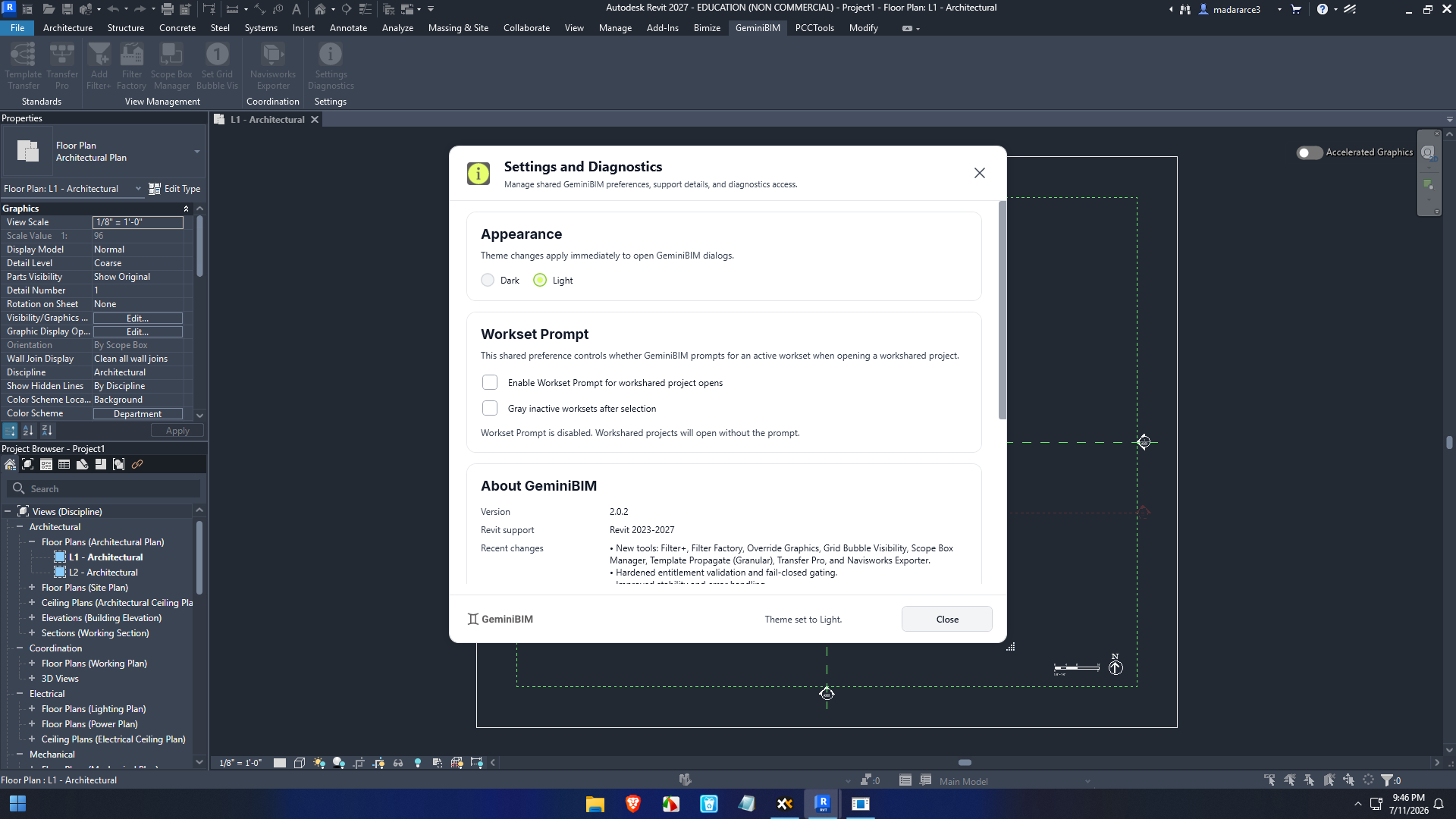
GeminiBIM Tools for Autodesk Revit 2027 Full Version 2.0.2
Final Verdict
GeminiBIM Tools for Revit is a highly practical productivity suite that enhances Autodesk Revit with automation, project management utilities, and workflow optimization tools. Rather than changing how professionals design buildings, it improves how efficiently they complete everyday BIM tasks.
From parameter management and model organization to documentation and quality control, the software delivers meaningful time savings while helping maintain consistent project standards. Its automation features reduce repetitive work, allowing architects, engineers, and BIM managers to focus on design quality and collaboration instead of manual administration.
Whether you’re part of a small design studio or a large multidisciplinary engineering firm, GeminiBIM Tools for Revit can become an essential part of your BIM toolkit. If you’re looking to streamline Revit workflows, improve documentation accuracy, and boost team productivity, this solution is well worth exploring for your next BIM project.


Reviews
There are no reviews yet.