Description
Geosolve SLOPE 12.05 version 2027: Powerful Slope Stability Analysis and Reinforced Soil Design Software
Summary
Geosolve SLOPE 2027 is a specialized geotechnical engineering program designed for analyzing slope stability, earth pressure, bearing capacity, and reinforced soil applications. Developed by Geosolve, the software has a long history in geotechnical engineering, with the original SLOPE program first released in 1982 and reinforced-soil analysis capabilities added in 1987. The Windows version followed in 2003.
What makes Geosolve SLOPE 12.05 particularly useful is its combination of established slope stability methods, automatic critical slip-surface searches, groundwater modeling, surcharge and anchor loading, seismic analysis, and reinforced-earth design. Engineers can work with natural or cut slopes, embankments, reinforced slopes, and walls while reviewing factors of safety and graphical representations of critical failure mechanisms.
For geotechnical engineers, civil engineers, consultants, and students who need a focused solution for slope stability calculations, Geosolve SLOPE offers a practical workflow without trying to become an oversized general-purpose engineering platform.
Introduction
Slope stability analysis is one of those engineering tasks where small changes in soil parameters, groundwater conditions, loading, or geometry can significantly affect the final result.
Imagine an engineer assessing a proposed road embankment. The geometry looks reasonable, but the site investigation identifies several soil layers and a fluctuating groundwater condition. A nearby structure also introduces a surcharge. Manually checking multiple potential failure mechanisms would quickly become repetitive.
This is where dedicated slope stability software becomes valuable.
Geosolve SLOPE is built specifically around this type of geotechnical problem. It allows engineers to define soil strata, groundwater conditions, loads, slope geometry, and other parameters before calculating factors of safety for potential failure mechanisms. The software can automatically generate slip surfaces to help identify critical conditions.
Rather than relying on one calculation method, SLOPE provides several established analysis approaches, including the Swedish Circle or Fellenius method, Bishop’s method, Spencer’s method, and Janbu’s method.
That makes it useful not only for obtaining a numerical result but also for comparing how different analytical assumptions affect the stability assessment.
What Is Geosolve SLOPE?
Geosolve SLOPE is commercial geotechnical engineering software for slope stability analysis and reinforced soil design.
The program can analyze both natural and cut slopes and can also be applied to certain earth pressure and bearing capacity problems. Its reinforced-soil capabilities can be used for reinforced slopes, embankments, and walls.
The software supports:
- Circular slip-surface analysis
- Wedge analysis
- Natural and cut slope assessment
- Reinforced soil design
- Embankment analysis
- Multiple soil strata
- Groundwater and piezometric conditions
- Surcharge loads
- Anchor loads
- Earthquake forces
- DXF and DWG profile imports
- Graphical presentation of results
- Automatic searches for critical failure mechanisms
This focused feature set makes Geosolve SLOPE particularly relevant to engineers who regularly perform slope stability and reinforced-earth calculations.
Key Features of Geosolve SLOPE
1. Multiple Slope Stability Methods
One of the strongest aspects of the program is its support for several traditional limit-equilibrium approaches.
Users can select from:
- Swedish Circle or Fellenius method
- Bishop’s method
- Spencer’s method
- Janbu’s method
Each method makes different assumptions about the distribution of forces within the potential sliding mass. The resulting factor of safety therefore provides useful engineering information when methods are compared appropriately.
For experienced engineers, having multiple methods available in one application can make sensitivity checking much easier.
2. Automatic Critical Slip-Surface Search
Finding the most critical potential failure surface is central to slope stability analysis.
Geosolve SLOPE can automatically generate slip surfaces and search for critical failure mechanisms. Instead of manually testing every possible circular failure surface, engineers can use the program to investigate a broader range of potential mechanisms.
The result is a workflow that can be considerably more efficient for complex slope profiles.
3. Groundwater and Pore Pressure Modeling
Water is often one of the most important variables in slope stability.
SLOPE allows groundwater conditions to be represented using water tables or multiple piezometric surfaces. For more complicated situations, local pore-pressure values can also be specified, including cases involving aquifers or construction-related pore pressures.
This is particularly valuable when evaluating slopes where changes in groundwater conditions may reduce effective stress and influence stability.
4. Reinforced Soil Design
The reinforced-soil functionality extends SLOPE beyond basic stability calculations.
The software can help determine appropriate reinforcement arrangements for achieving a required factor of safety. Supported reinforcement options include fabric, grids, strips, and soil nail.
For reinforced slopes and embankments, the program can provide information about reinforcement elevations, lengths, and the critical wedge associated with different reinforcement levels.
5. Loads and Seismic Conditions
Real projects rarely involve an isolated slope with no external loading.
Geosolve SLOPE allows engineers to model surcharge and anchor loads, while earthquake forces can also be included in the analysis.
This makes the software applicable to a wider range of practical engineering scenarios than a simple slope geometry calculator.
6. CAD Profile Import
Another useful productivity feature is the ability to import slope profiles from DXF or DWG files.
For engineers already working with CAD drawings, this can reduce repetitive geometry entry and make the transition from design drawings to geotechnical analysis more convenient.
Practical Use Cases
Road and Highway Embankments
Road projects frequently involve cut slopes, fills, and embankments.
An engineer can model the proposed slope geometry, soil layers, groundwater conditions, and traffic-related surcharge before evaluating the factor of safety.
This can help identify whether the proposed geometry requires modification or additional stabilization measures.
Natural Slope Assessment
Natural slopes can contain multiple soil layers and complicated groundwater conditions.
SLOPE’s ability to represent different strata and pore-pressure conditions can help engineers investigate possible failure mechanisms and compare alternative assumptions.
Reinforced Earth Structures
Where a conventional slope does not provide the required stability, reinforcement may become part of the solution.
SLOPE can be used to design or analyze reinforced slopes and embankments, including different reinforcement types and arrangements
Construction and Excavation Projects
Temporary or permanent cuts may need stability checks before construction proceeds.
Engineers can investigate different geometries and loading conditions and determine how the factor of safety changes as project conditions are modified.
Earthquake-Related Stability Studies
For projects in seismic regions, earthquake loading can be incorporated into the analysis.
This provides another useful scenario for geotechnical engineers evaluating slopes where seismic forces are part of the design considerations.
Performance Analysis
From a workflow perspective, Geosolve SLOPE is designed around practical engineering calculations rather than visual complexity.
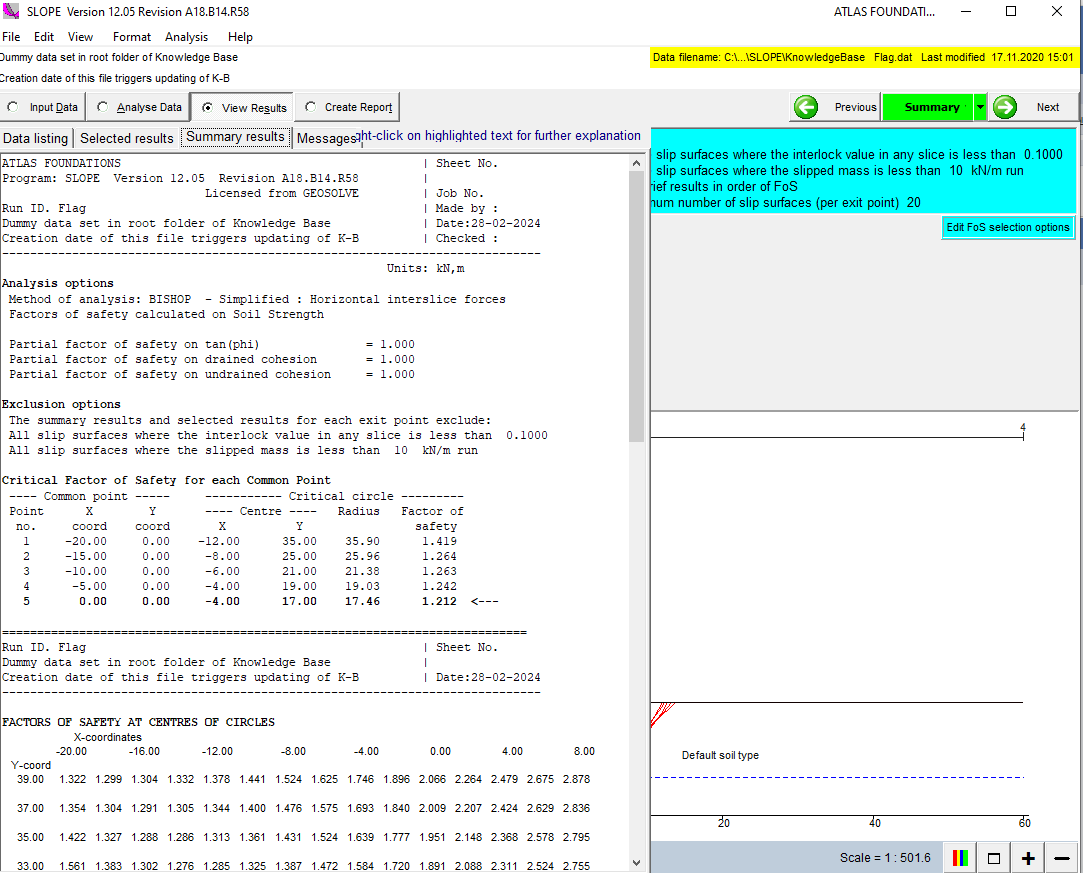
The program provides graphical displays of the soil profile, water-pressure profiles, surcharges, and critical slip surfaces. Results can also be presented through detailed numerical output, including factors of safety, force distributions, and reinforcement information.
This is important because a good engineering application should make results understandable rather than simply produce a number.
The software also performs extensive data checking and reports inappropriate parameter combinations through warnings and error messages. Its documentation explains that users can access clarification associated with these warnings, which can help during model preparation.
Another practical advantage is its relatively modest system footprint. Geosolve states that SLOPE operates on Windows systems, with program files occupying approximately 3 MB and requiring around 10 MB of RAM according to its published hardware information.
These requirements are extremely light by modern standards.
User Experience and Learning Curve
Geosolve has positioned its software as user-friendly and provides built-in Help facilities and user guides. The SLOPE user guide explains program operations, parameter definitions, and the underlying basis of the analysis. (Geosolve)
For a new user, the interface may feel more traditional than modern engineering software. However, this can also be an advantage for engineers who prefer a direct calculation-oriented environment.
The important point is that the quality of a slope stability result still depends heavily on the engineering model. Software can calculate a factor of safety, but it cannot replace appropriate site investigation, soil characterization, groundwater assessment, engineering judgment, or project-specific design standards.
Pros and Cons
Pros
- Dedicated tool for slope stability analysis
- Supports several established limit-equilibrium methods
- Automatic critical slip-surface generation
- Circular and wedge analysis options
- Multiple soil strata can be modeled
- Groundwater and pore-pressure conditions can be represented
- Supports surcharge, anchor, and earthquake loading
- Reinforced soil design capabilities
- DXF and DWG profile import
- Graphical results and detailed numerical output
- Built-in Help and user documentation
- Very low published hardware requirements
Cons
- The interface may appear dated compared with newer geotechnical platforms
- It is focused primarily on specific geotechnical calculations rather than being a broad multidisciplinary platform
- Advanced users working on highly complex three-dimensional problems may need other specialized tools
- Engineers must still verify assumptions, soil parameters, boundary conditions, and design criteria independently
- Commercial licensing can represent a significant investment for occasional users
Pricing and Plans
Geosolve’s published price list currently identifies several licensing options for SLOPE.
For SLOPE version 12, the published indicative pricing includes a five-year single-user standalone license at £1,660, with a five-year network installation listed at £2,150. Shorter starter-pack options are also available, including 12-month and 24-month licenses.
For SLOPE version 12R, which includes slope stability analysis and reinforced soil design, the published indicative price is £3,310 for a first five-year single-user standalone license and £4,300 for a network installation. Starter packs are also listed.
Geosolve notes that these prices are indicative and recommends requesting a formal quotation before purchase. License fees include support, maintenance, and updates during the license period according to the published pricing information. Academic discounts may also be available.
A limited-operation demonstration version is also available, allowing users to explore input, editing, and Help facilities and review pre-calculated examples.
Because licensing and pricing can change, buyers should confirm the current package and terms before ordering.
Final Verdict
Geosolve SLOPE remains a focused and capable option for engineers who need reliable slope stability and reinforced-soil analysis without the overhead of a large multidisciplinary engineering platform.
Its biggest strength is specialization. The software concentrates on the problems that geotechnical engineers actually encounter when evaluating slope stability: soil stratification, groundwater, surcharge loading, critical slip surfaces, different equilibrium methods, seismic forces, and reinforcement.
The availability of Bishop, Spencer, Janbu, and Fellenius approaches gives engineers useful flexibility for comparative analysis, while automatic slip-surface searches can reduce repetitive calculations. Reinforced-soil design capabilities make the software even more useful for stabilization and embankment projects.
At the same time, prospective users should understand what the software is and is not. It is a specialized engineering calculation tool, not a replacement for professional geotechnical judgment. The reliability of any calculated factor of safety depends on the quality of the input data and the appropriateness of the selected analytical assumptions.
For civil engineers, geotechnical consultants, earthworks designers, and engineering teams regularly working on slope stability problems, Geosolve SLOPE is worth exploring. Its long development history, focused analytical capabilities, practical modeling tools, and reinforced-soil options make it a useful addition to a geotechnical engineering workflow.
If your projects involve natural slopes, excavations, embankments, reinforced earth, groundwater-related stability, or seismic slope assessment, exploring Geosolve SLOPE can be a practical next step. Start by reviewing the available demonstration resources and evaluating how its workflow fits your own engineering requirements before selecting the appropriate license.



Reviews
There are no reviews yet.