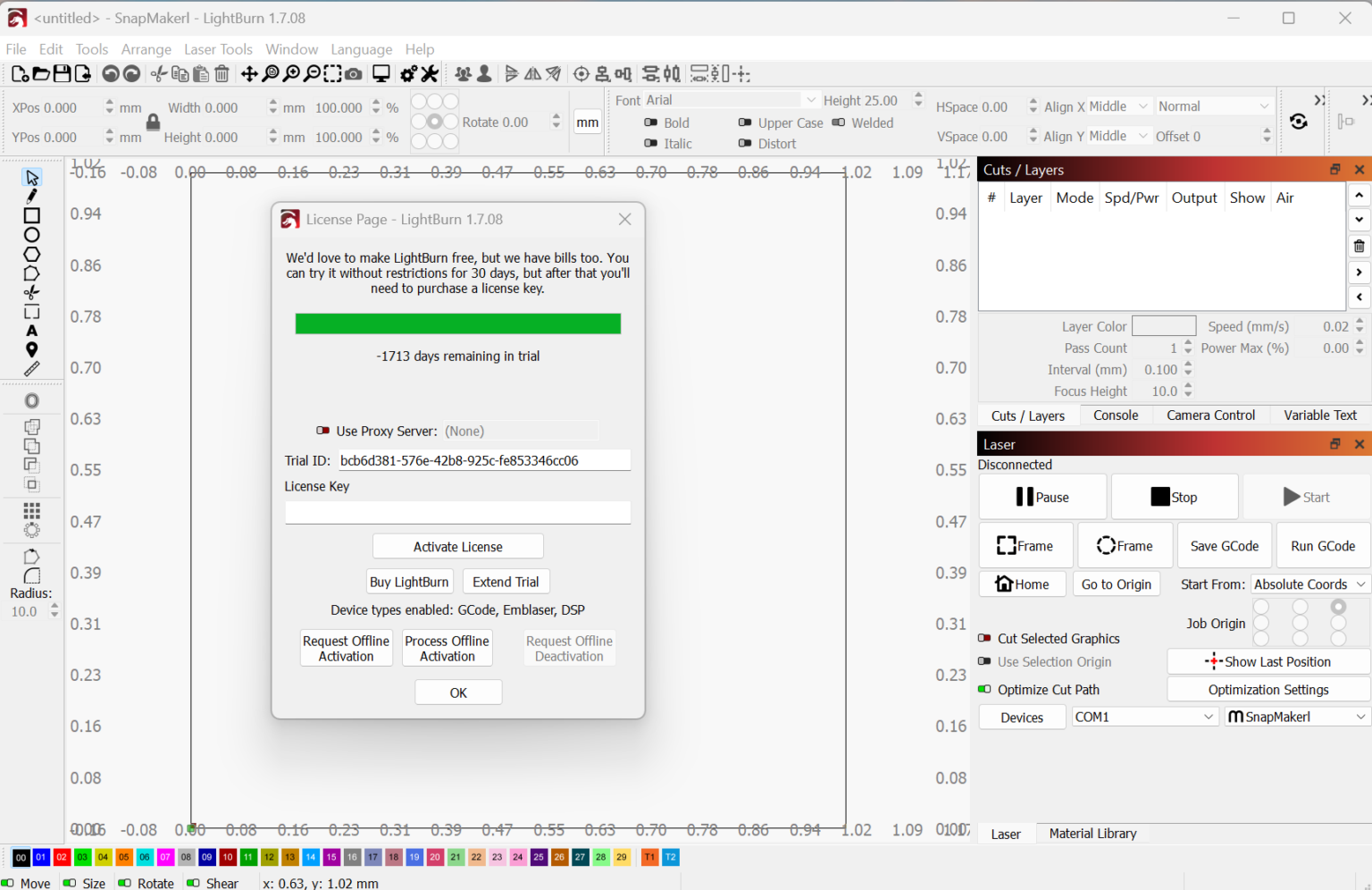
Description
LightBurn Software Review: The All-in-One Laser Engraving and Cutting Design Solution
Strong Summary
LightBurn is widely regarded as one of the most powerful and user-friendly laser engraving and cutting software solutions available today. Designed for hobbyists, makers, and industrial users alike, it brings design, layout, editing, and machine control into a single unified environment. Unlike many fragmented workflows that require switching between multiple programs, LightBurn streamlines everything from vector design to laser execution.
What makes LightBurn stand out is its compatibility with a wide range of laser controllers, including GRBL, Ruida, Trocen, and Galvo systems. It is especially valued for its precision control, intuitive interface, and reliable performance in real-world laser cutting and engraving applications.
Whether you are running a small laser engraving business, working in a fabrication workshop, or experimenting as a DIY creator, LightBurn offers a balanced combination of power, simplicity, and professional-grade features.
Introduction
In the modern fabrication and digital manufacturing landscape, laser engraving software plays a critical role in determining output quality, workflow efficiency, and production speed. LightBurn has emerged as a leading solution in this category, offering a comprehensive platform that eliminates the need for multiple tools.
Traditionally, users had to rely on separate software for design creation, file conversion, and machine control. LightBurn changes this by integrating these functions into one cohesive system. It supports both design creation and direct laser control, making it a complete laser cutter design software solution.
The software is compatible with Windows, macOS, and Linux, ensuring accessibility for a wide range of users. Its focus on precision and usability makes it suitable for both beginners and professionals working in laser engraving and cutting industries.
Key Features of LightBurn Software
LightBurn offers a rich set of features that cater to both creative design and technical laser control requirements.
1. Built-in Vector Design Tools
LightBurn includes a full set of vector editing tools that allow users to create designs directly within the software. These include:
- Shape creation tools (rectangles, circles, polygons)
- Node editing for precise adjustments
- Boolean operations (union, subtract, intersect)
- Text tool with advanced font control
2. Advanced Laser Control System
One of the strongest aspects of LightBurn is its direct machine control capability. Users can:
- Adjust power, speed, and pass settings
- Set layer-based cutting parameters
- Preview laser paths before execution
- Control multiple laser heads and operations
3. Wide Controller Compatibility
LightBurn supports multiple laser controller types, including:
- GRBL-based controllers
- Ruida DSP controllers
- Trocen controllers
- Galvo fiber laser systems
This flexibility makes it a preferred choice in mixed hardware environments.
4. Camera Integration
The software supports camera positioning systems, allowing users to align designs directly on materials. This feature improves accuracy and reduces material waste.
5. Layer-Based Workflow
LightBurn uses a color-coded layer system that helps users organize operations efficiently. Each layer can have different:
- Speed settings
- Power levels
- Cut or engrave modes
6. Real-Time Preview
Before running a job, users can simulate laser paths to identify errors, overlaps, or inefficiencies. This reduces production mistakes significantly.
7. File Compatibility
LightBurn supports multiple file formats, including:
- SVG
- DXF
- AI (import support)
- PNG and JPG (for engraving)
Practical Use Cases
LightBurn is not limited to a single industry. Its versatility makes it useful in various real-world applications.
Small Business Laser Shops
Many small engraving businesses rely on LightBurn for producing customized products such as:
- Personalized gifts
- Wooden engravings
- Acrylic signage
- Leather branding
The software enables quick design-to-production workflows, reducing turnaround time.
Industrial Manufacturing
In industrial environments, LightBurn is used for:
- Component marking
- Serial number engraving
- Batch processing
- Precision cutting tasks
Its stability and controller compatibility make it suitable for continuous production.
DIY Makers and Hobbyists
For hobby users, LightBurn simplifies laser experimentation. It is commonly used for:
- Home décor projects
- Custom artwork engraving
- Model making
- Craft customization
Educational Institutions
Engineering and design schools use LightBurn to teach students laser cutting principles, CAD workflows, and digital fabrication techniques.
Performance Analysis
LightBurn performs exceptionally well in both low-power desktop lasers and high-end industrial systems. Its optimized processing engine ensures smooth handling of complex vector files without lag.
Speed and Responsiveness
The software responds quickly even when handling large design files. Toolpath generation is efficient, minimizing waiting time during production setup.
Accuracy and Precision
LightBurn is known for its high precision in laser path execution. This is especially important in industries where millimeter-level accuracy is required.
Stability
One of its strongest advantages is system stability. Unlike some laser control software that crashes under load, LightBurn maintains consistent performance during long engraving sessions.
Learning Curve
While beginners may need some time to understand laser settings and layer configurations, the interface remains intuitive compared to industrial CAD systems.
Pros and Cons
Pros
- All-in-one design and laser control software
- Supports multiple laser controller types
- Powerful vector editing tools
- Excellent layer-based workflow system
- High precision and stable performance
- Cross-platform compatibility (Windows, macOS, Linux)
- Strong community support and documentation
Cons
- Requires a paid license (no permanent free version)
- Initial learning curve for beginners
- Advanced features may be overwhelming for casual users
- Not a full 3D CAD software solution
Pricing and Plans
LightBurn follows a one-time license model rather than a subscription system, which is one of its most appreciated features.
License Options
- Trial Version: Fully functional for a limited period
- GCode License: For GRBL-based and similar controllers
- DSP License: For Ruida and Trocen controllers
- Galvo License: For fiber laser systems
Upgrade Policy
Licenses typically include free updates for a fixed duration, after which users can optionally renew for continued updates while keeping the software functional.
Value for Money
Considering its capabilities, LightBurn is widely seen as a cost-effective solution for both small businesses and professional manufacturing environments. The one-time purchase model provides long-term affordability compared to subscription-based alternatives.
Real-World User Experience
Users across different industries often highlight LightBurn’s reliability and ease of integration with laser machines. A common experience shared by workshop owners is the significant reduction in workflow complexity.
Instead of exporting files between multiple design and control programs, users can complete the entire process inside LightBurn. This not only improves efficiency but also reduces errors caused by file conversions.
Many users also appreciate the ability to fine-tune laser parameters for different materials such as wood, acrylic, leather, and metal-coated surfaces. This flexibility allows experimentation without sacrificing consistency in production.
Final Verdict
LightBurn stands out as a complete, reliable, and professional-grade laser engraving software solution. It bridges the gap between design creation and machine control, offering an integrated environment that simplifies complex workflows.
For small businesses, it enhances productivity. For industrial users, it ensures precision and stability. For hobbyists, it provides an accessible entry point into laser cutting and engraving.
While it does require an initial investment and some learning effort, the long-term benefits far outweigh these limitations. Its flexibility, performance, and broad hardware compatibility make it one of the most trusted tools in the laser engraving industry.
Actionable Conclusion
If you are looking to improve your laser cutting or engraving workflow with a single powerful platform, LightBurn is a strong choice worth serious consideration. Its combination of precision control, design flexibility, and stable performance makes it suitable for both beginners and professionals aiming to scale their creative or manufacturing work efficiently.
Reviews
There are no reviews yet.