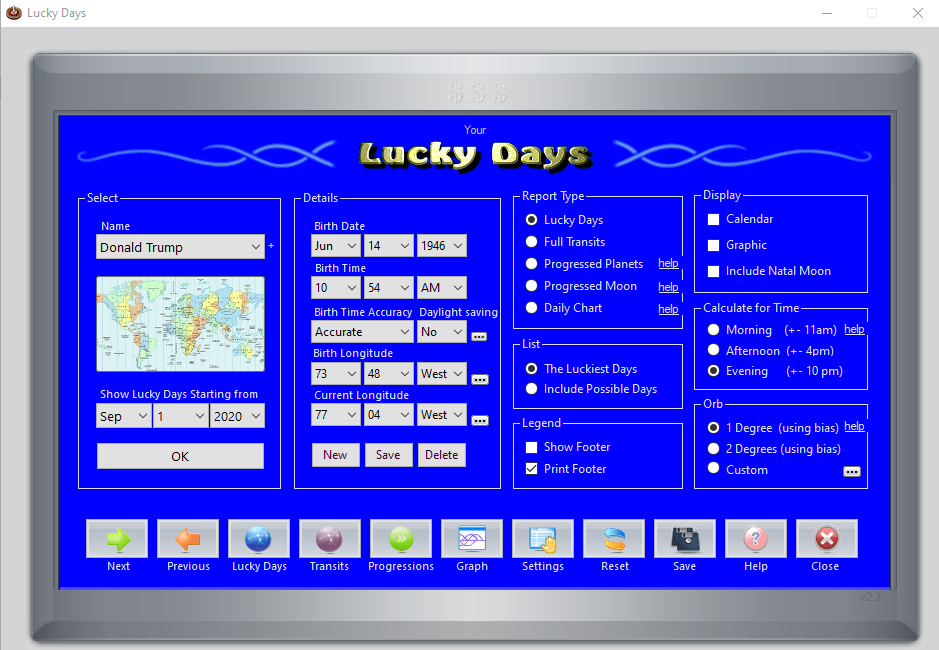
Description
Lucky Days Astrology 2026 A Smart and Reliable Date Analysis Software for Personal Planning
Lucky Days Summary
Finding the right time to make important life decisions has fascinated people for centuries. Whether it’s scheduling a wedding, launching a business, signing a contract, or planning a major trip, many individuals look for guidance beyond traditional calendars. Lucky Days is software designed to help users identify favorable and less favorable dates based on established date-analysis principles and customizable calculation methods.
Unlike simple calendar applications, Lucky Days provides structured insights into date patterns, allowing users to plan events with greater confidence. Its clean interface, detailed reports, and flexible customization make it suitable for beginners as well as experienced users interested in date analysis.
In this Lucky Days review, we’ll explore its features, practical applications, strengths, limitations, performance, pricing, and whether it’s worth adding to your software collection.
Introduction
Planning important events often involves balancing schedules, budgets, and personal preferences. Some users also consider date-analysis systems to help determine favorable timing for significant milestones.
Lucky Days is a specialized software solution created to simplify this process. Instead of manually performing calculations or consulting multiple references, the software automates complex date evaluations and presents the information in an easy-to-understand format.
Whether you’re planning personal events or assisting clients professionally, Lucky Days aims to provide organized reports that help users make more informed scheduling decisions.
The software focuses on ease of use while maintaining enough flexibility for users who want detailed analysis and personalized settings.
Key Features of Lucky Days
Intelligent Date Analysis
The primary strength of Lucky Days lies in its ability to analyze dates quickly and accurately. Users can evaluate individual dates or compare multiple options before making important decisions.
This feature saves significant time compared to manual calculations.
User-Friendly Interface
Lucky Days offers a clean workspace with clearly labeled tools and menus.
Even first-time users can navigate the software comfortably without spending hours learning complicated functions.
Highlights include:
- Simple navigation
- Easy calendar selection
- Clear result presentation
- Organized reports
- Beginner-friendly workflow
Customizable Settings
Every user has unique preferences.
Lucky Days allows customization of various calculation settings, helping users adapt the software according to their preferred analysis methods.
Flexible configuration improves both usability and accuracy for experienced users.
Detailed Reports
Instead of displaying only simple results, Lucky Days generates comprehensive reports explaining the characteristics of selected dates.
These reports help users understand:
- Favorable periods
- Less suitable dates
- Comparative analysis
- Planning recommendations
- Historical patterns where applicable
Fast Processing
The software performs calculations almost instantly.
Whether evaluating one date or an entire calendar, results are generated quickly without noticeable delays on modern computers.
Calendar Navigation
The integrated calendar system allows users to move between months and years effortlessly.
This feature is especially useful when planning long-term projects or future events.
Report Export Options
Many users appreciate the ability to save or print reports for future reference.
Export functionality makes it convenient for consultants and professionals who share reports with clients.
Practical Use Cases
Lucky Days is useful across a wide variety of real-world situations.
Personal Life Planning
Individuals often use Lucky Days when organizing:
- Weddings
- Engagements
- House moving
- Family gatherings
- Important purchases
- Travel planning
The software provides another perspective that users may incorporate into their planning process.
Business Decision Support
Entrepreneurs frequently evaluate dates before:
- Opening new businesses
- Launching products
- Signing agreements
- Starting marketing campaigns
- Scheduling company events
Lucky Days helps organize potential dates for comparison, making planning more systematic.
Professional Consultants
Professionals who provide scheduling or date-analysis consultations benefit from:
- Faster calculations
- Printable reports
- Consistent evaluations
- Reduced manual work
- Better client presentations
Long-Term Event Planning
Organizations planning conferences, seminars, educational programs, or community events may use Lucky Days to compare multiple scheduling options.
The software simplifies the decision-making process by presenting structured date information.
Personal Productivity
Some users enjoy selecting dates for:
- Beginning new habits
- Starting fitness programs
- Financial planning
- Educational goals
- Personal development projects
Although individual beliefs and planning methods vary, Lucky Days serves as a useful organizational tool for those who incorporate date analysis into their routines.
Performance Analysis
Performance is one of the strongest aspects of Lucky Days.
Installation
The installation process is straightforward and generally requires only a few minutes.
The setup wizard guides users through each step clearly.
Speed
Calculations are completed rapidly.
Users rarely experience delays while analyzing multiple dates or generating reports.
Fast response times improve overall productivity.
Stability
Lucky Days performs consistently during extended usage.
The software remains reliable even when generating multiple reports during a single session.
Resource Usage
Lucky Days does not demand high-end hardware.
Most standard Windows computers can run the software comfortably without excessive CPU or memory consumption.
This makes it accessible to a wide range of users.
Learning Curve
New users typically become comfortable with the software after only a short period.
The logical menu structure minimizes confusion while allowing access to advanced features when needed.
User Experience
One reason Lucky Days remains appealing is its balance between simplicity and functionality.
Users often appreciate that they can begin analyzing dates almost immediately after installation.
The software avoids unnecessary complexity while still providing detailed information for users who want deeper insights.
Reports are organized logically, making them easy to read and reference later.
The straightforward workflow also reduces the chance of input errors.
Benefits of Using Lucky Days
Lucky Days offers several practical advantages:
- Saves time compared to manual calculations
- Easy for beginners to learn
- Generates detailed reports
- Fast date comparisons
- Organized calendar interface
- Lightweight software performance
- Helpful customization options
- Suitable for both personal and professional use
- Reliable report generation
- Efficient long-term planning assistance
Pros and Cons
Pros
- Clean and intuitive interface
- Quick installation process
- Fast calculation engine
- Easy calendar navigation
- Comprehensive reporting
- Flexible customization options
- Low system requirements
- Suitable for beginners and experienced users
- Stable performance during extended use
Cons
- Specialized functionality may not appeal to users seeking a general productivity calendar
- Some advanced options may require time to fully understand
- Feature availability may vary depending on the software version
Pricing & Plans
Lucky Days pricing may vary depending on the edition, licensing model, and software distributor.
Potential purchase options may include:
- Single-user license
- Professional license
- Business or commercial licensing
- Upgrade packages for existing customers
Before purchasing, it is recommended to verify the latest pricing, included features, licensing terms, and update policies from the software seller.
Who Should Use Lucky Days?
Lucky Days is suitable for:
- Individuals interested in date-analysis software
- Event planners
- Business owners
- Professional consultants
- Coaches
- Researchers
- Personal development enthusiasts
- Long-term planners
Its combination of ease of use and detailed reporting makes it appropriate for both occasional and frequent users.
Lucky Days Compared with Traditional Planning Methods
Traditional planning methods often require consulting multiple calendars, notes, or manual calculations.
Lucky Days streamlines the entire process by centralizing date evaluation into one software solution.
Instead of spending valuable time performing repetitive calculations, users receive organized reports almost instantly.
For professionals handling multiple clients, this efficiency can significantly improve workflow.
Final Verdict
Lucky Days is a thoughtfully designed software solution for users who want an organized approach to date analysis and event planning. Its intuitive interface, fast performance, customizable settings, and detailed reporting make it a valuable option for individuals and professionals alike.
While it is designed for a specialized purpose rather than general calendar management, it performs that role effectively by simplifying complex date evaluations and presenting results in a clear, user-friendly format. The software is lightweight, stable, and easy to learn, making it suitable for users with varying levels of experience.
If you’re looking for dependable date analysis software to support personal planning, business scheduling, or professional consulting, Lucky Days is a worthwhile choice. Explore its features, compare the available licensing options, and see how it can enhance your planning process with structured insights and efficient reporting.



Reviews
There are no reviews yet.