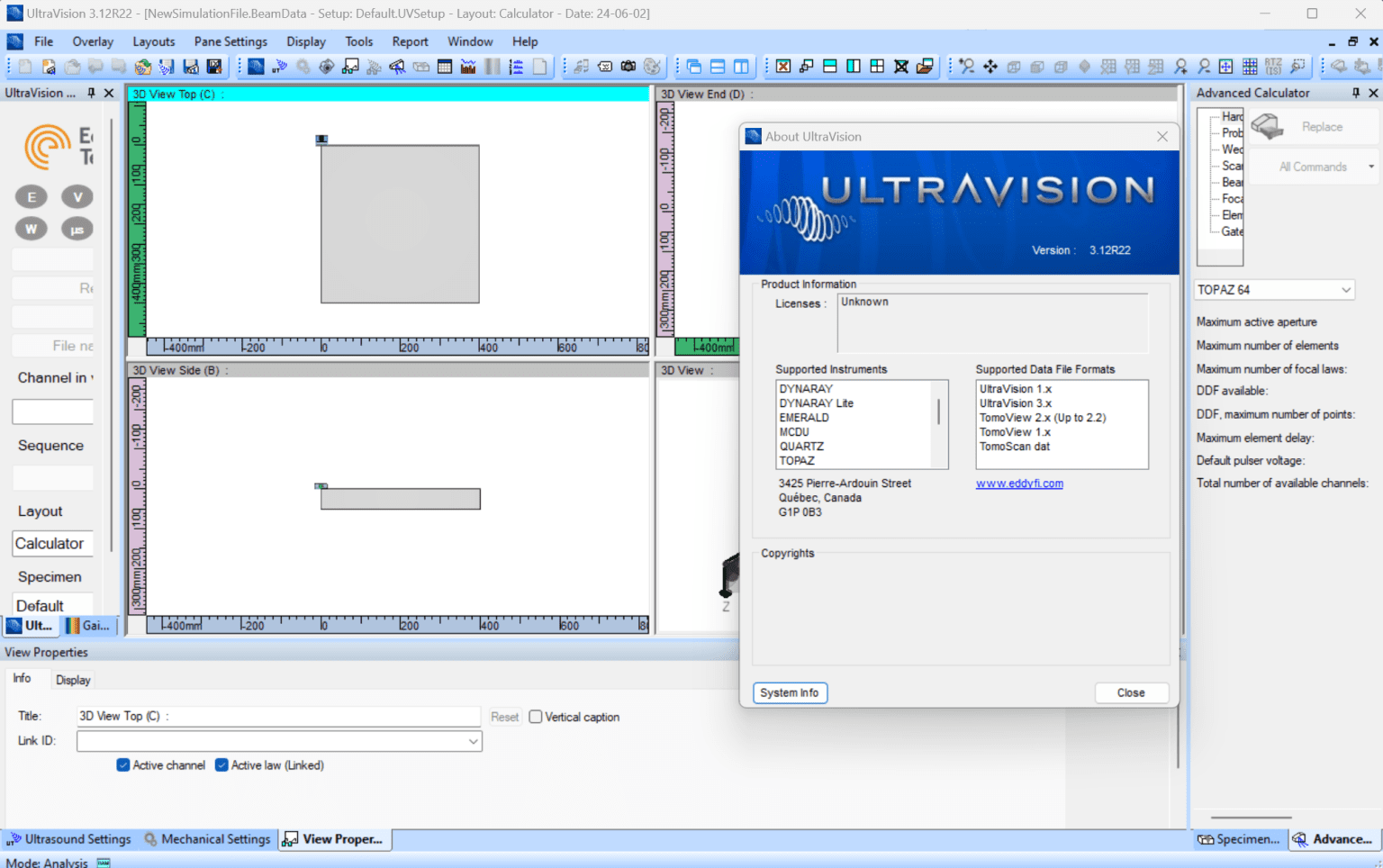
Description
UltraVision Review 2026: Advanced Display Management Software for Multi-Monitor Productivity
UltraVision Review Summary
UltraVision is a professional multi-monitor management solution designed to help users maximize workspace efficiency, streamline window organization, and improve productivity across complex display environments. Whether you’re a financial analyst working with multiple dashboards, a software developer managing coding environments, or a content creator editing videos across several screens, UltraVision offers a collection of tools that transform ordinary multi-monitor setups into highly organized workstations.
Unlike basic display utilities included with operating systems, UltraVision provides advanced features such as custom taskbars, window positioning controls, desktop extensions, hotkeys, wallpaper management, and display profiles. These capabilities make it particularly appealing to professionals who depend on multiple monitors for daily workflows.
In this UltraVision review, we’ll examine its features, real-world applications, performance, strengths, limitations, pricing information, and whether it remains a worthwhile investment for productivity-focused users in 2026.
Introduction to UltraVision
Modern work environments have evolved dramatically over the past decade. Single-monitor setups are increasingly being replaced by dual, triple, and even larger display configurations to accommodate growing workloads and multitasking requirements.
However, operating systems often provide only limited support for managing complex display arrangements efficiently. This is where UltraVision enters the picture.
UltraVision is designed specifically for users who want more control over their desktop environment. Instead of constantly resizing windows, dragging applications between screens, or dealing with cluttered taskbars, users can customize how applications behave across multiple displays.
For professionals handling dozens of applications simultaneously, UltraVision offers practical enhancements that save time and reduce workflow interruptions.
Key Features of UltraVision
UltraVision includes an extensive toolkit focused on display optimization and desktop organization.
1. Advanced Multi-Monitor Taskbars
One of UltraVision’s standout features is its ability to extend taskbars across multiple monitors.
Benefits include:
- Separate taskbars for each display
- Improved application organization
- Faster navigation between open programs
- Reduced desktop clutter
For users working with numerous applications throughout the day, dedicated taskbars significantly improve efficiency.
2. Window Management Controls
Managing application windows can become frustrating when several monitors are involved.
UltraVision simplifies this process through:
- Snap zones
- Custom window layouts
- Keyboard shortcuts
- Automatic application placement
- Quick maximize options
Users can establish predefined layouts for specific workflows.
For example:
A stock trader may place market charts on one screen, trading software on another, and communication platforms on a third monitor.
UltraVision automatically restores these positions.
3. Display Profiles
Professionals often switch between different workstation configurations.
UltraVision allows users to create profiles for:
- Office work
- Video editing
- Gaming
- Graphic design
- Presentations
Profiles can save:
- Resolution settings
- Window placements
- Wallpaper preferences
- Taskbar arrangements
This functionality reduces setup time considerably.
4. Wallpaper and Desktop Customization
UltraVision offers enhanced desktop personalization tools.
Users can:
- Span wallpapers across displays
- Assign unique backgrounds
- Rotate images automatically
- Create panoramic desktop environments
For creative professionals, this adds an aesthetic layer to workstation management.
5. Shortcut Automation
Power users appreciate automation.
UltraVision supports:
- Keyboard macros
- Hotkeys
- Application launching
- Workspace switching
These features reduce repetitive actions and improve productivity.
6. Desktop Extension Tools
The software provides additional desktop utilities including:
- Sticky notes
- Screen rulers
- Floating widgets
- Quick-launch panels
These small enhancements contribute to a more organized workspace.
Practical Use Cases
UltraVision serves a wide variety of industries and professional environments.
Software Developers
Developers frequently rely on multiple monitors.
Typical setup:
Monitor 1
Code editor
Monitor 2
Terminal windows
Monitor 3
Documentation
Monitor 4
Testing environment
UltraVision maintains these arrangements automatically.
This eliminates daily setup frustrations.
Financial Analysts
Financial professionals manage vast amounts of information.
Common applications include:
- Trading terminals
- News feeds
- Excel spreadsheets
- Economic calendars
- Communication software
UltraVision helps organize these tools efficiently.
Faster access to critical data can improve decision-making speed.
Video Editors
Editors benefit significantly from larger desktop spaces.
Possible workflow:
Display One
Timeline editing
Display Two
Media library
Display Three
Preview monitor
Display Four
Audio controls
UltraVision preserves these custom layouts.
Graphic Designers
Creative professionals often work simultaneously with:
Adobe Photoshop
Illustrator
Reference materials
Asset libraries
Client feedback windows
UltraVision keeps everything positioned exactly where needed.
Business Professionals
Managers and remote workers can use UltraVision to organize:
Email applications
Video conferencing tools
Project management systems
Spreadsheets
Customer databases
The software creates a more productive home office environment.
User Experience and Workflow Benefits
UltraVision focuses heavily on usability.
Most users report noticeable improvements in desktop organization within the first few days of use.
Some commonly cited benefits include:
Reduced Window Clutter
Applications remain arranged according to user preferences.
Less time is spent searching for hidden windows.
Faster Multitasking
Moving between projects becomes more seamless.
Professionals handling several responsibilities simultaneously benefit greatly.
Improved Focus
Organized displays help users stay concentrated on current tasks.
Visual distractions are minimized.
Better Ergonomics
Users can position frequently used applications on primary monitors while moving secondary tools elsewhere.
This contributes to a more comfortable working environment.
Performance Analysis
Performance is an important consideration for display management software.
Fortunately, UltraVision generally performs efficiently.
Resource Consumption
UltraVision has relatively modest hardware requirements.
Typical usage characteristics include:
Low CPU utilization
Minimal background activity
Small memory footprint
Little impact on overall system responsiveness
Stability
Users with properly configured systems often experience reliable operation.
Display settings typically remain intact after:
System reboots
Sleep mode
Docking station changes
Monitor reconnections
Compatibility
UltraVision supports many hardware configurations.
Compatible environments commonly include:
Windows desktop systems
Dual-monitor setups
Triple-monitor workstations
Ultra-wide displays
High-resolution monitors
Professional workstations
Businesses deploying extensive monitor arrays often find UltraVision especially useful.
Comparing UltraVision to Built-In Windows Tools
Many users ask whether UltraVision offers enough advantages over native Windows features.
The answer depends largely on workflow complexity.
Windows Built-In Features
Advantages:
Free
Simple setup
Basic snapping functionality
Limitations:
Limited customization
Restricted taskbar options
Minimal profile support
No advanced workspace restoration
UltraVision Advantages
Advanced taskbar control
Workspace profiles
Automation tools
Enhanced desktop customization
Professional display management
For casual users, built-in operating system tools may suffice.
For professionals managing multiple displays daily, UltraVision can deliver substantial productivity gains.
Pros and Cons
Pros
Comprehensive Multi-Monitor Features
Ultra Vision 3.12 R 22 offers numerous tools specifically designed for complex display environments.
Productivity Improvements
Workspace automation reduces repetitive tasks.
Flexible Customization
Users can personalize layouts extensively.
Lightweight Performance
The software generally consumes minimal system resources.
Useful for Specialized Workflows
Excellent choice for analysts, developers, designers, and content creators.
Cons
Learning Curve
New users may need time to explore advanced settings.
Primarily Benefits Multi-Monitor Users
Single-monitor users may not fully utilize its capabilities.
Interface Appearance
Some users may find portions of the interface less modern compared to newer productivity applications.
Pricing and Plans
Ultra Vision pricing can vary depending on licensing models, version updates, and reseller offerings.
Potential purchasing options may include:
- Single-user licenses
- Business licenses
- Enterprise deployments
- Upgrade packages
Prospective buyers should verify current pricing, upgrade eligibility, and support terms through authorized software distributors before purchasing.
For businesses managing multiple workstations, volume licensing may provide additional value.
Is UltraVision Worth It in 2026?
UltraVision remains a compelling solution for users seeking advanced control over multi-monitor environments.
Its strengths lie in:
- Efficient desktop organization
- Workspace automation
- Flexible customization
- Reliable multi-display support
- Improved professional productivity
While casual users may not require all its capabilities, professionals who spend eight or more hours daily working across multiple monitors often discover measurable efficiency gains.
Even saving a few minutes each day through automated window placement and profile management can translate into significant long-term productivity improvements.
Final Verdict
UltraVision successfully addresses many of the frustrations associated with managing complex multi-monitor setups. Its blend of window management tools, customizable taskbars, workspace profiles, and desktop enhancements makes it a practical investment for professionals who rely heavily on expansive screen real estate.
Whether you’re developing software, analyzing financial markets, editing videos, designing creative projects, or running a busy remote office, UltraVision provides the organizational tools needed to create a cleaner, faster, and more efficient workspace.
If you’re looking to optimize your multi-monitor workflow and reduce the time spent arranging applications every day, UltraVision is certainly worth exploring. Evaluating its features against your specific work habits can help determine whether it becomes an essential productivity tool in your professional setup.


Reviews
There are no reviews yet.