Description
Archi iSync for Autodesk Revit: Streamlining BIM Coordination and Architectural Workflows
Summary
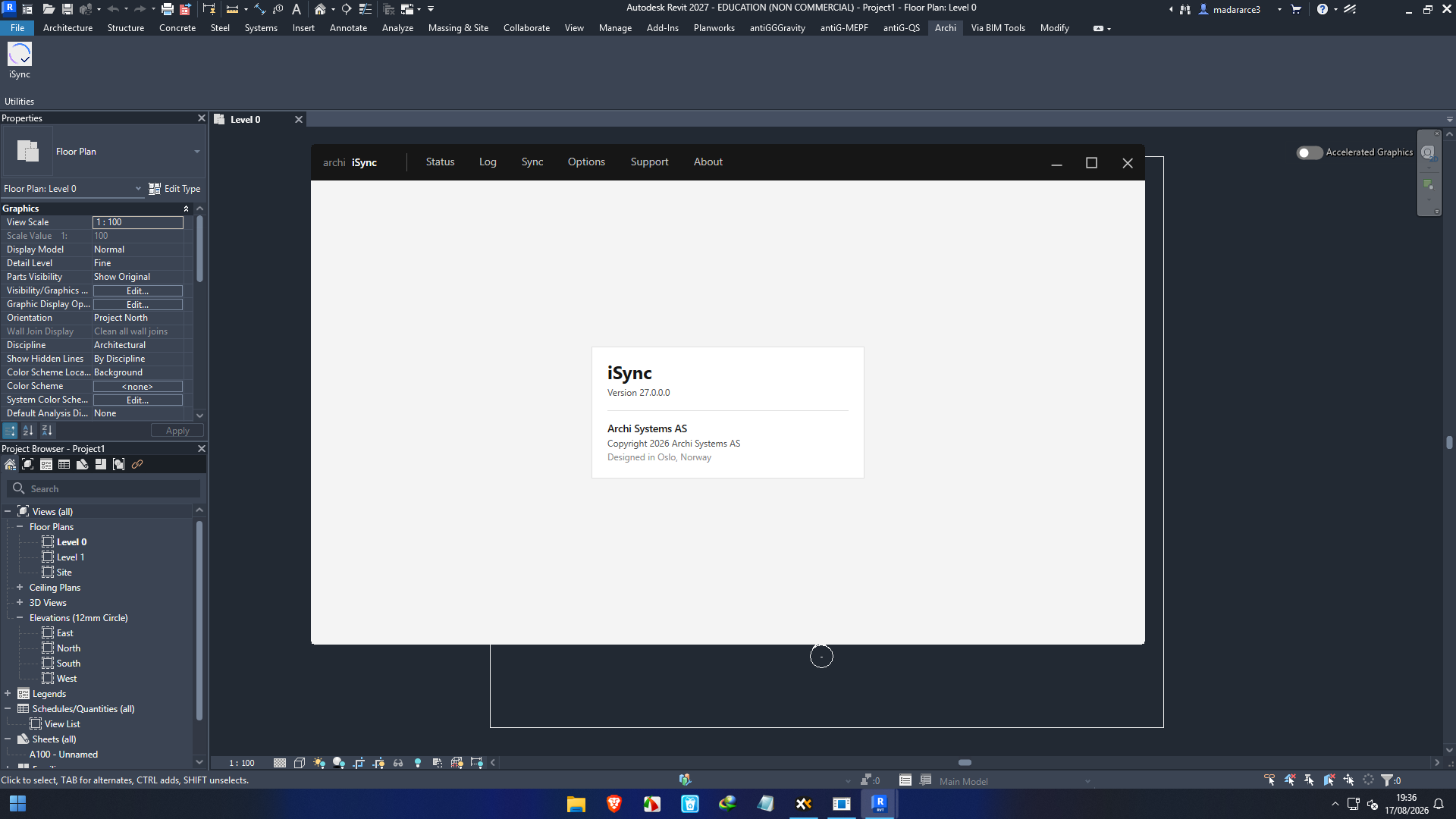
Archi iSync for Autodesk Revit is designed for architects, BIM professionals, and design teams who want a more connected and efficient workflow inside Autodesk Revit. In modern architectural projects, the challenge is rarely just creating a model. The real difficulty is keeping information organized, coordinating design changes, and moving efficiently between different parts of a BIM workflow.
For teams working on complex Revit projects, productivity can often be lost through repetitive tasks, disconnected workflows, manual coordination, and unnecessary model management steps. Archi iSync aims to address these challenges by providing tools that can help architectural professionals work more efficiently within their familiar Revit environment.
What makes this type of Revit productivity solution valuable is its practical focus. Instead of forcing users to completely change the way they design, it can complement existing Autodesk Revit workflows and help reduce the amount of repetitive work involved in everyday BIM production.
For architectural firms, BIM consultants, interior designers, engineering coordination teams, and individual Revit users, Archi iSync can be a useful addition when project efficiency, consistency, and model coordination are priorities.
Introduction
Autodesk Revit has become a central platform for Building Information Modeling, but even experienced users know that a powerful BIM platform does not automatically eliminate repetitive work.
A typical architectural project can involve hundreds or thousands of elements, multiple design revisions, shared models, documentation requirements, and constant coordination between team members. A small workflow inefficiency repeated throughout a project can eventually consume hours of valuable production time.
This is where specialized Revit tools can make a meaningful difference.
Archi iSync for Autodesk Revit is aimed at improving the way architectural professionals handle their day-to-day BIM workflows. Rather than treating Revit as a collection of isolated commands, productivity-focused extensions can help users create a smoother workflow around the modeling and documentation process.
The practical advantage becomes particularly noticeable on large projects. When users can spend less time dealing with repetitive operations and more time reviewing design decisions, project quality can improve while production becomes more predictable.
Key Features of Archi iSync for Autodesk Revit
The value of a Revit add-in is ultimately determined by how effectively it fits into real production workflows. Archi iSync is particularly relevant for users looking for a more organized and streamlined Revit experience.
Revit-Centered Workflow
One of the biggest advantages of using a specialized Revit solution is keeping work within the familiar Autodesk Revit environment.
Instead of constantly switching between unrelated applications, users can perform supported workflow tasks directly alongside their BIM models. This can help reduce interruptions and make project production feel more continuous.
Improved BIM Productivity
Architectural BIM projects often contain repetitive operations that do not necessarily require creative decision-making.
By simplifying parts of these workflows, productivity tools can allow users to dedicate more time to important tasks such as:
- Architectural design development
- Model review
- Documentation
- BIM coordination
- Quality checking
- Project revisions
- Client-driven changes
This is especially useful for teams working under tight project deadlines.
Better Workflow Consistency
Consistency is another important consideration in BIM production.
When different users handle similar tasks in different ways, the resulting project can become harder to manage. Standardized workflows help teams maintain a more predictable approach to model development and documentation.
Archi iSync can be considered as part of this broader BIM productivity strategy, particularly for firms trying to establish repeatable Revit workflows.
Support for Complex Architectural Projects
Large architectural projects tend to expose workflow weaknesses much faster than small projects.
A process that seems manageable in a small residential model can become frustrating when applied to a large commercial development containing extensive architectural information.
Productivity-focused Revit tools become more valuable as project complexity increases because even modest improvements can translate into significant time savings.
Practical Use Cases
Architectural Design Firms
Architectural practices often have multiple designers working on the same project at different stages.
A streamlined Revit workflow can help designers move from conceptual development toward detailed documentation without spending excessive time on repetitive model-management tasks.
For a small firm, this can mean allowing designers to concentrate on design rather than administrative operations.
BIM Production Teams
BIM production specialists frequently deal with structured modeling tasks, revisions, coordination, and documentation.
When the same operations are performed repeatedly across multiple projects, productivity improvements can have a measurable effect on overall project delivery.
Archi iSync can fit into a workflow where the goal is to make Revit-based production more efficient and consistent.
Large Commercial Developments
Commercial buildings can contain highly detailed architectural models with numerous views, components, systems, and documentation requirements.
On projects of this scale, workflow efficiency becomes increasingly important. A tool that reduces unnecessary manual operations can help users maintain momentum during demanding project phases.
BIM Consultants
BIM consultants often work with different clients, project standards, and modeling requirements.
Having productivity-oriented tools available inside Revit can help consultants develop repeatable processes and adapt more efficiently to different project environments.
Small Architecture Studios
Smaller teams may not have dedicated BIM managers or extensive production support.
For these users, improving individual productivity can be particularly valuable. A designer who saves a few minutes on repeated operations may save many hours over an entire project.
Performance Analysis
The performance of any Revit add-in should be evaluated in the context of the project rather than simply by looking at its feature list.
For smaller architectural models, users may not notice dramatic differences because the native Revit workflow may already be sufficient. The benefits become more apparent when working with larger projects, repeated tasks, multiple revisions, and structured BIM production processes.
A practical evaluation should consider several areas.
Workflow efficiency: How much time does the tool save compared with completing the same operation manually?
Ease of use: Can a Revit user understand the workflow without extensive training?
Project compatibility: Does the tool fit naturally into the firm’s existing modeling standards?
Model stability: Does the workflow remain reliable when working with larger and more complicated projects?
Team productivity: Does the tool help multiple users follow a more consistent process?
For professional environments, these factors can matter more than simply having a long list of features.
A good productivity extension should feel like part of the user’s workflow rather than another application that creates additional complexity.
User Experience
One of the most important aspects of any Revit extension is the learning curve.
Architects and BIM technicians already have demanding workloads. They generally do not want to spend days learning a complicated system just to perform a relatively simple operation.
The appeal of a tool such as Archi iSync is therefore connected to how naturally it can fit into an existing Autodesk Revit workflow.
For experienced Revit users, the greatest benefit may come from reducing repetitive actions. For newer users, the value can come from having a more structured approach to common project tasks.
In both cases, the best results come when the software is introduced as part of a clear BIM workflow rather than treated as a standalone solution.
Pros and Cons
Pros
- Designed around Autodesk Revit workflows
- Can help improve architectural BIM productivity
- Useful for repetitive project operations
- Suitable for professional architectural environments
- Can support more consistent workflows
- Potentially valuable for large and complex Revit projects
- Helps users focus more on design and coordination
Cons
- Its usefulness depends on the user’s specific Revit workflow
- Beginners may still need time to understand advanced BIM processes
- Benefits can vary significantly between different project types
- Users should verify compatibility with their specific Autodesk Revit version
- A productivity add-in does not replace good BIM standards or project management
Pricing & Plans
Pricing and licensing for Archi iSync for Autodesk Revit can vary depending on the edition, licensing model, supported Revit version, and purchasing arrangement.
Before purchasing, professional users should confirm the current license terms and ensure that the software version matches their Autodesk Revit installation.
For businesses, the most important consideration should not be the purchase price alone. The better question is whether the software can save enough production time to justify its cost.
For example, if a BIM team repeatedly performs time-consuming operations across several large projects, even small workflow improvements can potentially produce meaningful productivity gains over the course of a year.
Who Should Use Archi iSync for Autodesk Revit?
Archi iSync is most relevant to users who regularly work with Autodesk Revit and want to improve their architectural BIM workflow.
It may be particularly suitable for:
- Architects
- BIM modelers
- Revit technicians
- Architectural visualization teams
- BIM coordinators
- BIM consultants
- Engineering and construction professionals using Revit
- Architecture firms
- Design and documentation teams
It is less useful for someone who only opens Revit occasionally or works primarily on very simple models where advanced workflow optimization is unnecessary.
Why Revit Productivity Tools Matter
The modern BIM environment is increasingly focused on efficiency.
Architectural firms are expected to deliver detailed models, accurate documentation, coordinated information, and frequent revisions while maintaining tight deadlines. As project requirements grow, manually managing every small task becomes less practical.
This is why Revit productivity extensions have become increasingly important.
The goal is not simply to add more buttons to Revit. The real objective is to reduce friction between the user’s intention and the completed task.
When a tool successfully achieves that goal, the result can be surprisingly significant. Saving a minute or two on one operation may seem unimportant. But when that operation occurs hundreds of times across multiple projects, the accumulated savings can become substantial.
Archi iSync For Autodesk Revit 2027 Developer
Archi iSync For Autodesk Revit 27.0.0 Full Version 2027
Final Verdict
Archi iSync for Autodesk Revit is worth considering for architectural and BIM professionals who want to make their Revit-based workflows more efficient and organized.
Its strongest potential lies in workflow improvement rather than replacing Autodesk Revit itself. For users working on detailed architectural models, repetitive BIM production tasks, and complex project documentation, a specialized productivity solution can provide meaningful practical value.
The biggest advantage comes when the software is used as part of a well-defined BIM process. Firms that already have consistent modeling standards, project templates, and quality-control procedures are likely to get more value from workflow-focused tools.
Before adopting it across a professional team, users should evaluate the software against their actual production requirements, Revit version, project standards, and licensing needs.
Overall, if your daily Revit work involves repetitive operations, large architectural models, or a constant need to improve production efficiency, Archi iSync for Autodesk Revit deserves a closer look. The best way to judge its value is to test it against real project workflows and measure whether it helps your team spend less time on routine work and more time on meaningful design and BIM coordination.



Reviews
There are no reviews yet.