Description
Book Keeper 2026: A Complete Accounting Solution for Small Businesses and Professionals
Book Keeper Review Summary
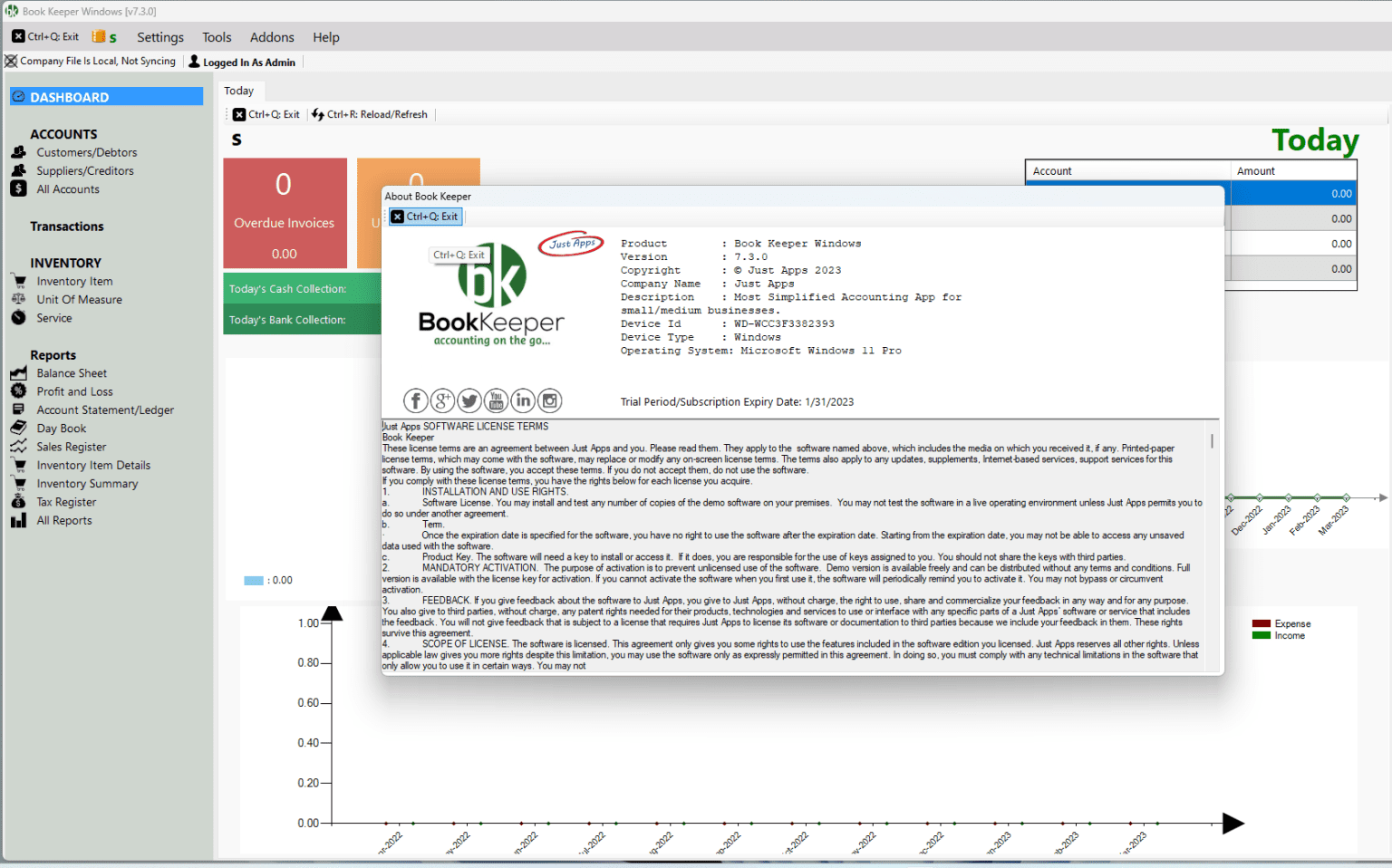
Managing business finances doesn’t have to be complicated. Whether you’re a small business owner, retailer, freelancer, or accountant, having reliable accounting software can make a significant difference in how efficiently you handle invoices, inventory, taxes, and financial reports. Book Keeper has established itself as a practical accounting solution designed for businesses that need powerful financial management without the complexity of enterprise accounting systems.
With an intuitive interface, comprehensive bookkeeping tools, GST support, inventory tracking, and multi-device accessibility, Book Keeper simplifies day-to-day accounting tasks while providing accurate financial insights. This review explores its features, performance, practical applications, advantages, limitations, pricing information, and overall value to help you determine whether it’s the right accounting software for your business.
Introduction
Every successful business depends on organized financial records. As businesses grow, manually tracking sales, purchases, expenses, taxes, and inventory quickly becomes inefficient and prone to errors. That’s where Book Keeper comes in.
Book Keeper is a comprehensive accounting software designed primarily for small and medium-sized businesses. It helps users manage accounting operations from a single platform while reducing paperwork and improving financial accuracy.
Unlike traditional bookkeeping methods, Book Keeper automates many repetitive accounting tasks, allowing business owners to spend more time focusing on growth rather than administrative work.
Whether you operate a retail store, wholesale business, service company, or independent consultancy, Book Keeper offers tools that simplify accounting while remaining accessible even to users with limited accounting experience.
Key Features of Book Keeper
Book Keeper includes a broad collection of accounting tools that address the daily financial needs of modern businesses.
Easy Invoice Creation
Creating professional invoices is one of Book Keeper’s strongest capabilities.
Users can:
- Generate sales invoices
- Create purchase invoices
- Customize invoice layouts
- Print invoices
- Share invoices digitally
- Track payment status
Professional invoicing improves customer confidence while helping businesses receive payments more efficiently.
Complete Financial Accounting
Book Keeper provides a complete bookkeeping environment.
Core accounting functions include:
- Ledger management
- Journal entries
- Trial balance
- Balance sheet
- Profit and loss reports
- Cash flow tracking
- Expense management
These reports help business owners understand their financial health without needing complicated spreadsheets.
Inventory Management
Inventory tracking is essential for retailers, wholesalers, and manufacturers.
Book Keeper helps users monitor:
- Product quantities
- Stock valuation
- Purchase orders
- Sales orders
- Low-stock alerts
- Warehouse inventory
Accurate inventory reduces losses caused by overstocking or stock shortages.
GST and Tax Management
One of the most appreciated features is its built-in GST support.
Users can:
- Generate GST invoices
- Maintain tax records
- Calculate taxes automatically
- Prepare GST reports
- Simplify tax filing
This automation minimizes calculation errors while saving valuable time during tax season.
Customer and Vendor Management
Book Keeper organizes customer and supplier information in one place.
Businesses can easily track:
- Outstanding balances
- Payment history
- Credit limits
- Purchase records
- Customer transactions
- Supplier payments
This feature improves relationship management while reducing payment delays.
Banking Features
Managing business banking becomes much easier with Book Keeper.
Users can:
- Record bank transactions
- Track deposits
- Monitor withdrawals
- Reconcile accounts
- Manage multiple bank accounts
Having all financial records synchronized helps maintain accounting accuracy.
Financial Reporting
One of Book Keeper’s greatest strengths is its reporting system.
Popular reports include:
- Sales reports
- Purchase reports
- Tax reports
- Inventory reports
- Profit analysis
- Outstanding payments
- Cash flow statements
These reports assist business owners in making informed financial decisions.
Multi-Device Support
Many businesses operate from multiple locations or require remote access.
Book Keeper supports synchronization across compatible devices, allowing users to access financial data wherever they work.
This flexibility is especially valuable for business owners who frequently travel or manage multiple branches.
Practical Use Cases
Book Keeper serves businesses across numerous industries.
Small Retail Shops
Retail businesses use Book Keeper to:
- Track inventory
- Generate invoices
- Manage daily sales
- Record expenses
- Monitor profits
Instead of maintaining paper records, everything is stored digitally for easy access.
Wholesale Businesses
Wholesalers benefit from:
- Bulk inventory tracking
- Customer account management
- Purchase order management
- Supplier payment tracking
Large transaction volumes become easier to organize and analyze.
Freelancers and Consultants
Independent professionals often need simple accounting without unnecessary complexity.
Book Keeper helps freelancers:
- Create professional invoices
- Record expenses
- Track payments
- Generate financial reports
- Monitor business income
This allows consultants to spend more time serving clients rather than managing paperwork.
Service-Based Businesses
Businesses offering repair services, agencies, clinics, and other professional services can manage:
- Client billing
- Service invoices
- Expense records
- Employee payments
- Tax reporting
Everything remains organized within a centralized accounting system.
Accountants
Professional accountants appreciate Book Keeper because it simplifies bookkeeping for multiple clients.
Its reporting capabilities make preparing financial statements much faster than manual methods.
Performance Analysis
Book Keeper performs reliably for businesses that require efficient accounting without overwhelming complexity.
The software loads quickly and maintains responsive performance even when handling extensive financial records and inventory databases.
The user interface is clean and easy to understand, making it accessible for beginners while still offering enough advanced functionality for experienced users.
Its accounting engine performs calculations accurately, reducing human errors that commonly occur with spreadsheets or manual bookkeeping.
Report generation is also impressively fast, allowing businesses to access financial insights whenever needed.
The software’s synchronization capabilities improve productivity for teams working across different devices, ensuring financial data remains updated and consistent.
Overall, Book Keeper provides dependable day-to-day performance suitable for growing businesses.
Real-World User Experience
Imagine a local electronics retailer processing dozens of sales every day.
Previously, staff members recorded transactions manually, updated inventory by hand, and spent hours preparing monthly financial reports.
After implementing Book Keeper, the business experienced noticeable improvements.
Invoices were generated instantly.
Inventory updated automatically after each sale.
Outstanding customer payments became easier to monitor.
Tax reports required significantly less preparation time.
Most importantly, the owner gained immediate visibility into daily profits, expenses, and inventory levels, helping make smarter purchasing decisions.
This kind of workflow improvement reflects why many businesses adopt dedicated accounting software instead of relying solely on spreadsheets.
Pros and Cons
Pros
- User-friendly interface
- Comprehensive accounting features
- Excellent inventory management
- Fast invoice generation
- Detailed financial reporting
- GST support
- Customer and vendor management
- Multi-device accessibility
- Suitable for small and medium businesses
- Reduces manual bookkeeping errors
Cons
- Advanced enterprise-level features may be limited
- Initial setup may require some accounting knowledge
- Certain advanced capabilities may depend on the selected version
Pricing & Plans
Book Keeper typically offers different licensing options depending on platform, edition, and business requirements.
Pricing may vary based on:
- Desktop version
- Mobile version
- Multi-user licenses
- Business edition
- Professional edition
Businesses should select the edition that matches their accounting needs, number of users, and desired features. Reviewing the latest licensing options before purchasing ensures the best value.
Why Businesses Choose Book Keeper
Many accounting solutions either overwhelm users with unnecessary complexity or lack essential financial tools.
Book Keeper strikes an effective balance by offering professional accounting capabilities within a user-friendly environment.
Businesses appreciate its ability to centralize accounting tasks, including:
- Sales management
- Purchase tracking
- Expense recording
- Tax management
- Inventory control
- Financial reporting
- Customer management
This all-in-one approach reduces software switching while improving operational efficiency.
SEO Benefits of Using Modern Accounting Software
Although accounting software isn’t directly related to website optimization, efficient financial management contributes to healthier business operations.
Accurate financial reporting enables companies to:
- Monitor profitability
- Control operating costs
- Improve budgeting
- Make data-driven decisions
- Scale business operations confidently
Book Keeper supports these objectives through reliable bookkeeping and financial visibility.
Final Verdict
Book Keeper remains one of the most practical accounting software solutions for small and medium-sized businesses seeking an affordable, feature-rich bookkeeping platform. Its combination of financial accounting, inventory management, invoicing, GST compliance, reporting tools, and customer management makes it a dependable choice for businesses looking to streamline everyday operations.
While larger enterprises with highly specialized accounting requirements may need more advanced solutions, Book Keeper delivers an excellent balance of usability, functionality, and performance for most growing businesses. Its intuitive interface reduces the learning curve, while its comprehensive feature set supports accurate financial management and informed decision-making.
If you’re searching for reliable accounting software that helps organize finances, simplify bookkeeping, improve reporting accuracy, and enhance business efficiency, Book Keeper is certainly worth considering. Explore its available editions, choose the version that fits your business needs, and experience a smarter, more organized approach to managing your financial operations.
If you’d like, I can also create an SEO title (under 60 characters), meta description (150–160 characters), focus keyphrase, FAQ section, and schema-ready FAQs for this article.


Reviews
There are no reviews yet.