Description
DataLoad Professional Review 2026: A Powerful Data Migration and Automation Solution for Enterprise Applications
Organizations that rely on large-scale enterprise systems often face a common challenge: moving, updating, and validating massive amounts of business data without disrupting operations. DataLoad Professional has become a trusted solution for companies seeking faster, more accurate, and highly automated data entry, migration, and testing capabilities.
Designed to work with major ERP and enterprise applications, DataLoad Professional simplifies repetitive data processing tasks while reducing manual errors. Whether businesses need to upload thousands of customer records, migrate financial information, test applications, or automate transactional data entry, the software offers a practical and efficient approach.
This review explores DataLoad Professional’s features, real-world applications, performance, advantages, limitations, and overall value for businesses looking to streamline complex data management workflows.
Introduction to DataLoad Professional
DataLoad Professional is an advanced data migration, automation, and testing tool developed to automate data entry into desktop, web-based, and enterprise applications.
Unlike traditional import tools that depend solely on APIs or backend integrations, DataLoad Professional works by simulating user actions directly within application interfaces. This capability makes it particularly valuable when organizations need to upload data into systems lacking bulk import functionality.
The software is commonly used with platforms such as:
- SAP
- Oracle E-Business Suite
- Salesforce
- PeopleSoft
- JD Edwards
- Microsoft Dynamics
- Custom enterprise applications
- Web portals
- Legacy systems
By automating keystrokes, mouse actions, and screen navigation, DataLoad Professional significantly reduces the time required for repetitive administrative tasks.
Key Features of DataLoad Professional
1. Automated Data Entry
One of DataLoad Professional’s most appreciated capabilities is its ability to automate data input.
Users can prepare information in spreadsheets and upload thousands of records directly into target systems.
Supported sources include:
- Excel files
- CSV files
- Text documents
- Databases
- ODBC connections
This feature minimizes manual work and lowers the risk of typing errors.
2. ERP Data Migration Support
Many organizations use DataLoad Professional during ERP implementation projects.
Typical migration activities include:
- Customer master data uploads
- Vendor information migration
- Inventory data transfers
- Financial transaction imports
- Employee record updates
Companies can migrate historical data efficiently while maintaining consistency.
3. Intelligent Screen Navigation
DataLoad Professional records user interactions and replicates them automatically.
Capabilities include:
- Tab navigation
- Keyboard shortcuts
- Function key execution
- Mouse click automation
- Dynamic screen handling
This functionality is especially useful for legacy applications that do not provide modern APIs.
4. Validation and Error Handling
Data quality is essential during migration projects.
The software includes mechanisms for:
- Data validation
- Conditional processing
- Exception handling
- Duplicate detection
- Logging activities
Organizations can identify problems before records are committed to production systems.
5. Scheduling and Unattended Execution
Businesses often need to process data uploads during off-hours.
DataLoad Professional supports:
- Batch execution
- Scheduled jobs
- Background processing
- Automated task execution
This reduces downtime and improves operational efficiency.
6. Application Testing Support
Besides migration tasks, many IT teams leverage DataLoad Professional for testing purposes.
Testing activities include:
- Regression testing
- Functional validation
- Data population
- System acceptance testing
- Repetitive scenario execution
Automation accelerates testing cycles considerably.
7. Flexible Scripting Capabilities
Advanced users benefit from scripting options that allow customization.
Examples include:
- Conditional logic
- Variables
- Data transformations
- Dynamic calculations
- Reusable templates
This flexibility makes the software adaptable for highly specialized workflows.
Practical Use Cases of DataLoad Professional
Understanding how organizations use DataLoad Professional in real environments helps demonstrate its value.
Use Case 1: SAP Master Data Upload
A manufacturing company implementing SAP needed to upload over 120,000 customer records.
The team initially estimated several weeks of manual work.
After implementing DataLoad Professional:
- Upload preparation took three days.
- Data validation reduced duplicate entries.
- Migration completed in less than one week.
- Error rates dropped significantly.
The company accelerated its ERP deployment schedule and reduced labor costs.
Use Case 2: Oracle Financial Migration
A multinational business migrated historical accounting records into Oracle.
Challenges included:
- Large transaction volumes
- Legacy formatting issues
- Limited import functionality
Using DataLoad Professional, consultants automated uploads from Excel spreadsheets.
Benefits included:
- Faster project completion
- Improved consistency
- Reduced dependency on manual operators
Use Case 3: Salesforce Bulk Updates
Sales teams frequently need to update account details.
One organization used DataLoad Professional to process:
- Contact changes
- Opportunity updates
- Product information
- Pricing revisions
Instead of editing records individually, employees uploaded thousands of modifications in a few hours.
Use Case 4: Legacy System Modernization
Many companies continue using older business applications.
These systems often lack:
- APIs
- Import modules
- Integration connectors
DataLoad Professional acts as a bridge between modern spreadsheets and outdated interfaces.
Organizations avoid costly redevelopment efforts while maintaining productivity.
User Experience and Ease of Use
The overall user experience is designed for technical consultants, business analysts, migration specialists, and IT administrators.
The interface is relatively straightforward.
Users typically follow these steps:
Step 1
Prepare source data.
Usually within Excel.
Step 2
Record screen actions.
Identify where information should be entered.
Step 3
Map spreadsheet columns.
Configure upload rules.
Step 4
Validate datasets.
Check for inconsistencies.
Step 5
Execute migration.
Monitor logs.
Step 6
Review results.
Correct exceptions if necessary.
Although beginners may require some training, experienced users can become highly productive within a short period.
Performance Analysis
Performance is one of DataLoad Professional’s strongest selling points.
Several factors contribute to its effectiveness.
Speed
Compared to manual entry, automation dramatically increases throughput.
Typical improvements include:
- 70–90% time savings
- Faster data preparation
- Reduced project delays
Large datasets can often be processed overnight.
Reliability
Stable execution is critical for enterprise projects.
DataLoad Professional provides:
- Process monitoring
- Execution logs
- Recovery mechanisms
- Controlled uploads
These features help maintain confidence during high-volume operations.
Scalability
The software performs well in environments ranging from small businesses to multinational enterprises.
Suitable for:
- Thousands of records
- Millions of transactions
- Multi-department migrations
- International implementations
Accuracy
Human data entry errors can be expensive.
Automation minimizes problems related to:
- Missing fields
- Incorrect values
- Duplicate records
- Formatting mistakes
Organizations achieve higher-quality datasets.
Advantages of Using DataLoad Professional
Significant Time Savings
Automation reduces repetitive administrative work.
Employees can focus on strategic initiatives instead of manual typing.
Supports Multiple Applications
Compatibility with numerous enterprise systems makes DataLoad Professional versatile.
Businesses do not need separate migration tools for every platform.
Cost Reduction
Reducing manual labor leads to measurable cost benefits.
Consultants complete projects faster.
Internal teams become more efficient.
Improved Data Quality
Validation features support cleaner and more consistent records.
Higher-quality data contributes to better reporting and business decisions.
Excellent for Testing
IT departments appreciate the software’s ability to automate repetitive testing scenarios.
This shortens software deployment cycles.
Potential Drawbacks
While DataLoad Professional delivers substantial benefits, prospective users should consider several limitations.
Learning Curve
Advanced automation scenarios may require experience.
New users might need training before managing complex projects.
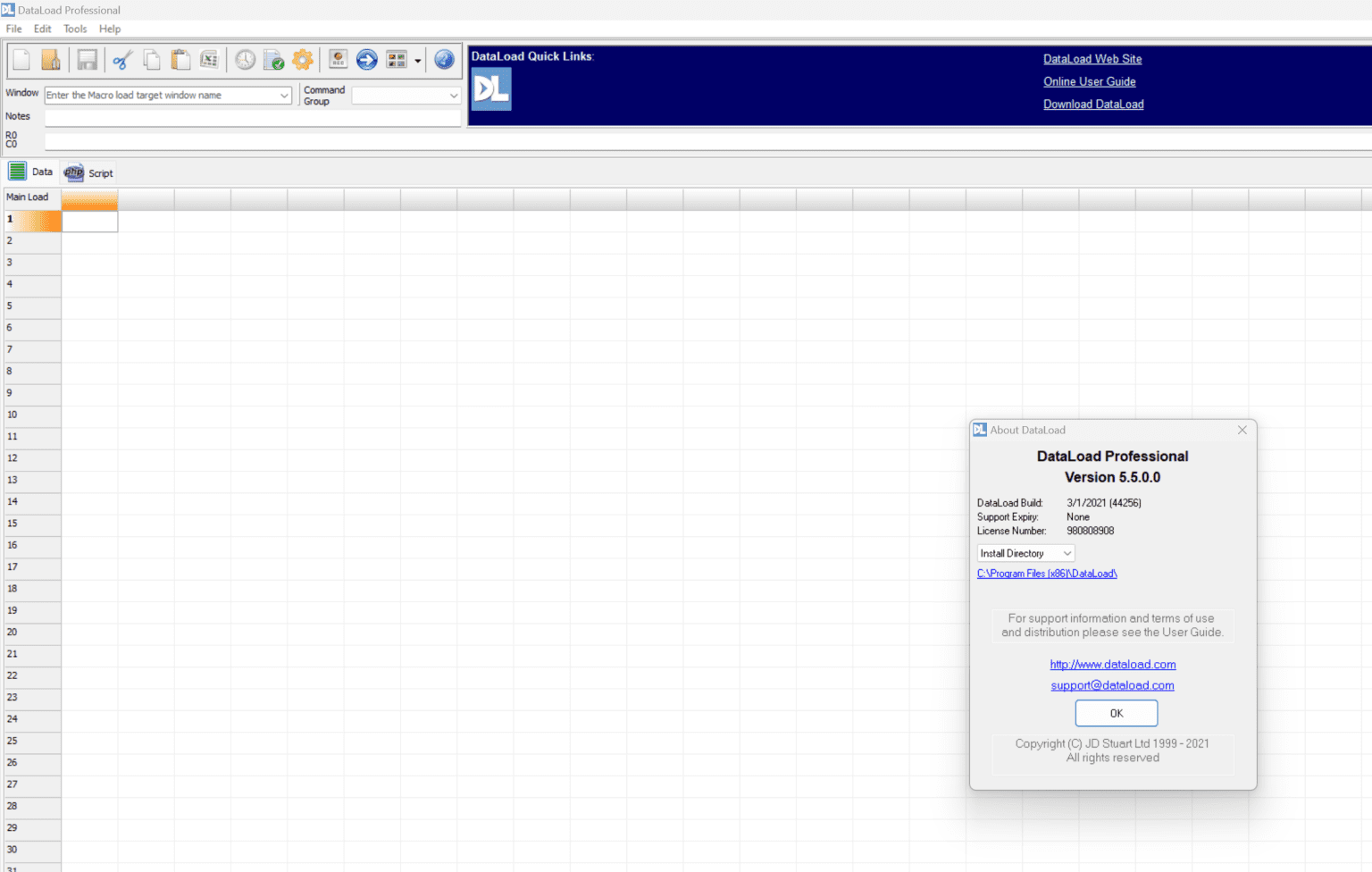
Interface Appearance
Some users feel the interface prioritizes functionality over modern aesthetics.
The design is practical but not particularly contemporary.
Licensing Costs
Professional-grade migration tools often involve commercial licensing.
Smaller organizations with occasional upload requirements may need to evaluate return on investment carefully.
Pricing and Plans
DataLoad Professional generally follows a commercial licensing model.
Pricing may vary depending on:
- Number of users
- Deployment requirements
- Maintenance agreements
- Enterprise support options
Organizations interested in implementation should contact authorized vendors or software representatives for the latest pricing details.
Potential buyers should also inquire about:
- Trial availability
- Technical support packages
- Upgrade policies
- Training services
For companies regularly handling migrations and testing projects, the investment often pays for itself through labor savings and increased efficiency.
Who Should Use DataLoad Professional?
DataLoad Professional is especially suitable for:
ERP Consultants
Managing large implementation projects.
Data Migration Specialists
Handling high-volume transfers.
System Administrators
Maintaining enterprise applications.
Quality Assurance Teams
Automating testing procedures.
Large Enterprises
Reducing manual operational workloads.
Businesses with Legacy Systems
Bridging technology gaps without extensive redevelopment.
DataLoad Professional Developer
Final Verdict
DataLoad Professional remains one of the most practical solutions available for enterprise data migration, automated data entry, and application testing. Its ability to interact directly with application interfaces gives it a unique advantage over traditional import utilities, particularly in environments where APIs are unavailable or limited.
The software excels in speeding up ERP implementations, improving data accuracy, reducing manual effort, and supporting large-scale testing initiatives. While there is a learning curve for advanced configurations, organizations that regularly manage bulk data uploads will likely find the productivity gains well worth the investment.
For businesses seeking a dependable enterprise automation tool capable of simplifying complex migration projects, DataLoad Professional deserves serious consideration. Exploring a trial version or scheduling a product evaluation can help teams determine how effectively it fits into their existing workflows and long-term digital transformation strategies.



Reviews
There are no reviews yet.