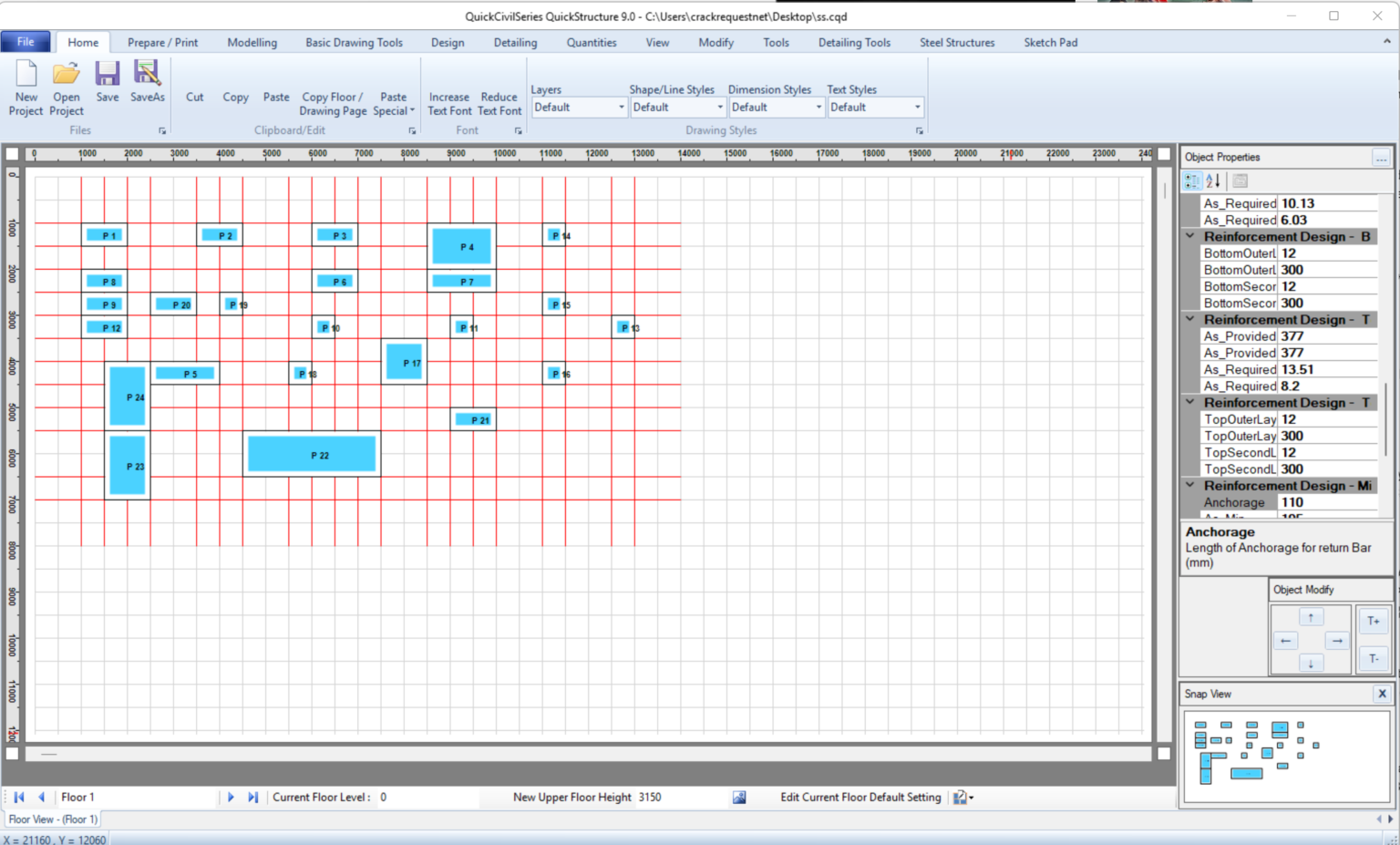
Description
QuickCivilSeries QuickStructure 9.0 – Comprehensive Software Review for Civil & Structural Engineering Professionals
Strong Summary
QuickCivilSeries QuickStructure is an advanced civil and structural engineering software solution designed to streamline analysis, design, and documentation workflows for engineers, architects, and construction professionals. Built for efficiency and accuracy, it combines structural modeling, load analysis, and design automation into a unified environment. Whether used for residential buildings, commercial structures, or infrastructure projects, the software aims to reduce manual calculation errors while improving project delivery speed.
In an industry where precision and compliance are critical, QuickCivilSeries QuickStructure positions itself as a reliable engineering companion that enhances productivity without compromising design integrity. This review explores its capabilities, real-world applications, performance strengths, and overall value for professionals in the civil engineering domain.
Introduction
Civil and structural engineering projects require a balance of creativity, compliance, and computational accuracy. Traditional methods of manual calculations and fragmented design tools often slow down workflows and increase the risk of errors. QuickCivilSeries QuickStructure addresses these challenges by offering a centralized structural engineering platform.
The software is designed to support engineers working on beams, columns, slabs, foundations, and complete structural systems. By integrating modeling and analysis into a single interface, it reduces dependency on multiple tools and improves coordination across design stages.
From small-scale residential buildings to complex infrastructure planning, QuickStructure within the QuickCivilSeries suite provides a structured workflow that aligns with modern engineering demands. Its focus on usability and automation makes it suitable for both experienced structural engineers and students learning advanced design concepts.
Key Features
QuickCivilSeries QuickStructure offers a wide range of technical and productivity-focused features tailored for structural engineering tasks.
1. Structural Modeling Environment
- Intuitive 2D and 3D modeling workspace
- Easy creation of beams, columns, slabs, and load-bearing systems
- Parametric modeling for quick design adjustments
2. Advanced Load Analysis
- Dead load, live load, wind load, and seismic load analysis
- Automated load combination generation
- Compliance with standard engineering codes (region-dependent configurations)
3. Design Automation Tools
- Automated reinforcement design for RCC structures
- Steel structure design optimization
- Built-in validation checks for structural safety
4. Finite Element Analysis Support
- Element-based structural simulation
- Stress, strain, and deflection visualization
- Improved accuracy for complex structural systems
5. Material Library Integration
- Predefined material properties for concrete, steel, and composite materials
- Custom material definition options
- Code-based material standards support
6. Reporting and Documentation
- Automated structural calculation reports
- Exportable design documentation in multiple formats
- Clear presentation of engineering assumptions and results
7. User-Friendly Interface
- Simplified navigation for faster learning curve
- Organized toolbars for design, analysis, and reporting
- Workflow-oriented layout for professional productivity
Practical Use Cases
QuickCivilSeries QuickStructure is not limited to theoretical design. It is widely applicable in real-world engineering scenarios.
Residential Building Design
Engineers can design reinforced concrete frames for houses, villas, and apartment buildings. The software helps ensure proper load distribution and structural stability while minimizing material waste.
Commercial Construction Projects
For offices, malls, and industrial buildings, QuickStructure assists in managing complex load combinations and long-span structural elements. It ensures compliance with safety standards while optimizing design efficiency.
Infrastructure Engineering
Bridges, culverts, and retaining structures can be analyzed using advanced load simulations. Engineers can evaluate environmental forces such as wind and seismic activity more effectively.
Academic and Training Use
Engineering students and educators use QuickStructure to understand structural behavior, perform simulations, and validate manual calculations. It acts as a practical learning tool for structural design principles.
Renovation and Structural Assessment
The software also supports evaluation of existing structures, helping engineers assess stability and plan reinforcements or modifications.
Performance Analysis
One of the strongest aspects of QuickCivilSeries QuickStructure is its performance stability during complex calculations. Structural analysis, especially for multi-storey buildings, requires significant computational power, and the software handles this efficiently.
Speed and Optimization
The system is optimized to process large structural models without frequent crashes or lag. Even when dealing with multiple load cases, it maintains consistent performance.
Accuracy of Results
Results generated through finite element analysis and load combinations Quick Civil Series Quick Structure 9.0 show a high degree of reliability when compared to manual calculations. This enhances confidence in engineering decisions.
Scalability
From simple beams to complex structural frames, the software scales effectively without requiring separate tools. This makes it suitable for both small engineering firms and large consultancy projects.
Workflow Efficiency
By integrating modeling, analysis, and reporting, Quick Structure reduces the need for switching between different platforms. This improves project turnaround time and reduces operational friction.
Pros and Cons
Pros
- Comprehensive structural engineering toolkit
- Supports both RCC and steel design workflows
- Automated load calculations improve accuracy
- User-friendly interface suitable for professionals and learners
- Strong performance for medium and large-scale projects
- Integrated reporting system saves documentation time
Cons
- Learning curve for users unfamiliar with structural engineering software
- Advanced simulation features may require high system resources
- Limited customization depending on regional code availability
- Not a fully general-purpose CAD tool; focused mainly on structural design
Pricing and Plans
QuickCivilSeries QuickStructure typically follows a licensing-based pricing model, which may vary depending on usage level and deployment type.
Common licensing structures include:
- Single-user professional license for independent engineers
- Multi-user enterprise license for engineering firms
- Educational licenses for academic institutions and students
Some versions may include optional modules for advanced analysis, extended material libraries, or infrastructure-specific design tools. Pricing is generally structured based on feature access, support level, and license duration.
For most users, selecting a plan depends on project complexity and team size. Individual engineers may benefit from standard licensing, while consultancy firms often prefer enterprise-level configurations for collaboration and scalability.
QuickCivilSeries QuickStructure Developer
QuickCivilSeries QuickStructure 9.0 Download
Final Verdict
QuickCivilSeries QuickStructure stands out as a practical and efficient solution for structural engineering design and analysis. It successfully bridges the gap between manual calculations and modern automated engineering workflows. By combining modeling, load analysis, finite element simulation, and reporting in a unified environment, it helps engineers work faster while maintaining high design accuracy.
The software is particularly valuable for professionals handling multi-storey buildings, infrastructure projects, and structural assessments where precision is critical. While it may require some initial learning and system resources for advanced simulations, its long-term productivity benefits are significant.
For engineers, consultants, and students seeking a reliable structural design tool, QuickCivilSeries QuickStructure offers a balanced combination of usability, performance, and engineering depth.
Conclusion
QuickCivilSeries QuickStructure is best suited for those who want to modernize their structural design workflow and improve project efficiency without compromising accuracy. Exploring its features can help engineers reduce design time, improve safety compliance, and streamline documentation processes across various project types.




Reviews
There are no reviews yet.