Description
SambaPOS Review: A Powerful Restaurant POS System for Modern Hospitality Businesses
Strong Industry Summary
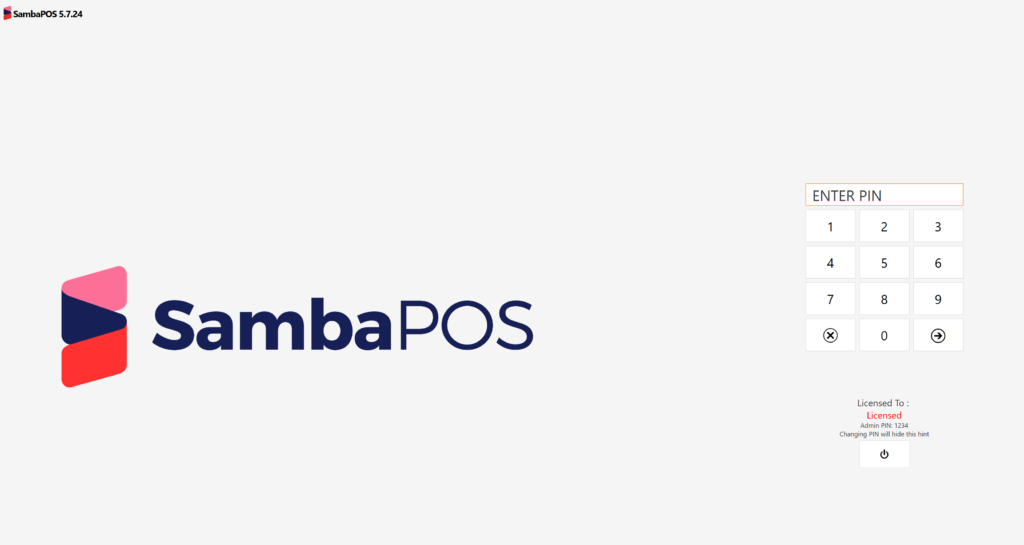
SambaPOS is a feature-rich restaurant point of sale (POS) system designed to streamline food service operations, improve order accuracy, and enhance customer service efficiency. Built for restaurants, cafés, bars, and multi-outlet hospitality businesses, it combines order management, kitchen communication, billing automation, and reporting into a unified platform.
Unlike basic billing tools, SambaPOS positions itself as a customizable restaurant management solution that adapts to complex workflows, making it suitable for both small eateries and high-volume dining environments. Its flexibility, rule-based automation, and detailed reporting capabilities make it a strong competitor in the restaurant POS software market.
Introduction to SambaPOS
In today’s competitive hospitality industry, efficiency and accuracy are critical for survival. Manual order taking, disconnected kitchen communication, and outdated billing systems often lead to delays, revenue leakage, and customer dissatisfaction. This is where SambaPOS plays a transformative role.
SambaPOS is a point of sale system for restaurants that goes beyond traditional billing software. It integrates front-of-house operations, kitchen order management, inventory tracking, and sales reporting into a single platform. Whether managing a small café or a full-scale restaurant chain, businesses can configure SambaPOS to match their exact operational workflow.
The software is particularly known for its customization engine, which allows restaurant owners to design their own ordering rules, screen layouts, and operational logic without needing advanced technical knowledge.
Key Features of SambaPOS
SambaPOS offers a wide range of tools designed to simplify restaurant operations and improve efficiency. Below are its most important features:
1. Advanced Order Management
SambaPOS allows waiters to take orders quickly using a structured digital interface. Orders are instantly routed to the kitchen display system, reducing delays and miscommunication.
2. Kitchen Display System (KDS)
The integrated kitchen display system ensures that chefs receive real-time order updates. Orders are prioritized, tracked, and updated automatically when modified or completed.
3. Table and Floor Management
Restaurants can visualize seating layouts, manage table status, and monitor occupancy. This helps optimize seating capacity and improve table turnover rates.
4. Customizable POS Interface
One of SambaPOS’s strongest features is its fully customizable interface. Businesses can design workflows, buttons, menus, and categories based on their service style.
5. Inventory and Stock Tracking
SambaPOS includes inventory management tools that track ingredient usage, monitor stock levels, and generate alerts when items are low. This helps reduce waste and control costs.
6. Detailed Reporting and Analytics
The system provides deep insights into sales performance, employee activity, peak hours, and menu performance. These analytics support better business decisions.
7. Multi-User and Role-Based Access
Different staff roles such as cashier, waiter, and manager can have controlled access levels, improving security and accountability.
8. Discount and Promotion Management
Restaurants can create flexible discount rules, promotional offers, and loyalty programs to attract repeat customers.
9. Offline Functionality
SambaPOS can operate without constant internet access, ensuring uninterrupted service even during network issues.
Practical Use Cases
SambaPOS is designed for versatility, making it suitable for multiple hospitality environments:
Small Cafés and Coffee Shops
Small businesses benefit from fast order entry, simplified billing, and basic inventory tracking. SambaPOS helps reduce waiting time and improves order accuracy.
Full-Service Restaurants
For dine-in restaurants, table management and kitchen coordination become essential. SambaPOS ensures smooth communication between waiters and kitchen staff, reducing delays and confusion.
Fast Food Chains
Speed is critical in fast food operations. The software’s quick-order interface and KDS system help process high order volumes efficiently.
Multi-Branch Restaurant Businesses
Chain restaurants can standardize operations across multiple locations. Reporting tools allow owners to compare performance between branches.
Bars and Nightclubs
SambaPOS helps manage bar tabs, split billing, and high-frequency orders with ease, ensuring fast service during peak hours.
Performance Analysis
From an operational standpoint, SambaPOS delivers strong performance in environments where speed and accuracy are essential. Its order processing system is responsive, allowing real-time synchronization between front-of-house and kitchen stations.
The software is optimized for stability, even under high transaction loads. Restaurants with heavy rush hours benefit from its ability to handle multiple simultaneous orders without system lag.
Customization is another major strength. While some POS systems restrict workflow design, SambaPOS allows businesses to build highly specific operational structures. This makes it particularly valuable for restaurants with unique service models.
However, the learning curve can be slightly steep for beginners. Because of its flexibility, initial setup requires careful configuration. Once properly set up, the system runs smoothly and requires minimal intervention.
In terms of reliability, SambaPOS performs consistently well in both small and large-scale deployments. Its offline mode ensures that service continues even during internet outages, which is critical in regions with unstable connectivity.
Pros and Cons of SambaPOS
Pros
- Highly customizable POS system for restaurants
- Strong kitchen display system integration
- Efficient order management and table tracking
- Detailed sales and operational reporting
- Suitable for small cafés to large restaurant chains
- Offline functionality ensures uninterrupted service
- Role-based access improves staff control and security
- Supports inventory tracking and cost control
Cons
- Initial setup can be complex for non-technical users
- Requires time to fully configure workflows
- Advanced customization may require training
- Interface design may feel technical for first-time users
Pricing and Plans
SambaPOS generally follows a flexible pricing structure depending on the edition and deployment requirements. While exact pricing can vary by region and vendor, it typically includes:
- Basic Edition: Suitable for small restaurants and cafés with core POS features
- Professional Edition: Includes advanced reporting, inventory tools, and customization options
- Enterprise Setup: Designed for multi-branch restaurants requiring centralized control and advanced configuration
Some versions may involve a one-time license fee, while others operate on subscription-based models depending on the service provider or deployment environment.
Businesses are encouraged to choose a plan based on operational size, number of outlets, and required features.
Final Verdict
SambaPOS stands out as a powerful and flexible restaurant POS system designed for businesses that require more than basic billing functionality. Its strength lies in its customization capabilities, real-time kitchen integration, and detailed operational reporting.
For restaurant owners looking to improve efficiency, reduce order errors, and gain better control over inventory and sales, SambaPOS offers a comprehensive solution that adapts to diverse hospitality environments.
While the initial setup may require effort and learning, the long-term benefits in operational efficiency and business insight make it a worthwhile investment.
If you are managing a restaurant, café, or multi-branch food service business and want a reliable point of sale system for restaurants that scales with your needs, SambaPOS is a strong option worth serious consideration.


Reviews
There are no reviews yet.